OOoLatex: Installing LaTeX in Open Office

  • Context: LaTeX 
  • Thread starter Thread starter Briggs
  • Start date Start date
  • Tags Tags
    Latex
Click For Summary

Discussion Overview

The discussion revolves around the installation and use of the OOoLatex extension for Open Office, which allows users to incorporate LaTeX typesetting into their documents. Participants share their experiences, challenges, and opinions regarding the extension and its dependencies.

Discussion Character

  • Technical explanation
  • Debate/contested
  • Homework-related

Main Points Raised

  • One participant describes the installation process for the OOoLatex extension and lists required dependencies such as MikText, Ghostscript, and MinSYS.
  • Another participant questions the necessity of using the extension, suggesting that writing and compiling a LaTeX document directly is easier and produces better results.
  • A participant shares their experience as a newcomer to LaTeX, expressing concern about the potential redundancy of the topic.
  • Several participants report encountering a "Basic runtime error" related to Ghostscript configuration, with one asking for suggestions to resolve the issue.
  • Another participant confirms experiencing the same error and highlights a specific line of code that is causing the problem.
  • One participant expresses a positive view of the extension, noting its usefulness for collaborating on documents with others who may not be familiar with LaTeX.

Areas of Agreement / Disagreement

There is no consensus on the value of the OOoLatex extension, as some participants find it helpful while others argue that direct LaTeX compilation is preferable. Additionally, multiple participants report technical issues without a clear resolution.

Contextual Notes

Participants mention specific configuration challenges and errors encountered during installation, indicating potential limitations in the setup process and dependencies required for the extension to function correctly.

Who May Find This Useful

This discussion may be useful for users of Open Office who are interested in integrating LaTeX into their documents, particularly those who are new to LaTeX or are experiencing technical difficulties with the OOoLatex extension.

Briggs
Messages
34
Reaction score
0
OOoLatex Extension for Open Office

The extension can be installed in Open Office by way of Tools -> Extension Manager -> Add. You will also need the following dependencies to carry out the behind the scenes LaTeX makery.

Dependencies:
MikText
Ghostscript
MinSYS

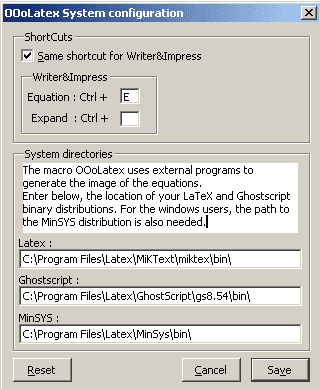
It is probably best to install all the programs to one directory and set up the paths in the extension as follows
2im4c9z.png


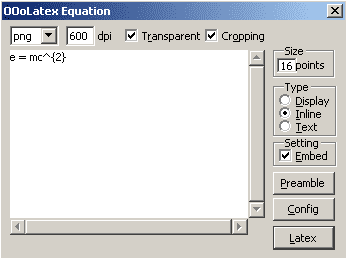
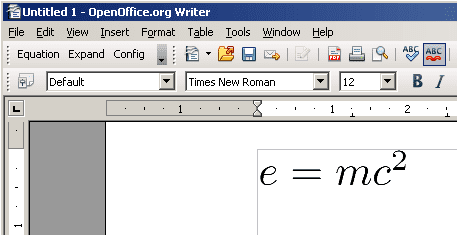
Once installed and configured there will be a new toolbar in the top left of the Open Office window. Press equation and input your LaTeX - there are a few options you can play about with if desired - when you're done hit Latex and some magic stuff will happen
29c1fl1.png


35c0hl0.png


Don't worry: it will look nice and smooth when exported to pdf.
 
Physics news on Phys.org
But, why? It's a lot easier, and looks a lot better, if you just write and compile a latex document?!
 
This was something I found helpful and thought others might want to know. I'm new to the whole LaTeX thing so I apologise if the topic is redundant.
 
I tried it but got an error that said BASIC runtime errroe. Any suggestion?

I had a problem configuring ghostscript
 
I am getting the same problem too.

"Basic runtime error. File not found"

The code "Shell(sShellCommand, 4, sShellArg, true)" is highlighted.

Any solution to this problem? I already have configured the 3 programs mentioned above.
 
It's a nice extension --- occasionally have to work with OO (or those other office suite) documents and now at least the equations look decent. No redundancy there. A typical case when have to collaborate with uninformed people :wink: .
 

Similar threads

  • · Replies 1 ·
Replies
1
Views
3K
  • · Replies 3 ·
Replies
3
Views
13K
  • · Replies 2 ·
Replies
2
Views
3K
Replies
2
Views
3K
  • · Replies 18 ·
Replies
18
Views
3K
Replies
5
Views
2K
  • · Replies 12 ·
Replies
12
Views
6K
  • · Replies 1 ·
Replies
1
Views
4K
  • · Replies 13 ·
Replies
13
Views
4K