Mathematica How to Enhance 3D Parametric Plots in Mathematica?

  • Thread starter Thread starter Ishika_96_sparkles
  • Start date Start date
  • Tags Tags
    3d Parametric Plot
Click For Summary
The discussion revolves around enhancing a 3D parametric plot created using Mathematica. The user seeks to improve the visual representation of a curve and add arrowheads along it in an anti-clockwise direction. They initially faced an issue where disabling the mesh caused the curve to disappear, which was resolved by using the Show function to combine individual plots. The user successfully implemented built-in commands to label the curves on the surface, enhancing the graphic's clarity. However, confusion remained regarding the use of replacement rules for adding arrowheads to the curve. The correct approach involves using the replacement rule /.Line -> Arrow, but it was emphasized that this requires specifying Line[x_] rather than just Line. The discussion also highlighted the importance of using the correct syntax and understanding how to apply arrowheads effectively along the plotted curve.
Ishika_96_sparkles
Messages
57
Reaction score
22
TL;DR
I tried to make a superimposed plot of a curve on a half sphere and need help with some graphics.
This is the code line that i used to generate the following graphs

[CODE title="Mathematica Code lines"]ParametricPlot3D[{{1 + Cos[t], Sin[t],
2*Sin[t/2]}, {2 *Cos[t]*Sin[\[Phi]], 2*Sin[t]*Sin[\[Phi]],
2*Cos[\[Phi]]}}, {t, 0, 2 \[Pi]}, {\[Phi], 0, \[Pi]/2},
PlotStyle -> {Directive[Green, Thickness[0.025]], Yellow},
PlotRange -> All, PlotLegends -> {"Curve 1", "Sphere"},
BoxRatios -> {2, 2, 1}, Axes -> False, Background -> Gray,
Boxed -> False, Mesh -> 10][/CODE]

I obtained the following output
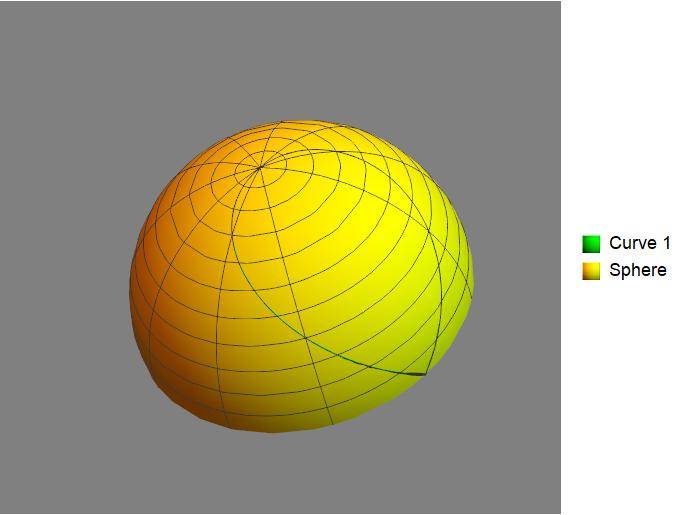
ParPlot3D.jpg


and with a slight change in the background
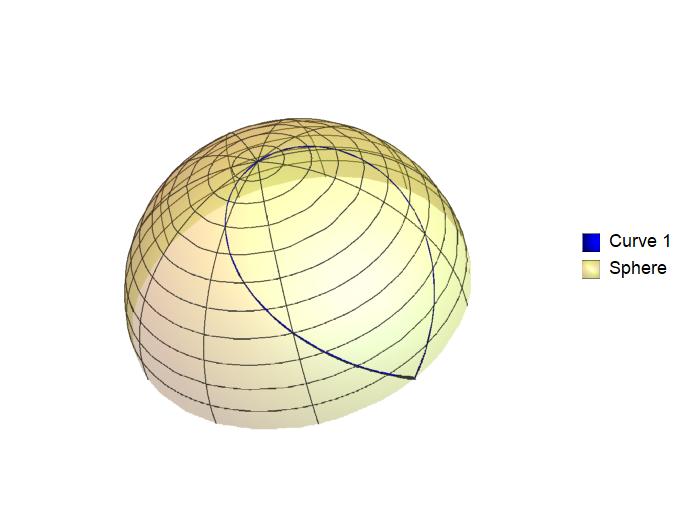
ParPlot3D2.jpg


Query:

I want to know if the visual of the general curve can be improved
and if one could put arrowheads along the Curve 1 in the anti-clockwise sense of rotation. What could be the procedure?

When I turn off the Mesh, the Curve 1 also vanishes. How could I keep the curve and put Mesh-> None at the same time?
 
Physics news on Phys.org
Ishika_96_sparkles said:
I want to know if the visual of the general curve can be improved
How?

Ishika_96_sparkles said:
and if one could put arrowheads along the Curve 1 in the anti-clockwise sense of rotation. What could be the procedure?
See https://mathematica.stackexchange.com/questions/127415/addding-arrows-in-closed-curves

Ishika_96_sparkles said:
When I turn off the Mesh, the Curve 1 also vanishes. How could I keep the curve and put Mesh-> None at the same time?
It works when I try it.
 
DrClaude said:

Thanks for the reply Dr Claude. I followed your link and tried to use it in my own code. I am able to get this
3Dplots.jpg
The improved visual of the graphic by using some built-in commands to label curves on the surface itself. For instance, the curve on the surface be labelled \alpha (t) and is positioned along the curve somewhere.

About the Mesh-> None problem, i used Show[c1,s1] for the individual plots. Its solves now.

However, i still do not fully understand the technique of using the arrowheads. For example i use[CODE title="Mathematica Code lines"]c1=ParametricPlot3D[{1+Cos[t],Sin[t],2*Sin[t/2]},{t,0,pi/2}],
PlotStyle-> {Directive[Red,Thickness[0.005]],Arrowheads[{0,0.05,0.05,0.05,0}]},
PlotRange-> All,BoxRatios-> {2,2,1},Boxed-> True,Axes-> True]/.Line-> Arrow[/CODE]

I do not understand how the replacement works in this case! i.e. /.Line-> Arrow is linked to the list of arrowheads be placed on the curve c1. How? or should I have used /.c1-> Arrow?
 
Ishika_96_sparkles said:
[CODE title="Mathematica Code lines"]c1=ParametricPlot3D[{1+Cos[t],Sin[t],2*Sin[t/2]},{t,0,pi/2}],
PlotStyle-> {Directive[Red,Thickness[0.005]],Arrowheads[{0,0.05,0.05,0.05,0}]},
PlotRange-> All,BoxRatios-> {2,2,1},Boxed-> True,Axes-> True]/.Line-> Arrow[/CODE]
This can't be the exact code as the brackets aren't paired.

Ishika_96_sparkles said:
I do not understand how the replacement works in this case! i.e. /.Line-> Arrow is linked to the list of arrowheads be placed on the curve c1. How? or should I have used /.c1-> Arrow?
The former is the correct approach. Note however the use of :> instead of -> and the fact that it is Line[x_], not simply Line.
 
DrClaude said:
This can't be the exact code as the brackets aren't paired.

Yes, i had typed it out by hand. Sorry for the inconvenience.

Here is all the code pasted below

[CODE lang="matlab" title="Mathematica Code lines"]Clear[c1, s1]

c1 = ParametricPlot3D[{1 + Cos[t], Sin[t], 2*Sin[t/2]}, {t, 0,
2 \[Pi]},
PlotStyle -> {Directive[Red, Thickness[0.005]],
Arrowheads[{0, 0.05, 0.05, 0.05, 0}]}, PlotRange -> All,
BoxRatios -> {2, 2, 1}, Boxed -> True, Axes -> True] /.
Line -> Arrow;

s1 = ParametricPlot3D[{2 *Cos[t]*Sin[\[Phi]], 2*Sin[t]*Sin[\[Phi]],
2*Cos[\[Phi]]}, {t, 0, 2 \[Pi]}, {\[Phi], 0, \[Pi]/2},
PlotStyle ->
Directive[Yellow, Opacity[0.3], Specularity[White, 10]],
PlotRange -> All, BoxRatios -> {2, 2, 1}, Axes -> False,
Background -> White, Boxed -> False, Mesh -> None];

Show[{c1, s1}][/CODE]

Used the Arrow part in c1.
 

Similar threads

  • · Replies 1 ·
Replies
1
Views
2K
  • · Replies 2 ·
Replies
2
Views
2K
  • · Replies 1 ·
Replies
1
Views
2K
  • · Replies 4 ·
Replies
4
Views
4K
  • · Replies 1 ·
Replies
1
Views
2K
  • · Replies 0 ·
Replies
0
Views
627
  • · Replies 1 ·
Replies
1
Views
3K
  • · Replies 1 ·
Replies
1
Views
3K
  • · Replies 2 ·
Replies
2
Views
1K
  • · Replies 2 ·
Replies
2
Views
3K