Troubleshooting 'PlotLegend not showing' in Plot Function: Solutions & Examples

  • Context: Mathematica 
  • Thread starter Thread starter Ishika_96_sparkles
  • Start date Start date
  • Tags Tags
    Quantum
Click For Summary

Discussion Overview

The discussion revolves around troubleshooting the issue of plot legends not appearing in a plotting function. Participants explore various approaches to identify and resolve the problem, focusing on the use of the SHOW command and the PlotLegends option in a plotting context.

Discussion Character

  • Technical explanation
  • Exploratory
  • Debate/contested

Main Points Raised

  • One participant shares a code snippet using the Plot function with multiple plots and mentions that the plot legends do not show up as expected.
  • Another participant suggests testing each plot individually to determine if the issue lies with a specific plot or the way legends are specified.
  • There is a recommendation to try plotting in reverse order to see if that affects the visibility of the legends.
  • A participant proposes using the Legended function with the SHOW command as a cleaner alternative to include legends, specifying the placement of the legend explicitly.
  • One participant expresses gratitude for the insights shared, indicating that the discussion may benefit future readers.

Areas of Agreement / Disagreement

Participants do not reach a consensus on a single solution, as multiple approaches are discussed, and the effectiveness of each method remains uncertain.

Contextual Notes

Some participants note that the visibility of plot legends may depend on how attributes are specified in the plot commands, but the exact cause of the issue is not resolved.

Ishika_96_sparkles
Messages
57
Reaction score
22
TL;DR
I plotted a few curves for the wavefunction of Quantum Harmonic oscillator problem with certain energy values. The plotlegends do not seem to work in the final output.
Here, are the parts of the plot function[CODE title="plot I"]p1 = Plot[Normal[g*Exp[-x^2/2] /. solute[[1]] /. en -> 3], {x, -8, 8},
PlotStyle -> {Dashed, Gray}, PlotLegends -> Automatic];
(* Here, g=1 - x^2 - x^4/6 - x^6/30 - x^8/168 - x^10/1080 , energy en =3 and solute is the series solution of g with unknown coefficients*)[/CODE][CODE title="plot II"]p2 = Plot[
Normal[g*Exp[-x^2/2] /. solute[[1]] /. en -> 10], {x, -8, 8},
PlotStyle -> {Dashed, Red}, PlotLegends -> Automatic];

(* Here, g=1 - (9 x^2)/2 + (15 x^4)/8 - x^6/16 - (3 x^8)/896 - x^10/3840 *)[/CODE]

[CODE title="plot III"]p3 = Plot[
Normal[g*Exp[-x^2/2] /. solute[[1]] /. en -> 17], {x, -8, 8},
PlotStyle -> {Thick, Black}, PlotLegends -> Automatic];

(* Here, g= 1 - 8 x^2 + 8 x^4 - (32 x^6)/15 + (16 x^8)/105 *)
[/CODE]

and then the SHOW command as follows

[CODE title="Show command"]
Show[{p1, p2, p3}, PlotRange -> All,
LabelStyle -> Directive[Blue, Italic, 12]][/CODE]

What did I do wrong, here?
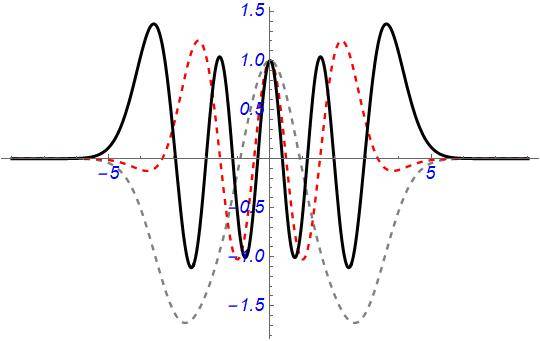
The plots with no legends for the curves.
 
Physics news on Phys.org
Try plotting one at a time and see if the plot legends appear then add one plot and try again.

If they appear on the first plot but not the 2nd or 3rd then you know where your error might be.

You could also try plotting them in reverse order.

The basic idea is to see if its the way you specified plot legends in each plot call vs a mistake in a plot that somehow hides the plot legend.

Also have you searched via google to see if others have had the same issue?

Here's what I found about plotlegends:

https://reference.wolfram.com/language/PlotLegends/ref/PlotLegend.html

In one example they do two plots in one call so maybe that's what you have to do.
 
Thanks @jedishrfu
I shall try your suggestion and see if it works and then post the working solution here.
 
So, this is the way i have learned to do it for the SHOW command
(I checked the plots individually and the PlotLegend worked fine. However, I found the following way to be more clean than filling the plot command with most of the attributes.)

[CODE title="Use of Legended" highlight="LineLegend"]
Legended[Show[p1, p2, p3, PlotRange -> All],
Placed[LineLegend[{Gray, Red,
Green}, {"\!\(\*SubscriptBox[\(\[Psi]\), \(2\)]\)(x)",
"\!\(\*SubscriptBox[\(\[Psi]\), \(6\)]\)(x)",
"\!\(\*SubscriptBox[\(\[Psi]\), \(8\)]\)(x)"}], {.9, .8}]][/CODE]

The numbers in the curly brackets are the position coordinates {x,y} of the placement of the legend for the curve. The output is given below. Thanks a lot for the help!

QM_prac-1b.jpg
 
  • Like
Likes   Reactions: jedishrfu
Thanks for your analysis, solution and insight. It’s always great to see that in a thread And will help future readers who stumble across it in their search for answers.
 
  • Like
Likes   Reactions: Ishika_96_sparkles

Similar threads

  • · Replies 1 ·
Replies
1
Views
3K
  • · Replies 1 ·
Replies
1
Views
1K
  • · Replies 1 ·
Replies
1
Views
3K
  • · Replies 3 ·
Replies
3
Views
2K
  • · Replies 2 ·
Replies
2
Views
3K
  • · Replies 6 ·
Replies
6
Views
2K
  • · Replies 5 ·
Replies
5
Views
5K
  • · Replies 4 ·
Replies
4
Views
2K
  • · Replies 1 ·
Replies
1
Views
2K
  • · Replies 2 ·
Replies
2
Views
2K