Perform RK4 between 2 Clusters in Magnetic Field

Click For Summary
SUMMARY

The discussion focuses on implementing the Runge-Kutta 4th order (RK4) method to simulate the motion of charged particles between two clusters in a magnetic field using C++. The user is experiencing issues with the RK4 implementation, specifically that the results are not aligning with expectations. Key functions involved include dxdt(), dydt(), and dzdt(), which calculate the derivatives based on the electric and magnetic fields. The user is utilizing the ROOT framework for their simulations.

PREREQUISITES
  • Understanding of C++ programming, particularly with ROOT framework
  • Familiarity with numerical methods, specifically Runge-Kutta methods
  • Knowledge of physics concepts related to charged particles in electric and magnetic fields
  • Experience with debugging techniques in C++
NEXT STEPS
  • Learn how to effectively use a C++ debugger, such as GDB or the built-in debugger in IDEs like CLion or Visual Studio
  • Study the implementation of the Runge-Kutta method in numerical simulations
  • Investigate the physics of charged particle dynamics in magnetic fields, focusing on Lorentz force calculations
  • Explore ROOT framework documentation for advanced data visualization techniques and histogram filling
USEFUL FOR

Researchers and developers working in computational physics, particularly those simulating charged particle dynamics in magnetic fields, as well as students learning numerical methods and C++ programming.

harryharns
Messages
6
Reaction score
0
TL;DR
I have a simulated data of charged particles in a magnetic field. I have selected clusters, each cluster contains a set of points(x,z) and I want to perform RK4 between the first and second clusters and fill the positions in a histogram.

I have selected the clusters with the initial conditions(positions and velocity). but the thing is I have performed the rk4 but it is not behaving like I want and I am not able to perform the rk4 between the two clusters. Here is my code:
C++:
 firstCluster = hitClusterArray->at(0);
    secondCluster = hitClusterArray->at(1);
    firstPosition = firstCluster.GetPosition();
    secondPosition = secondCluster.GetPosition();
 
    Double_t iniPx, iniPy, iniPz;
    Double_t iniVx1, iniVy1, iniVz1;

    Double_t secPosX,secPosY,secPosZ;
    Double_t iniPosX,iniPosY,iniPosZ;

    secPosX = secondPosition.X();
    secPosY = secondPosition.Y();
    secPosZ = secondPosition.Z();
    iniPosX = firstPosition.X();
    iniPosY = firstPosition.Y();
    iniPosZ = firstPosition.Z();

    phi = TMath::ATan2(secPosY- iniPosY, secPosX - iniPosX);
    Double_t phiDeg;
    if (phi < 0){
    phiDeg = 360+ phi*TMath::RadToDeg();
    }  else {
    phiDeg = phi*TMath::RadToDeg();
    }

    iniPx = p * TMath::Cos(phiDeg*TMath::DegToRad()) * TMath::Sin(theta);        // in MeV/c
    iniPy = p * TMath::Sin(phiDeg*TMath::DegToRad()) * TMath::Sin(theta);              // in MeV/c
    iniPz = p * TMath::Cos(theta);                                              // in MeV/c    iniVx1 = (iniPx * 5.344286e-22)/m; //meter per second [m/s]
    iniVy1 = (iniPy * 5.344286e-22)/m;
    iniVz1 = (iniPz * 5.344286e-22)/m;
    int clusterCount = 0;
    for (auto iCluster = 0; iCluster < hitClusterArray->size(); ++iCluster) {
    auto cluster = hitClusterArray->at(iCluster);
    auto pos = cluster.GetPosition();

    Double_t clusterPosX = pos.X();
    Double_t clusterPosY = pos.Y();
    Double_t clusterPosZ = pos.Z();

    //std::count<<iniPosX << " " << iniPosY << " "<< iniPosZ <<endl << endl;
    for (pp =  0; pp< 100; pp++){

    l1x[pp] = fx(t1,iniPx1);
    l1y[pp] = fy(t1,iniPy1);
    l1z[pp] = fz(t1,iniPz1);

    l1vx[pp] = dxdt(t1,iniPx1,iniPy1,iniPz1);
    l1vy[pp] = dydt(t1,iniPx1,iniPy1,iniPz1);
    l1vz[pp] = dzdt(t1,iniPx1,iniPy1,iniPz1);

    l2x[pp] = fx(t1+h*0.5,iniPx1+0.5*h*l1x[pp]);
    l2y[pp] = fy(t1+h*0.5,iniPy1+0.5*h*l1y[pp]);
    l2z[pp] = fz(t1+h*0.5,iniPz1+0.5*h*l1z[pp]);

    l2vx[pp] =dxdt(t1+h*0.5,iniPx1+l1vx[pp]*0.5*h,iniPy1+l1vy[pp]*h*0.5,iniPz1+l1vz[pp]*h*0.5);
    l2vy[pp] =dydt(t1+h*0.5,iniPx1+l1vx[pp]*h*0.5,iniPy1+l1vy[pp]*h*0.5,iniPz1+l1vz[pp]*h*0.5);
    l2vz[pp] =dzdt(t1+h*0.5,iniPx1+l1vx[pp]*h*0.5,iniPy1+l1vy[pp]*h*0.5,iniPz1+l1vz[pp]*h*0.5);

    l3x[pp] = fx(t1+h*0.5,iniPx1+0.5*h*l2x[pp]);
       l3y[pp] = fy(t1+h*0.5,iniPy1+0.5*h*l2y[pp]);
       l3z[pp] = fz(t1+h*0.5,iniPz1+0.5*h*l2z[pp]);
       l3vx[pp] =dxdt(t1+h*0.5,iniPx1+l2vx[pp]*0.5*h,iniPy1+l2vy[pp]*h*0.5,iniPz1+l2vz[pp]*h*0.5);
       l3vy[pp] =dydt(t1+h*0.5,iniPx1+l2vx[pp]*h*0.5,iniPy1+l2vy[pp]*h*0.5,iniPz1+l2vz[pp]*h*0.5);
       l3vz[pp] =dzdt(t1+h*0.5,iniPx1+l2vx[pp]*h*0.5,iniPy1+l2vy[pp]*h*0.5,iniPz1+l2vz[pp]*h*0.5);

       l4x[pp] = fx(t1+h,iniPx1+l3x[pp]*h);
       l4y[pp] = fy(t1+h,iniPy1+l3y[pp]*h);
       l4z[pp] = fz(t1+h,iniPz1+l3z[pp]*h);

       l4vx[pp] = dxdt(t1+h,iniPx1+l3vx[pp]*h,iniPy1+l3vy[pp]*h,iniPz1+l3vz[pp]*h);
       l4vy[pp] = dydt(t1+h,iniPx1+l3vx[pp]*h,iniPy1+l3vy[pp]*h,iniPz1+l3vz[pp]*h);
       l4vz[pp] = dzdt(t1+h,iniPx1+l3vx[pp]*h,iniPy1+l3vy[pp]*h,iniPz1+l3vz[pp]*h);      iniPx1 = iniPx1 + h/6 *( l1vx[pp] + 2*l2vx[pp] + 2*l3vx[pp] + l4vx[pp]);
      iniPy1  = iniPy1 + h/6 *(l1vy[pp] + 2*l2vy[pp] + 2*l3vy[pp] + l4vy[pp]);
      iniPz1  = iniPz1 + h/6 *(l1vz[pp] + 2*l2vz[pp] + 2*l3vz[pp] + l4vz[pp]);

      iniPosX = iniPosX + h/6 *( l1x[pp]  + 2*l2x[pp] + 2*l3x[pp] + l4x[pp]);
      iniPosY  = iniPosY + h/6 *( l1y[pp] + 2*l2y[pp] + 2*l3y[pp] + l4y[pp]);
      iniPosZ  = iniPosZ + h/6 *( l1z[pp] + 2*l2z[pp] + 2*l3z[pp] + l4z[pp]);
                                  
    
         kx_vs_ky->Fill(iniPosX, iniPosY);

      }

       //Update the initial conditions for the next cluster
         iniPosX = clusterPosX;
         iniPosY = clusterPosY;
         iniPosZ = clusterPosZ;
                               
          ++clusterCount;
       if (clusterCount > 2) {
           break; // stop iterating over clusters after the second one
           }
    }
<Moderator's note: Please use code tags when posting code>
 
Last edited by a moderator:
Technology news on Phys.org
What language are you using? It looks like a language derived from C, but I can't tell beyond that.
 
I am using c++
 
harryharns said:
but the thing is I have performed the rk4 but it is not behaving like I want and I am not able to perform the rk4 between the two clusters.
For useful advice from us you need to provide more detail on what "not behaving like I want" means.

Also, there are several function calls (?) to functions that aren't shown in your code: dxdt(), fx(), fy(), fz(). I assume these are function calls. If they aren't coded correctly, that will affect the code you've shown.

Are you using a debugger? If not, why not? Can you hand-simulate a simple data set to do some calculations, and compare your results to what your program produces?

In addition, there are a whole bunch of what seem like arrays that don't have declarations.
 
I have the functions declared from the equation of motions. No I am not using a debugger as I am new to c++ and I do not know what a debugger is. can you advice me on the best debugger to use? and all the arrays are declared I didnt show the whole code as it is long. I have used a simple calculation for the rk4 but not simulated data. the problem is that between cluster 1 and cluster 2 there should be the rk4 points.
 
harryharns said:
No I am not using a debugger as I am new to c++ and I do not know what a debugger is. can you advice me on the best debugger to use?
A debugger is software that lets you insert breakpoints in your code to allow you to single-step through it. Most debuggers have a lot of features besides this, including inspecting variables, looking at memory, and many other options. Most C++ compilers come with a set of tools, such as a debugger, profiler, and other software.

Before I can advise you on which debugger to use, I need to know which compiler are you using?
 
I am using the root for it
 
harryharns said:
I want to perform RK4 between the first and second clusters and fill the positions in a histogram.
I can't make any sense of this. Could you please elaborate on what you want to solve?
 
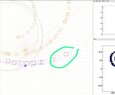
this is what I want to solve. In the image, the cubes (circled in green)are the clusters with positions (x,y,z). I want to calculate the small points between cluster 1 and cluster 2 using the rk4 method.
 

Attachments

  • WhatsApp Image 2023-05-10 at 12.04.39 PM.jpeg
    WhatsApp Image 2023-05-10 at 12.04.39 PM.jpeg
    37.5 KB · Views: 138
  • #10
harryharns said:
this is what I want to solve. In the image, the cubes (circled in green)are the clusters with positions (x,y,z). I want to calculate the small points between cluster 1 and cluster 2 using the rk4 method.
I'm sorry, but this is not helpful at all. What differential equations are you solving?
 
  • #11
Charge particles in magnetic and electric field. this is the functions.
C++:
Double_t  dxdt(double t,double vx, double vy, Double_t vz){

        Double_t Energy = GetEnergy(vx, vy, vz);
        Double_t st = StoppingPower(Energy);
        Double_t Ex,Ey,Ez,f1;                   //Electric field in V/m. 
        Double_t Bx,By,Bz;              // magnetic field in Tesla
        Double_t rr,az,po;
        Double_t q = 1.6022*TMath::Power(10,-19);       //charge of the particle(proton) in (C)
        Double_t m = 1.6726*TMath::Power(10,-27);       // mass of the particle in kg
        Double_t B= -3.0;                 // Applied magnetic field (T).
        Double_t E=TMath::Cos((q*B)/m) * 500;   // Applied Electric field(V/m).
        Bx = 0;
        By = 0;                 // magnetic field in x and y  direction in Tesla.
        Bz = B;          // magnetic field in the z direction in Tesla.
        Ex = 0;
        Ey = 0;                 // Electric field in the x and  direction in V/m.
        Ez = -E;                        // Electric field in the z direction.         rr = TMath::Sqrt(TMath::Power(vx,2)+TMath::Power(vy,2)+TMath::Power(vz,2));
        az = TMath::ATan2(vy,vx);
        po = TMath::ACos(vz/rr);

        f1 =  q/m * (Ex + vy*Bz-vz*By) - st*TMath::Sin(po)*TMath::Cos(az); //-s*TMath::Sin(po)*TMath::Cos(az) ;                                    //dxdt with energyloss compensation.

        double bro = Bz * rr / TMath::Sin(po)/ 1000.0;
//count<<Energy<<endl;
//count<<bro<<endl;
        //std::count<<Ex <<" "<< vy<<" "<<vz << " " <<By<< " "<< f1<<std::endl; 
        return f1;

        }

double  dydt(double t,double vx, double vy, Double_t vz){
Double_t Energy = GetEnergy(vx, vy, vz);
        Double_t st = StoppingPower(Energy);
        Double_t Ex,Ey,Ez,f2;              //Electric field in V/m. 
        Double_t Bx,By,Bz;              // magnetic field in Tesla
        Double_t q = 1.6022*TMath::Power(10,-19);   //charge of the particle in C
        Double_t B= -3.0;                 // Applied magnetic field.
        Double_t rr,az,po;
        Double_t m = 1.6726*TMath::Power(10,-27);  // mass of the particle in kg
        Double_t E = TMath::Cos((q*B)/m) * 500 ;
        Bx = 0;                      // magnetic field in x and y  direction in Tesla.
        By = 0;
        Bz = B;          // magnetic field in the z direction in Tesla.
        Ex = 0;                      // Electric field in the x and  direction in V/m.
        Ey = 0;
        Ez = -E;                        // Electric field in the z direction.

        rr = TMath::Sqrt(TMath::Power(vx,2)+TMath::Power(vy,2)+TMath::Power(vz,2));
        az = TMath::ATan(vy/vx);
        po = TMath::ACos(vz/rr);       f2 =  q/m * (Ey + vz*Bx - vx*Bz) - st*TMath::Sin(po)*TMath::Sin(az); 

        double bro = Bz * rr / TMath::Sin(po)/ 1000.0;
//count<<bro<<endl;
//count<<Energy<<endl;
        //std::count<<f2<<std::endl;
        return f2;
        }

double  dzdt(double t,double vx, double vy,Double_t vz){
Double_t Energy = GetEnergy(vx, vy, vz);
        Double_t st = StoppingPower(Energy);
        Double_t Ex,Ey,Ez,f3;              //Electric field in V/m. 
        Double_t Bx,By,Bz;              // magnetic field in Tesla
        Double_t q = 1.6022*pow(10,-19);   //charge of the particle in eV
        Double_t B= -3.0;                 // Applied magnetic field.
        Double_t rr,az,po;
        Double_t m = 1.6726*TMath::Power(10,-27);  // mass of the particle in kg
        Double_t E = TMath::Cos((q*B)/m) * 500 ; 
        Bx = 0;                      // magnetic field in x and y  direction in Tesla.
        By = 0;
        Bz = B;          // magnetic field in the z direction in Tesla.
        Ex = 0;                      // Electric field in the x and  direction in V/m. 
        Ey = 0;
        Ez = -E;                        // Electric field in the z direction.

        rr = TMath::Sqrt(TMath::Power(vx,2)+TMath::Power(vy,2)+TMath::Power(vz,2));
        az = TMath::ATan(vy/vx);
        //std::count<<az<<endl;
        po = TMath::ACos(vz/rr);        f3 =  q/m * (Ez + vx*By - vy*Bx)- st*TMath::Cos(po);
        double bro = Bz * rr / TMath::Sin(po)/ 1000.0;
//count<<bro<<endl;
//count<<Energy<<endl<<endl;
        //std::count <<r<< " " << TMath::Power(vy,2) + TMath::Power(vx,2) + TMath::Power(vz,2)<< " " << TMath::Power(vz,2) <<  std::endl; 
        return f3;
        }

//  Functions for positions.

Double_t fx(Double_t t, Double_t vx){       Double_t f1x =  vx;
        return f1x;        }

Double_t fy(Double_t t,Double_t vy){        Double_t f2y = vy;
        return f2y;        }
Double_t fz(Double_t t,Double_t vz){

        Double_t f3z =  vz;
        return f3z;

        }
 
Last edited by a moderator:
  • #12
harryharns said:
I am using the root for it
I don't know what this means in the context of C++ compilers. Are you possibly using gcc? I believe that's the compiler that comes with Linux distributions.
 
  • #13
ROOT is a C++ based framework widely used in particle physics. It comes with a C++ interpreter.

There is a lot of weird stuff in the code that makes understanding it more difficult.
Code:
Double_t fx(Double_t t, Double_t vx){
       Double_t f1x =  vx;
        return f1x;
        }
This function does nothing besides returning its second parameter.
The comment is "Functions for positions." but it accepts a parameter vz, which would naturally be the name for a velocity. Equivalently for y and z.

Where is theta calculated? The code uses it.

dxdt, dydt, dzdt have a lot of redundant code and could be combined to a single function.