Python - Endpoint : Can the function not return an array of dictionaries ?

  • Context: Python 
  • Thread starter Thread starter mathmari
  • Start date Start date
  • Tags Tags
    Array Function Python
Click For Summary

Discussion Overview

The discussion revolves around a Python server endpoint that retrieves islands belonging to a specific municipality from a CSV file using pandas. Participants explore issues related to data types, specifically the serialization of numpy int64 types to JSON.

Discussion Character

  • Technical explanation
  • Debate/contested

Main Points Raised

  • One participant describes an error encountered when returning an array of dictionaries, suggesting it may be related to the type of data being returned.
  • Another participant references external sources indicating that the error is due to the int64 type from numpy, proposing a solution to convert these to Python int before JSON serialization.
  • A later reply questions whether this issue arises from the CSV file's number definitions, wondering if all numeric values need conversion to int for proper serialization.
  • Another participant agrees that pandas defaults to using int64 and float64, suggesting a function could be created to convert these types to standard Python types for JSON compatibility.

Areas of Agreement / Disagreement

Participants generally agree on the need to convert numpy types to standard Python types for JSON serialization, but there is uncertainty about whether this is a universal requirement for all numeric values from CSV files.

Contextual Notes

Participants note that the default behavior of pandas may lead to issues with JSON serialization due to the use of int64 and float64 types, which are not directly compatible with JSON.

mathmari
Gold Member
MHB
Messages
4,984
Reaction score
7
Hey! 😊

I am trying to write a code for a server in Python and I got stuck.

I gave as an input a csv file and using pandas we get a dictionary where the titles are the keys and the inputs are the values.

From that we get the below :
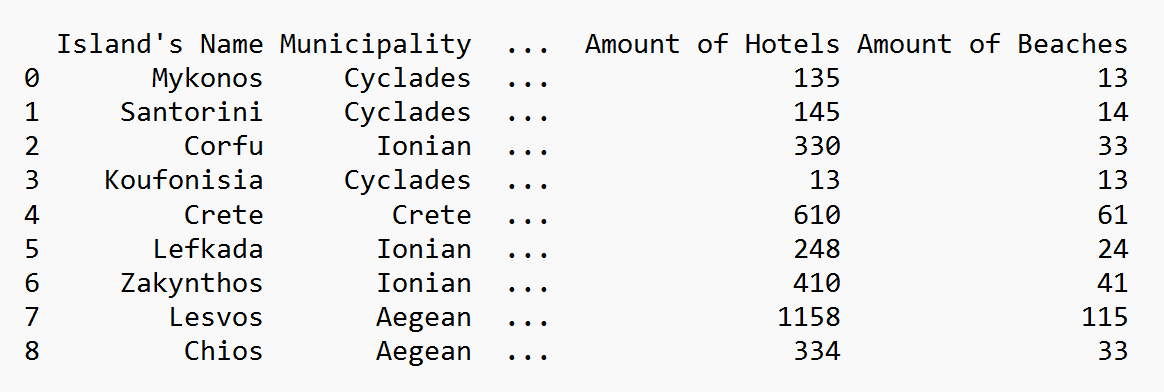
1653924226377.png


I have written the below endpoint to get all the islands that belog to the specific municipality :

Code:
@app.route("/municipality/<municipality>",methods=["GET"])
def get_island_municipality(municipality): 
    dict_to_send = {} 
    dict_to_send["data"] = get_islands_municipality(municipality)
    dict_to_send["message"]=f'These are the islands that belong to {municipality}'
    return jsonify(dict_to_send)
and the function I have used is the below one :

Code:
def get_islands_municipality(municipality): 
    islands = []  
    for i in range(len(dataframe["Municipality"])) : 
        islands_dict = {} 
        if dataframe["Municipality"][i] == municipality :  
            islands_dict["Island's Name"] = dataframe["Island's Name"][i] 
            islands_dict["Municipality"] = dataframe["Municipality"][i] 
            islands_dict["Amount of Hotels"] = dataframe["Amount of Hotels"][i]  
            islands_dict["Amount of Beaches"] = dataframe["Amount of Beaches"][i]  
            islands.append(islands_dict)
    return islands

but I get an error, I suppose that the error relates to the type of my return. I return an array of dictionaries, right? Is that not allowed? The error that I get is "TypeError: Object of type int64 is not JSON serializable".

:unsure:
 
Technology news on Phys.org
I had to look this up but I found a couple threads on StackExhange which reference this error and they both say that this is due to the int64 type. That is a numpy type, so the fix seems to be converting it to a Python int before dumping to JSON. I would try modifying your function to something like this maybe.

Code:
def get_islands_municipality(municipality):
    islands = [] 
    for i in range(len(dataframe["Municipality"])) :
        islands_dict = {}
        if dataframe["Municipality"][i] == municipality : 
            islands_dict["Island's Name"] = dataframe["Island's Name"][i]
            islands_dict["Municipality"] = dataframe["Municipality"][i]
            islands_dict["Amount of Hotels"] = int(dataframe["Amount of Hotels"][i])
            islands_dict["Amount of Beaches"] = int(dataframe["Amount of Beaches"][i])
            islands.append(islands_dict)
    return islands
 
Jameson said:
I had to look this up but I found a couple threads on StackExhange which reference this error and they both say that this is due to the int64 type. That is a numpy type, so the fix seems to be converting it to a Python int before dumping to JSON. I would try modifying your function to something like this maybe.

Code:
def get_islands_municipality(municipality):
    islands = []
    for i in range(len(dataframe["Municipality"])) :
        islands_dict = {}
        if dataframe["Municipality"][i] == municipality :
            islands_dict["Island's Name"] = dataframe["Island's Name"][i]
            islands_dict["Municipality"] = dataframe["Municipality"][i]
            islands_dict["Amount of Hotels"] = int(dataframe["Amount of Hotels"][i])
            islands_dict["Amount of Beaches"] = int(dataframe["Amount of Beaches"][i])
            islands.append(islands_dict)
    return islands
Now it works properly! :geek: Does this happen because in the cvs filrthe numbers are not defined to beof type int? Or why does this happen?
So every time we have numbers in a csv file and we want to return these values we have to make them int first? :unsure:
 
I think so unfortunately. Here are the types that the JSON format can work with and it looks like pandas has default behavior to use int64 and float64. You could write a function to loop over your columns and column types and convert any int64 dtypes to int as well as float64 to float.
 

Similar threads

  • · Replies 4 ·
Replies
4
Views
2K
  • · Replies 55 ·
2
Replies
55
Views
7K
  • · Replies 2 ·
Replies
2
Views
1K
  • · Replies 9 ·
Replies
9
Views
3K
  • · Replies 1 ·
Replies
1
Views
2K
  • · Replies 15 ·
Replies
15
Views
2K
  • · Replies 16 ·
Replies
16
Views
2K
  • · Replies 17 ·
Replies
17
Views
3K
  • · Replies 8 ·
Replies
8
Views
2K
  • · Replies 2 ·
Replies
2
Views
2K