Removing "Thingy" from my Taskbar

  • Thread starter Thread starter WWGD
  • Start date Start date
Join the discussion
Registration is free. Ask a follow-up in this thread, or start your own.
20 replies · 2K views
Messages
7,831
Reaction score
13,158
TL;DR
Want to remove a system entity from my Taskbar, but don't know its name.
Hi All,
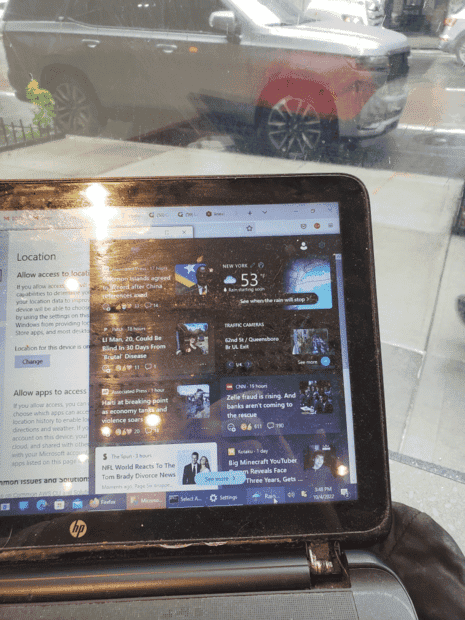
Trying to remove the entity in the right half of the screenn from my Taskbar : ( Post continues below pic)
1664914376444.png


Problem is I don't know it's name. Anyone? If you can help me 3D-Print the car on top, even better ;).
Edit: I've checked Taskbar Settings , where its not listed; right-clicked on it, which does not give me the option to close it/remove it.
 
Last edited:
Physics news on Phys.org
It's called spam :wink:

Actually its not clear what it is - possibly "Widgets"; you can turn this off in Taskbar Settings. Or it might be some app; right click on it and select "remove from taskbar".
 
  • Like
Likes   Reactions: WWGD
pbuk said:
It's called spam :wink:

Actually its not clear what it is - possibly "Widgets"; you can turn this off in Taskbar Settings. Or it might be some app; right click on it and select "remove from taskbar".
I've tried. I've gone into settings/Taskbar, I don't see anything resembling it mentioned. Right-clicking on the image doesn't give me anything either.
Edit: I'll irewrite my original to nclude whst I've tried so far.
 
How are we supposed to tell what you're talking about? Can't you do a print screen and circle it?

Is it that little icon that looks like an umbrella and says "rain"?

Is that the Windows Weather app? Have you tried looking in the Taskbar settings for it?
 
WWGD said:
right-clicked on it, which does not give me the option to close it/remove it.
That sounds exactly like Widgets which you can turn off in Taskbar Setttings.
1664920109222.png
 
  • Like
Likes   Reactions: WWGD
pbuk said:
Actually its not clear what it is
1664920747833.png
 
  • Like
Likes   Reactions: WWGD
russ_watters said:
right click taskbar->news and interests->turn off
Oh yes, news and interests in Win10, widgets in Win11.
 
  • Like
Likes   Reactions: WWGD and russ_watters
pbuk said:
Well done. Next thing to look up is how to snip a rectangle instead of the whole screen :smile:
My Paint program is the basic one that comes from Windows, and its not too flexible; copied the entire web page, including tabs. I ended up using my phone camera, sent it to my PC, and copied it into PF.
 
WWGD said:
My Paint program is the basic one that comes from Windows, and its not too flexible; copied the entire web page, including tabs. I ended up using my phone camera, sent it to my PC, and copied it into PF.
Don't need Paint.
1:
1664930485116.png

2:
1664930517929.png

3: Ctrl-V directly into PF editor.
 
  • Like
Likes   Reactions: WWGD
DaveC426913 said:
Don't need Paint.
1:
View attachment 315043
2:
View attachment 315044
3: Ctrl-V directly into editor.
Thanks. Id had a sort of electronic curse, where my desktop background had randomly changed colors to where I could barely see the screen, then the icons in my Taskbar were so huge I couldn't r-click, as there was no open space to do so, all among other fun surprises.
 
Next lesson: Hiding bookmarks before taking screen grabs.

1664931645000.png
 
  • Like
  • Haha
Likes   Reactions: davenn, robphy, pbuk and 1 other person
DaveC426913 said:
Next lesson: Hiding bookmarks before taking screen grabs.

https://www.physicsforums.com/attachments/315048
Thank you. I had pasted the wrong pic. Now fixed.
 
But I worked so hard on post 14... :(
 
  • Haha
  • Like
Likes   Reactions: hutchphd, Tom.G and WWGD
russ_watters said:
Also, windows key+shift+s
:eek:
How long has that existed??
 
WWGD said:
My Paint program is the basic one that comes from Windows, and its not too flexible; copied the entire web page, including tabs. I ended up using my phone camera, sent it to my PC, and copied it into PF.
Find and learn to use "Snipping Tool" or "Snip & Sketch". Much neater than trying to use MS Paint!