MATLAB Replacing the "quad" function with "integral" doesn't work in Matlab

Click For Summary
The discussion focuses on the transition from using the deprecated "quad" function to the "integral" function for numerical integration in MATLAB. Initially, the user encountered a warning about exceeding the maximum function count when using "quad." After replacing "quad" with "integral," the user found that the plot did not display correctly until they implemented array operators (.*, ./, .^) in their function definition. The corrected code successfully utilized "integral," and the user also noted that using the option 'ArrayValued', true, allows for proper handling of array inputs. This highlights the importance of understanding array operations in MATLAB for effective numerical integration.
PainterGuy
Messages
938
Reaction score
73
TL;DR
Why using numerical integration "integral" function is not working for me?
Hi,

I was trying to numerically integrate the following inverse Fourier transform integral,

1565230874256-png.png
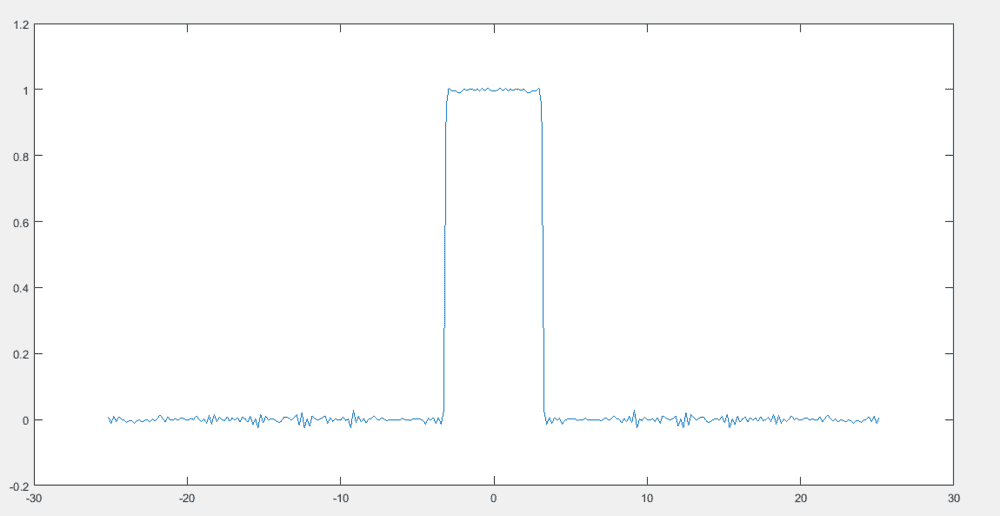
, using the code below. The plot is also shown below.

The plot looks good which means the result is good as well. By the way, I was getting a warning which I quote below the code.

Matlab:
% file name "fourier_transform_unit_pulse_numerical_integration.m"
% using quad function

clear all; close all; clc;

x=linspace(-8*pi,8*pi,300);
Rs_x=0.*[1:300];for i1=1:300

    x1=x(i1);

    f=@(w)(1/pi)*(((2*sin(pi*w)/w)*cos(x1*w)));

    Rs_x(i1)=quad(f,0,60);

end

plot(x,Rs_x);
hold;

Code:
Warning: Maximum function count exceeded; singularity likely.
> In quad (line 98)
  In fourier_transform_unit_pulse_numerical_integration (line 18)

Plot #1
1565399554834.png
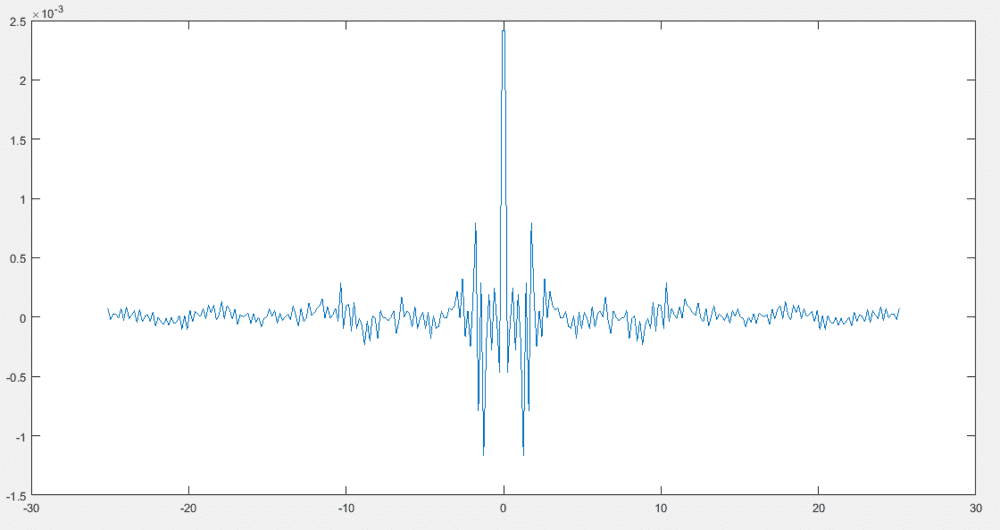
In the code below, I'm using "quad" function to do the numerical integration and I understand that it's a deprecated function and "integral" function should be used instead. I replaced "quad" with "integral" in the code. The "integral" function doesn't work for me as the plot below shows. Where am I going wrong? Could you please help me?

Matlab:
Rs_x(i1)=quad(f,0,60);
changed to
Matlab:
Rs_x(i1)=integral(f,0,60);

Plot #2
1565399921232.png
 
Physics news on Phys.org
Hi again,

I think that I understand it now. The following code works. Please note that in this corrected code I'm using the operators .^, .*, ./, and .\ which are called array operators and are used when multiplying or dividing vectors or matrices of the same size term by term. It means that the function "integral" accepts vector or array values by default. When the array operators are used, it signals that element by element operations are to be carried out; in other words, all the variables should be treated as scalars or as a single element of an array.

In MATLAB functions such as sin and sign can have either scalars or arrays (vectors or matrices) passed to them. There are a number of functions that are written specifically to operate on vectors or on columns of matrices; these include the functions min, max, sum, prod, cumsum, and cumprod.

It's mostly safe to use array operators because this increases the chances that the expression would work with most functions.

Matlab:
% file name "fourier_transform_unit_pulse_numerical_integration.m"
% using integral function

clear all; close all; clc;

x=linspace(-8*pi,8*pi,300);
Rs_x=0.*[1:300];for i1=1:300

    x1=x(i1);

    f=@(w)(1/pi).*(((2.*sin(pi.*w)./w).*cos(x1.*w)));

    Rs_x(i1)=integral(f,0,60);

end

plot(x,Rs_x);
hold;

1565474462069.png


We could have used instead the following lines without using array operators and the code would work fine. In MATLAB command window type: help integral.

Matlab:
f=@(w)(1/pi)*(((2*sin(pi*w)/w)*cos(x1*w)));
Rs_x(i1)=integral(f,0,60, 'ArrayValued', true);

Using "ArrayValued', true" signals that all the variables are arrays and term by terms operations are to be carried out.

Thank you!

Helpful link(s):
1: https://www.mathworks.com/help/matlab/ref/integral.html#btw3ipp-6
 
Last edited:
  • Informative
Likes mfb

Similar threads

  • · Replies 6 ·
Replies
6
Views
4K
  • · Replies 1 ·
Replies
1
Views
2K
  • · Replies 1 ·
Replies
1
Views
2K
  • · Replies 10 ·
Replies
10
Views
3K
  • · Replies 5 ·
Replies
5
Views
3K
  • · Replies 29 ·
Replies
29
Views
5K
  • · Replies 10 ·
Replies
10
Views
4K
  • · Replies 11 ·
Replies
11
Views
3K
  • · Replies 10 ·
Replies
10
Views
3K
  • · Replies 3 ·
Replies
3
Views
2K