Troubleshooting LaTeX Codes with Fraction Line Disappearance

  • Context: LaTeX 
  • Thread starter Thread starter mech-eng
  • Start date Start date
  • Tags Tags
    Latex
Click For Summary
SUMMARY

The discussion focuses on troubleshooting the issue of disappearing fraction lines in LaTeX codes, attributed to browser settings and rendering issues. Users identified that the problem may stem from the browser's handling of pixel resolution and aspect ratio, particularly in Chrome version 73.0.3683.86. Solutions include utilizing the zoom feature to enhance visibility and adjusting font size settings to mitigate rendering anomalies. The conversation emphasizes the importance of browser compatibility and settings in LaTeX document presentation.

PREREQUISITES
  • Understanding of LaTeX document formatting
  • Familiarity with browser settings and rendering
  • Knowledge of pixel resolution and aspect ratio concepts
  • Experience with troubleshooting in web browsers, specifically Chrome
NEXT STEPS
  • Research LaTeX rendering issues in different browsers
  • Learn about pixel resolution and aspect ratio in graphical rendering
  • Explore browser settings that affect LaTeX document display
  • Investigate the impact of zoom features on web content rendering
USEFUL FOR

This discussion is beneficial for LaTeX users, web developers, and anyone experiencing rendering issues in documents, particularly those using Chrome for LaTeX compilation and viewing.

mech-eng
Messages
825
Reaction score
13
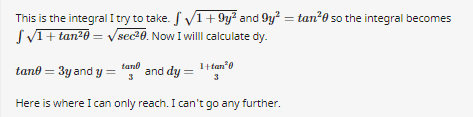
I cannot determine what the problem is. My latex codes have strange behaviors. This might be related to my PC. Fraction lines are disappearing.

What is the problem?
latex.png


When I put reply button then preview it it looks good.

https://www.physicsforums.com/threa...blem-using-trigonometric-substitution.969439/
Thank you.
 
Last edited:
Physics news on Phys.org
Have you tried zooming into see if it’s really not there?
 
It is related to your PC/browser settings. It appears just fine in my browser.
 
  • Like
Likes   Reactions: mech-eng
Orodruin said:
It is related to your PC/browser settings. It appears just fine in my browser.

What could I do to fix the problem?
 
I think @Greg Bernhardt can help. There were similar problems before associated with a browser setting associated with some kind of rapid rendering. Greg may remember what setting it was.

Meanwhile, please post what browser and browser version number you are using.
 
Chrome. It reads it is updated. There is a number: 73.0.3683.86 and a writing something as "formal compilation".
 
How about the font size setting? It may affect the rendering too.
 
jedishrfu said:
How about the font size setting?
This is what @Greg Bernhardt's reply was when I asked a similar question.

Greg Bernhardt said:
I would use the zoom feature rather than mess with specific font sizes.
 
I mentioned zooming in earlier (see post #2) but apparently it got lost in the stream of other posts.

Sometimes graphical rendering will lose a horizontal or vertical line of one pixel width if positioned at a fold where everything along the fold is skipped to keep the aspect ratio intact. Zooming in helps you to see if that's the problem or not and font size adjustments can help make this disappear.
 
  • Like
Likes   Reactions: dlgoff
  • #10
Yes, when zooming in, it works. Thanks. I could never have thougth zooming could cause such a problem.
 
  • #11
Its not the zooming but the notion of how aspect ratio is kept. There is only so much horizontal and vertical resolution available and so invariably a row or column of pixels is sacrificed in the interest of preserving the aspects of the image being rendered.
 
  • Like
Likes   Reactions: dlgoff

Similar threads

  • · Replies 9 ·
Replies
9
Views
2K
  • · Replies 2 ·
Replies
2
Views
2K
  • · Replies 4 ·
Replies
4
Views
2K
  • · Replies 5 ·
Replies
5
Views
4K
  • · Replies 11 ·
Replies
11
Views
5K
  • · Replies 8 ·
Replies
8
Views
2K
  • · Replies 16 ·
Replies
16
Views
3K
  • · Replies 5 ·
Replies
5
Views
3K
  • · Replies 14 ·
Replies
14
Views
2K
  • · Replies 11 ·
Replies
11
Views
6K