MATLAB Using repmat to plot a periodic function

Click For Summary
The discussion focuses on plotting a periodic function defined piecewise between -π and π using MATLAB's `repmat`. The function outputs 1 for values between -π and 0, and 0 for values between 0 and π, repeating this pattern outside the defined range. Users suggest defining the function using an anonymous function syntax and replicating it with `repmat` to extend the plot. There are attempts to troubleshoot issues with the plot not matching expectations, particularly regarding the function's definition and output. The conversation emphasizes the importance of correctly implementing the function logic to achieve the desired graphical representation.
Wrichik Basu
Science Advisor
Insights Author
Gold Member
Messages
2,180
Reaction score
2,721
Consider the following function:
$$f(x) = \begin{cases}
1 & \text{when} & -\pi<x<0\\
0 & \text{when} & 0<x<\pi
\end{cases}$$
Beyond ##-\pi## and ##\pi##, the function just repeats itself; it is periodic.

I want to plot this function for values beyond ##-\pi## and ##\pi##. The graph should look something like this:
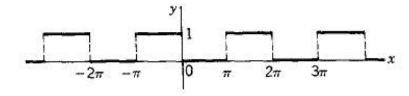
1597848733284.png

This answer to a similar question in MATLAB central says I have to use repmat, but I can't understand how to use it in my specific case.

Any help is appreciated.
 
Physics news on Phys.org
First try running the example as is.

Notice they define an f function via the @(x) scheme

Repmat then replicates the function f so you need to define a similar function for your plot maybe something like this (a guess):

f = @(x) [ 0 * (sin(x)<=0) + 1 * (sin(x)>0) ]

where x is in radians and the sin(x)<=0 and sin(x)>0 factors control the 0 1 output that you're looking for. I've not tested this though.
 
jedishrfu said:
First try running the example as is.

Notice they define an f function via the @(x) scheme

Repmat then replicates the function f so you need to define a similar function for your plot maybe something like this (a guess):

f = @(x) [ 0 * (sin(x)<=0) + 1 * (sin(x)>0) ]

where x is in radians and the sin(x)<=0 and sin(x)>0 factors control the 0 1 output that you're looking for. I've not tested this though.
I did something like this:
Matlab:
f = @(x)[1.*(-pi<x & x<0) + 0.*(0<x & x<pi)];
x = linspace(-pi,pi);
intvl = [-9 9];
pfx = repmat(f(x),1,diff(intvl)/3);
px = linspace(intvl(1),intvl(2),length(pfx));
plot(px, pfx);
hold on; grid on; grid minor;
xticks([-4*pi:1:4*pi]);
xticklabels({'-4\pi', '-3\pi', '-2\pi', '-\pi', '0', '\pi', '2\pi', '3\pi', '4\pi'});
xlim([-4*pi 4*pi]);
After executing till line 7, I get the following figure:
1597851451213.png
After executing lines 8, 9 & 10, I get this one:

1597851561939.png
Doesn't quite match the figure I want. Where is the problem?
 
Your anonymous function looks suspicious only when x<-pi will you get a 1

Did you try the one I wrote for f = @(x) ?
 

Similar threads

  • · Replies 2 ·
Replies
2
Views
2K
  • · Replies 1 ·
Replies
1
Views
2K
  • · Replies 8 ·
Replies
8
Views
3K
  • · Replies 1 ·
Replies
1
Views
2K
  • · Replies 1 ·
Replies
1
Views
5K
  • · Replies 1 ·
Replies
1
Views
3K
  • · Replies 11 ·
Replies
11
Views
3K
  • · Replies 5 ·
Replies
5
Views
2K
  • · Replies 1 ·
Replies
1
Views
3K
  • · Replies 4 ·
Replies
4
Views
2K