What is the best way to reduce overexposure in DSLR astrophotos?

  • Context: Stargazing 
  • Thread starter Thread starter QuantumPion
  • Start date Start date
  • Tags Tags
    dslr
Click For Summary

Discussion Overview

The discussion revolves around techniques to reduce overexposure in DSLR astrophotography, particularly in the context of capturing deep sky images. Participants explore various settings, editing software, and strategies to improve image quality while dealing with ambient city light and skyglow.

Discussion Character

  • Exploratory
  • Technical explanation
  • Debate/contested
  • Mathematical reasoning

Main Points Raised

  • One participant mentions experiencing washed-out images after a few seconds of exposure and questions whether this is due to ambient city light.
  • Another suggests adjusting the ISO setting, as a high ISO can lead to poor contrast.
  • Concerns about skyglow are raised, with a suggestion to use the "levels" function in Photoshop to improve image quality.
  • A participant emphasizes the importance of shooting in RAW format instead of JPEG, citing the loss of data in JPEG files due to compression.
  • There is a discussion about the Canon T5i camera's capabilities and modifications made to improve its performance for astrophotography.
  • Participants discuss the potential benefits of using Lightroom and other editing software for post-processing images.
  • One participant inquires about free or open-source editing tools and the viability of image stacking multiple short exposure shots to enhance detail.
  • It is noted that while stacking images can improve detail, it may not eliminate skyglow, and finding darker locations for shooting is recommended.

Areas of Agreement / Disagreement

Participants express various viewpoints on the best practices for reducing overexposure, with no consensus on a single solution. Multiple competing strategies and tools are discussed, indicating ongoing uncertainty and exploration of the topic.

Contextual Notes

Limitations include the dependence on specific camera models and settings, as well as the varying effectiveness of different editing software. The discussion does not resolve the optimal approach for all situations.

Who May Find This Useful

Individuals interested in astrophotography, particularly those using DSLRs in urban environments, may find the insights and suggestions relevant to their practice.
QuantumPion
Science Advisor
Messages
902
Reaction score
42
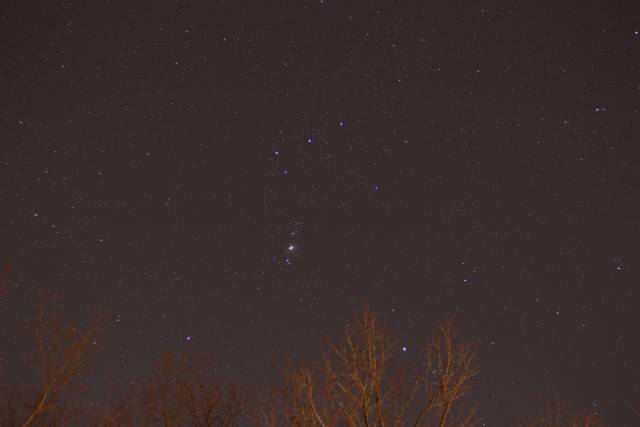
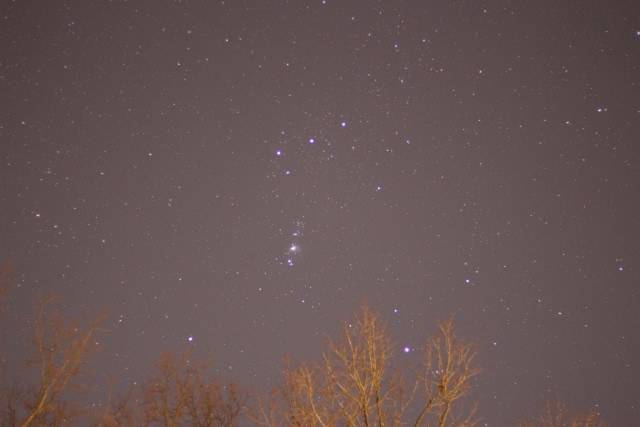
Hi, I've been trying to take some deep sky images with my DSLR. However, my pictures tend to get washed out and overexposed after more than just a couple seconds. Is there something I can do to fix this, or is this just an issue with ambient city light? I'm already using a lens hood, and viewfinder cap, and it's a moonless night. I am using a 50mm f1.8 lens.

IMG_1101.jpg

IMG_1102.jpg

image hosting api
 
Astronomy news on Phys.org
Have you tried adjusting the ISO setting? Having it set too high is a common cause of poor contrast.
 
What is "a few seconds"? But yes, that looks like a symptom of skyglow. Using the "levels" function in photoshop, you can clip the low end. It is a standard technique.
 
  • Like
Likes   Reactions: davenn
QuantumPion said:
However, my pictures tend to get washed out and overexposed after more than just a couple seconds. Is there something I can do to fix this, or is this just an issue with ambient city light?

russ_watters said:
What is "a few seconds"? But yes, that looks like a symptom of skyglow. Using the "levels" function in photoshop, you can clip the low end. It is a standard technique.
very easily fixed in PS or lightroom ... lightroom has a nice feature called de-haze that darkens the backgrounds very well
let me see if I can find an example from my own collection

Dave
 
Last edited:
OK here's a real fast comparison and edit of a pic of mine in lightroom The object is the LMC ( Large Magellanic Cloud).

first pic is the jpg out of the camera
second pic is the RAW file edited and a jpg conversion done
you can see the huge difference in colour, and detail

2015_05_08_3682sm.jpg
2015_05_08_3682-2sm.jpg
Note I used the term "RAW File" ... I don't know what camera you are using, hopefully it has a RAW imaging mode
if you are not using it, USE IT ! I cannot stress this enough. Editing jpg files is very self defeating because of the huge
amount of image compression done to generate the file ... lots of data is lost.Dave
 
  • Like
Likes   Reactions: sophiecentaur and russ_watters
I don't have photoshop but I guess that is the only way around it! I'm using a Canon T5i. ISO was 800 or 1600 I believe. Exposure was 2 seconds for first picture and 3 seconds for second IIRC.
 
QuantumPion said:
I don't have photoshop but I guess that is the only way around it! I'm using a Canon T5i. ISO was 800 or 1600 I believe. Exposure was 2 seconds for first picture and 3 seconds for second IIRC.

OK what about lightroom ?
These days you can get a photoshop and lightroom package for around US$10 - 12 / month subscription really good value
I had to look up a T5i ( that model naming style is mainly only used in the USA) ... ahhh, the EOS 700D ... It's one of the 3 Canon cameras I have :smile:
Also have the 5D MKIII and the 6D.
The 700D I did surgery on and removed a couple of the filters to make it a better astro camera ... more sensitive at the red end of the spectrum

you didn't respond to my comments on the use of RAW files ??
I hope my pic's helped you to show you how to overcome city light skyglow ?

Dave
 
Last edited:
Yes thanks for the help. Next time I will get RAW's instead of JPEG's so that if I eventually get photoshop or lightroom I can mess around with them. Are there any free/open source tools that can do the required editing? Also, would image stacking multiple ~2 second exposure shots be worthwhile to try?
 
QuantumPion said:
Are there any free/open source tools that can do the required editing?

there is GIMP -- free, I don't know if it has all the features that LR and PS have, but, from what I understand, it has many of them
I don't know if it is easier or harder to use

QuantumPion said:
Also, would image stacking multiple ~2 second exposure shots be worthwhile to try?

yes, that is always good ... it won't stop the sky glow, but will give more detail on the starfield

I have to assume you were shooting those images from a suburban area ... being that the trees were also well lit
find a spot out of your town/city where the ambient light and the sky glow level is low

for image stacking a commonly used and free program is DSS ( Deep Sky Stacker) use DSS only for the stacking
the processing is still done in your other fav editing program. DSS can do processing, but isn't as good as say LR or PSDave
 

Similar threads

  • · Replies 152 ·
6
Replies
152
Views
12K
  • · Replies 15 ·
Replies
15
Views
6K