Who Limits My Internet Speed, and How Do They Do It?

Click For Summary

Discussion Overview

The discussion revolves around issues related to internet speed, specifically focusing on latency, dropouts, and potential causes for poor performance during online meetings. Participants explore various factors affecting internet connectivity, including ISP practices, hardware choices, and network conditions.

Discussion Character

  • Exploratory
  • Technical explanation
  • Debate/contested
  • Mathematical reasoning

Main Points Raised

  • One participant reports experiencing frequent freezes and dropouts during Zoom meetings, with latency spikes observed up to 8000ms.
  • Concerns are raised about whether the ISP controls speed through modem reprogramming or external methods, and how speed limits are enforced.
  • Some participants discuss the concept of throttling, suggesting it may occur during high usage periods rather than being a deliberate action by the ISP.
  • Suggestions include using a wired connection to eliminate Wi-Fi issues, upgrading the modem, or renting a modem from the ISP.
  • One participant mentions the possibility of using a cell phone as a hotspot for meetings, though this may incur additional costs.
  • There is a discussion about the number of channels provided by the ISP and how upgrading service may involve activating more channels.
  • Participants suggest using tools like tracert or pingplotter to diagnose latency issues and identify potential bottlenecks in the network.
  • One participant notes that external factors, such as increased online activity during holidays, could affect overall internet performance.
  • Another participant mentions the limitations of available ISPs in the area, suggesting that options may be limited to satellite service.

Areas of Agreement / Disagreement

Participants express a range of views on the causes of the internet issues, with no consensus on the primary source of the problems. Some suggest hardware or local network issues, while others point to ISP practices and external factors.

Contextual Notes

Participants highlight potential limitations in diagnosing the issue, including the dependence on specific hardware, network congestion, and the impact of external events like natural disasters.

Who May Find This Useful

This discussion may be useful for individuals experiencing similar internet connectivity issues, those interested in understanding ISP practices, or anyone looking for troubleshooting tips related to online meetings and streaming services.

anorlunda
Staff Emeritus
Science Advisor
Homework Helper
Insights Author
Messages
11,326
Reaction score
8,754
I've been bothered lately with an excessive number of freezes and dropouts when trying to conduct meetings on Zoom. As many as 10 freezes with 5 dropouts in 15 minutes.

I installed a tool to monitor my connection from my PC. In 4 hours, it gathered the following stats.

General stats​

Online for 0:13:28
Disconnects, today: 23
Availability, today: 98.78%
Downtime, today: 0:02:58
Disconnects, total: 23
Availability, total: 98.78%
Downtime, total: 0:02:58
Latency:

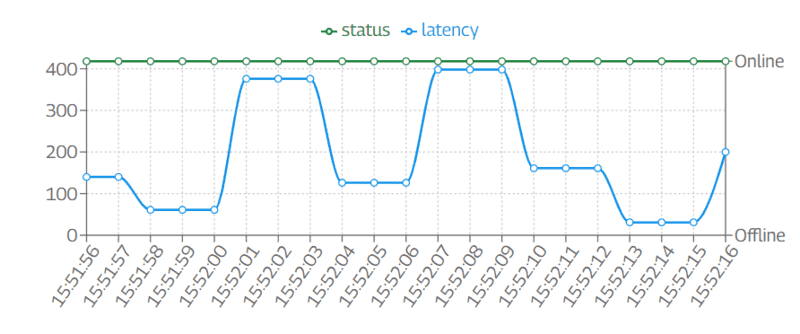
It also shows time plots of Online status and latency. The plot below shows the latency seen by my PC when downloading on my phone. Both share the modem and connection. Watching that plot, I have seen the latency go as high as 8000ms (8s) for periods as long as 30s. The dropouts, mostly seem to be preceded by long latency.
1670706056378.png

When streaming video, for example Netflix, the buffering seems to mask all such problems and no pauses or dropouts are noticed. But a Zoom meeting must be real time, not buffered.

My modem is Netgear, and it claims to be certified with up to 200 Mbps. My ISP is Xfinity/Comcast and I pay for 75 Mbps. They also offer 200, 400, 800, 1000, and 1200 Mbps speeds.

Here are my questions.
  • Does the ISP reprogram my modem to set the speed, or is the speed controlled outside my house?
  • When the speed limit is reached, how is it enforced? Increase latency? On/Off toggling like PWM? Something other method?
  • I see discussions about "throttling" on the net, and it sounds different than setting the speed. They make it sound like throttling kicks in when a threshold of GB is exceeded. Many of the sources also say that using a VPN allows you to bypass throttling. But I expec that VPN does not allow you to get 1200 Mbps performance when paying only for 75 Mbps. What is the difference between speed control and throttling?

To reduce my problems should I:
  1. Forget WIFI for my PC and run an Ethernet cable from PC to modem?
  2. Get a better modem?
  3. Rent the modem from the ISP?
  4. Pay more money to the ISP?
  5. Use a VPN?
  6. Use a different ISP? (not an option at my location.)
 
Computer science news on Phys.org
#1 might work if there is interference periods with Wifi.

Your ISP could have periods of heavy traffic itself.

Looking at the graph, it seems the latency follows a pattern of lengths 6 seconds, somewhat periodic.
Is that from the ISP's own system packeting, or something internal to your own computer ( or phone ) - ie a system interrupt to an internal system process. ie anti-virus program.
If so #2-4, shouldn't solve the issue.
With a VPN you are still going through your ISP and what you paid for.

Your paid for 75 MPS. You get no more. I imagine your ISP allows only a certain number of packets to be sent to you. If you pay for more speed, you get a higher packet rate.

throttling - since there is only so much wire ( bandwidth ), heavy usage when everyone connects at the same time and wants to download movies exceeding what the ISP can provide through the wire, everyone's speed drops lower so everyone can share equally to some extent. Not deliberate throttling, but due to hardware limitations. An upgrade to the ISP's system would be in order to keep clients more happy. That may or may not be your problem.
 
You can perhaps try use tracert during periods of latency to see if you can get a fix on what link the latency is introduced. If tracert never reveals the high latency link it may be a protocol or bandwidth problem. That said, bad wi-fi is a very likely candidate for latency, especially if you need to stream data and there is a lot of other active wi-fi access points nearby (as shown when you do a wi-fi search from your computer or mobile phone) or other sources of electronic noise.
 
Also we are getting close to Xmas, kids are getting out of school, people are ordering stuff online, medicare final countdown all happening during the day, nighttime people streaming, kids playing games... so the ISP may be portioning out internet service.

What tool did you use to track internet usage?

The wired approach can rule out wifi issues. I've seen that at home where my wifi turned to crap. Also do you have more than one wifi network. I have an extender for hard to reach wifi home camera connections. However, my machines would periodically connect to the extender network due to some drop out issue with the main network and then not reconnect to the main.
 
  • Like
Likes   Reactions: russ_watters
Filip Larsen said:
You can perhaps try use tracert during periods of latency to see if you can get a fix on what link the latency is introduced. If tracert never reveals the high latency link it may be a protocol or bandwidth problem. That said, bad wi-fi is a very likely candidate for latency, especially if you need to stream data and there is a lot of other active wi-fi access points nearby (as shown when you do a wi-fi search from your computer or mobile phone) or other sources of electronic noise.
Thanks. That's interesting.
Code:
tracert  physicsforums.com

Tracing route to physicsforums.com [2606:4700:20::ac43:4487]
over a maximum of 30 hops:

  1     3 ms     2 ms     1 ms  2601:881:8480:6a00:a36:c9ff:feb0:3c12
  2    17 ms    10 ms    12 ms  2001:558:40c1:c::1
  3    10 ms     9 ms     9 ms  2001:558:312:6005::1
  4    11 ms    10 ms    11 ms  2001:558:310:d6::1
  5     *       14 ms     *     2001:558:310:93::1
  6    21 ms    23 ms    44 ms  ae-30-ar03.bonitasprngs.fl.naples.comcast.net [2001:558:310:74::2]
  7     *        *        *     Request timed out.
  8    23 ms    24 ms    23 ms  be-3111-pe11.nota.fl.ibone.comcast.net [2001:558:3:64::2]
  9    24 ms    25 ms    74 ms  2001:559::902
 10    22 ms    23 ms    23 ms  2400:cb00:368:3::
 11    22 ms    29 ms    30 ms  2606:4700:20::ac43:4487

Trace complete.

I got this "Request timed out" message 4 times in a row. Naples Florida is in the zone recently hit by Hurricane Ida. That might have something to do with why my problems started recently. I also assume there is nothing I can do to prevent hops from going to Naples.

The one that timed out was this hop from Naples to Miami.
7 * * 23 ms be-33913-cs01.miami.fl.ibone.comcast.net [2001:558:3:354::1]
 
Could you use your cell phone as a hotspot for the zoom meetings? Might be expensive if you go over some monthly data plan though.
 
anorlunda said:
My ISP is Xfinity/Comcast
There's your problem. I have them too, and I'd prefer to find a company with better customer service, such as Spawn of Satan, Inc. and.or one more competent. Are the Three Stooges available?

Typically, you are buying a number of "channels". To over simplify, you get ~40 Mb/s per channel. At 75, you probably have 2 channels. When you upgrade your service, they turn more on. Like I said, it's more complicated than that, but that's the idea. Most modems have a web interface, and you can see a) how many channels are running, b) what the error rate (corrected and uncorrectable) per channel is

So if the problem is on the Comcast end, you might see errors or bad channels in the stats.

However, WiFi is more likely to be your culprit. Especially if you are in a congested area.
 
  • Like
  • Haha
  • Informative
Likes   Reactions: Astronuc, anorlunda and pbuk
Just a FYI.
A somewhat more informative version of "tracert" is "pingplotter." In addition to the tabular data, it plots a latency line graph for each hop.
I've been using the free version for a few decades, there is also a paid version that I know nothing about. A Google search for it works.

Cheers,
Tom
 
  • Like
Likes   Reactions: jedishrfu
anorlunda said:
Use a different ISP?[/S] (not an option at my location.)
You should check out https://broadbandmap.fcc.gov/home to see what's available at your address. I discovered a few options that I never heard about at mine.
 
  • #10
vela said:
You should check out https://broadbandmap.fcc.gov/home to see what's available at your address. I discovered a few options that I never heard about at mine.
Thanks, that's useful. Here is their answer for my address. My only other option is satellite.

1670783077559.png
 
  • #11
anorlunda said:
I got this "Request timed out" message 4 times in a row. Naples Florida is in the zone recently hit by Hurricane Ida. That might have something to do with why my problems started recently. I also assume there is nothing I can do to prevent hops from going to Naples.
The time out could happen simply because that hop doesn't respond to pings. I agree with the others that wifi is the most likely culprit.

That said, I did seen to notice that Zoom connections seemed flakier when I was using cable internet two years ago. Students seemed to get disconnected during class more often, and when in a meeting where I wasn't the host, I experienced occasional pauses and dropouts. I don't recall the same issues when I was using AT&T.
 
  • #12
It could be due to a Zoom priority scheme servicing hosts more carefully than listeners.
 
  • #13
Unfortunately latency ties directly to your throughput in bits per second.
How to Calculate TCP throughput for long distance WAN links
If you have a good signal to noise ratio, you could try to increase your TCP window size,
but the larger the carrier, the larger the amount to resend if an error is detected.
if it were me, I would try the direct cable first, that would eliminate the WiFi as a factor.
I do not think the VPN would help, as it will add overhead, and may still go through the same path.
There is a chance that a VPN would not go through the slow area, and your internet point of presents(where you look like you are coming from, has no long latency hops, but it is just a chance.
 
  • #14
Good news. I followed the advice of many in this thread and changed my PC from WIFI connection to Ethernet. After 24 hours of use, zero dropouts, zero slow-downs!!! :smile:

Thank you all for the good advice.
 
  • Like
Likes   Reactions: Astronuc, Wrichik Basu, Filip Larsen and 2 others
  • #15
anorlunda said:
...changed my PC from WIFI connection to Ethernet. After 24 hours of use, zero dropouts, zero slow-downs!!!

So the search universe of problems has been reduced to size three: 😁
  1. Computer
  2. Router
  3. External interference
All a miniverse of their own. :cry:
(is that even a word?)
 
  • Like
Likes   Reactions: Astronuc and anorlunda
  • #16
anorlunda said:
Forget WIFI for my PC and run an Ethernet cable from PC to modem?
A close friend has a similar problem. The household uses WiFi from the cable modem, rather than WiFi from a router. There are intermittent problems with the WiFi.

We use a Netgear router, which is attached via RJ45 cable to the modem. It seems to work. My son does a lot of streaming, but he's connected via cable. I use WiFi with my laptops/smartphone and cable for desktop.

The same person uses Xfinity/Comcast, and as V50 mentioned that could be a factor.
 
  • Like
Likes   Reactions: anorlunda

Similar threads

Replies
22
Views
6K
  • · Replies 6 ·
Replies
6
Views
3K