Who moved my cheese? How do I log out?
- Thread starter jim hardy
- Start date
Join the discussion
Registration is free. Start your own thread to ask a follow-up.
17 replies · 2K views
Physics news on Phys.org
Discussion
Mentor
- 37,555
- 14,432
"My PF" -> Log Out? I see it, bottom right.
- 13,934
- 16,839
I still see it in the My PF dropdown (on desktop). It's the last entry, aligned one row below the "two step verification" but in the left hand column.
- 19,385
- 15,622
Jim, like the previous two posters I see it as well (desktop). Are you running from a mobile app?
Science Advisor
Homework Helper
Dearly Missed
- 9,864
- 4,896
Inconsistent Software Someplace
"My PF" dropdown doesn't show "logout".
The new stuff recently added pushed it down below the bottom of page.
Scrolling down by either up-down arrow key or the drag slider at right didnt work first time, so i started this thread. It worked twice after that, now it refuses again to scroll and i am unable to log out.
The page behind the dropdown scrolls but the dropdown itself stays stationary and is not tall enough to show logout. It ends at two step verification.Before Microsoft computers were predictable
but no more
"Consistency is be the bugaboo of little minds" i know,,,,
Surely when Leonard Cohen sang "You will not like it here - There's no one left to torture "
was he addressing Bill Gates ?
can you PLEASE move logout to top of the "My Pf" dropdown list? Surely it's used more frequently than some of those other things...
"My PF" dropdown doesn't show "logout".
The new stuff recently added pushed it down below the bottom of page.
Scrolling down by either up-down arrow key or the drag slider at right didnt work first time, so i started this thread. It worked twice after that, now it refuses again to scroll and i am unable to log out.
The page behind the dropdown scrolls but the dropdown itself stays stationary and is not tall enough to show logout. It ends at two step verification.Before Microsoft computers were predictable
but no more
"Consistency is be the bugaboo of little minds" i know,,,,
Surely when Leonard Cohen sang "You will not like it here - There's no one left to torture "
was he addressing Bill Gates ?
can you PLEASE move logout to top of the "My Pf" dropdown list? Surely it's used more frequently than some of those other things...
OCR
- 996
- 936
jim hardy said:"My PF" dropdown doesn't show "logout".
The new stuff recently added pushed it down below the bottom of page.
That's odd...

Last edited:
- 19,385
- 15,622
Odd, you are missing the "show on-line status" checkbox. Also, note that the bottom line is separated by an HTML dropdown box separator line which explains why it isn't on the same line as "password" in your box.
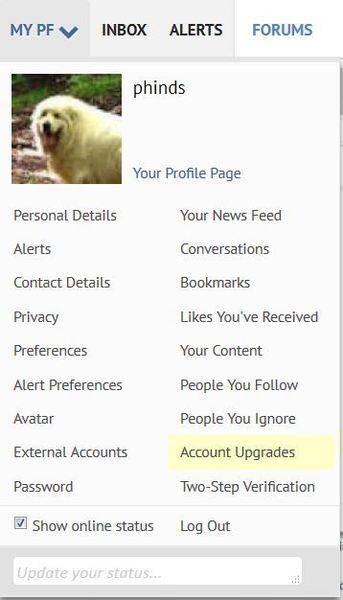
OCR
- 996
- 936
phinds said:Odd, you are missing the "show on-line status" checkbox:
I think you need to be a "Gold Member" for that option... not sure, though ?
No "Bookmarks" option, or "update your status", either ?Edit:
Also, note that the bottom line is separated by an HTML dropdown box separator line which explains why it isn't on the same line as "password" in your box.
Yeah, I see that...
Science Advisor
Gold Member
- 9,750
- 11,988
Unless you are on a public computer, there is no need to log out,jim hardy said:What happened to Log Out in My Pf dropdown?
What is two step verification ?
How do i log out now?
aaarrgghhhh - Who moved my cheese ?
old jim
just leave the page ... PF will show that you are no longer online
in the members online now column on the lower right side of the
PF main pageDave
Science Advisor
Homework Helper
Dearly Missed
- 9,864
- 4,896
here's what it looks like
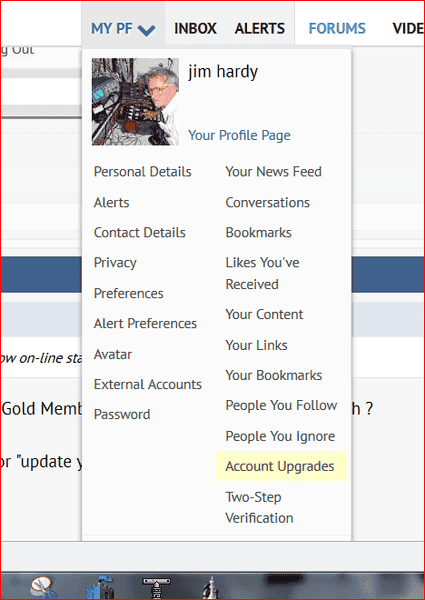 i found a workaround, Firefox tools allows to zoom in or out . At about 80% 'Logout' appears on bottom. Works okay today. Tomorrow , who knows ?
Thanks, but i prefer to always close the door behind me.
"Internet security" is an oxymoron.
(grumpy) old jim
davenn said:Unless you are on a public computer, there is no need to log out,
just leave the page ... PF will show that you are no longer online
in the members online now column on the lower right side of the
PF main page
Thanks, but i prefer to always close the door behind me.
"Internet security" is an oxymoron.
(grumpy) old jim
Mentor
- 37,555
- 14,432
You can go to https://www.physicsforums.com/logout/ manually. The link does not log you out directly, you have to confirm it.
- 20,002
- 11,130
This is because we're about to add a link directory which added "your links" option which bumped some options out of your view because your screen resolution is very low. I will look into adding it to the top.jim hardy said:here's what it looks like
- 20,002
- 11,130
I need to find a new way to annoy youjim hardy said:Thanks Greg !


Similar threads
- solarblast
- · Replies 6 ·
- Feedback and Announcements
- Replies
- 6
Undergrad
How do I log linearize an equation?
- thegodfather
- · Replies 1 ·
- Differential Equations
- Replies
- 1
- JasonRox
- · Replies 7 ·
- Feedback and Announcements
- Replies
- 7
- maks4
- · Replies 12 ·
- STEM Academic Advising
- Replies
- 12