Why do I always get 0 values in the radiation part? (MCNP5)

  • Thread starter Thread starter emilmammadzada
  • Start date Start date
  • Tags Tags
    Mcnp5 Radiation
Click For Summary
SUMMARY

The forum discussion addresses the issue of consistently obtaining zero values in the radiation output when using MCNP5 for simulations. Users noted that the stopping power and range values are present, but the radiation values remain at zero across various energy levels. The consensus indicates that this may be due to incorrect input parameters or settings in the MCNP5 simulation, particularly in the definition of materials or geometry that could affect radiation calculations.

PREREQUISITES
  • Understanding of MCNP5 simulation software
  • Familiarity with radiation physics concepts
  • Knowledge of material definitions in MCNP5
  • Experience with input file configurations in MCNP5
NEXT STEPS
  • Review MCNP5 documentation on material definitions and geometry setup
  • Examine input file parameters for potential misconfigurations
  • Explore troubleshooting techniques for radiation output in MCNP5
  • Learn about the impact of geometry on radiation transport in MCNP5 simulations
USEFUL FOR

Researchers, nuclear engineers, and students working with MCNP5 simulations, particularly those focused on radiation transport and material interactions.

  • #31
What options are you choosing? The file is written about half way through a lot of questions when I try it.
 
  • Like
Likes   Reactions: emilmammadzada
Engineering news on Phys.org
  • #32
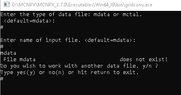
mcnp5 doesn't have many options for me, gridconv.exe asks for input file name and then output file name. It asks if it's binary.
 

Attachments

  • Ekran görüntüsü 2022-12-11 174523.jpg
    Ekran görüntüsü 2022-12-11 174523.jpg
    16.8 KB · Views: 168
  • #33
In gridconv, at the question "Enter name of input file" you must put the mdata file (binary file) and not the mcnp file. To create mdata file you must run the input file (for example SPCr.txt in post 15) with mcnp and the mdata will be create (mdata or mdatb or mdatc or ...).
hope it's help.
 
  • Love
  • Informative
Likes   Reactions: Alex A and emilmammadzada
  • #34
PSRB191921 said:
In gridconv, at the question "Enter name of input file" you must put the mdata file (binary file) and not the mcnp file. To create mdata file you must run the input file (for example SPCr.txt in post 15) with mcnp and the mdata will be create (mdata or mdatb or mdatc or ...).
hope it's help.
Should mdata and gridconv be in the same folder?
 
  • #35
no gridconv in in the bin folder and mdata in the files folder
 
  • Informative
Likes   Reactions: emilmammadzada
  • #36
PSRB191921 said:
no gridconv in in the bin folder and mdata in the files folder
I got such error in separate folder.mdata and gridconv are in separate folders
 

Attachments

  • f.jpg
    f.jpg
    12 KB · Views: 134
  • #37
first you can run mcnp :
MCNP6 i=SPCr.txt o=SPCr.o mdata=meshbinary
second run gridconv
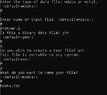
at the question "Enter name of input file" put "meshbinary"
at the question "what do you want to name your file" put "meshascii.txt"
Normally a file name meshascii.txt is created: it is the result !
 
  • Informative
Likes   Reactions: emilmammadzada
  • #38
PSRB191921 said:
first you can run mcnp :
MCNP6 i=SPCr.txt o=SPCr.o mdata=meshbinary
second run gridconv
at the question "Enter name of input file" put "meshbinary"
at the question "what do you want to name your file" put "meshascii.txt"
Normally a file name meshascii.txt is created: it is the result !
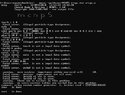
The application gave an error again
 

Attachments

  • d.jpg
    d.jpg
    11.9 KB · Views: 165
  • #39
you must bin in 32 bits try meshbin instead of meshbinary (too long)
 
  • Informative
Likes   Reactions: emilmammadzada
  • #40
it was the same again
 

Attachments

  • y.jpg
    y.jpg
    10.3 KB · Views: 158
  • #41
what is your input file ?
 
  • Informative
Likes   Reactions: emilmammadzada
  • #42
This
 

Attachments

  • #43
strange no problem for me
 
  • Skeptical
Likes   Reactions: emilmammadzada
  • #44
Could the method be different in mcnp5?
 
  • #45
and if you run
MCNP5 i=spc.txt o=spc.o
 
  • Like
Likes   Reactions: emilmammadzada
  • #46
Now it's been like this
 

Attachments

  • r.jpg
    r.jpg
    52.7 KB · Views: 147
  • #47
of course ! MCNP5 does not transport proton !
you must try with MCNPX or MCNP6 !
 
  • Sad
Likes   Reactions: emilmammadzada
  • #48
PSRB191921 said:
of course ! MCNP5 does not transport proton !
you must try with MCNPX or MCNP6 !
Unfortunately I don't have mcnp6 (
 
  • #49
so you can't. Only MCNPX or MCNP6 can transport protons
 
  • Like
Likes   Reactions: emilmammadzada
  • #50
PSRB191921 said:
so you can't. Only MCNPX or MCNP6 can transport protons
I was just starting the mcnp application. So I don't have much information about the application and I wanted to learn.(
 
  • #51
PSRB191921 said:
so you can't. Only MCNPX or MCNP6 can transport protons
I wrote mcnpx instead of mcnp5, something like this happened
 

Attachments

  • df.jpg
    df.jpg
    97.7 KB · Views: 130
  • #52
yes it will be ok because MCNPX transports proton
 
  • Like
Likes   Reactions: emilmammadzada
  • #53
PSRB191921 said:
yes it will be ok because MCNPX transports proton
Now which app is mine mcnp5 or mcnpx?))
 
  • #54
both
 
  • Informative
Likes   Reactions: emilmammadzada
  • #55
PSRB191921 said:
both
I wish I could solve this gridconv problem too, it would be great for me
 
  • #56
I think that has been solved. Before you were putting your input file into gridconv, not the mdata file produced by mcnpx. It is fine to put the mdata file in the same directory as gridconv.exe but if the exe is in your bin directory with mcnpx.exe it should work. You must be in the directory where the mdata file is before you run gridconv.

Edit,
At the point gridconv asks 'Do you wish to continue?' you can hit enter for 'no' because at that point the text file has been created. Then you can hit return again to exit the program.
 
  • Like
  • Informative
Likes   Reactions: emilmammadzada and PSRB191921
  • #57
Alex A said:
I think that has been solved. Before you were putting your input file into gridconv, not the mdata file produced by mcnpx. It is fine to put the mdata file in the same directory as gridconv.exe but if the exe is in your bin directory with mcnpx.exe it should work. You must be in the directory where the mdata file is before you run gridconv.

Edit,
At the point gridconv asks 'Do you wish to continue?' you can hit enter for 'no' because at that point the text file has been created. Then you can hit return again to exit the program.
yes the app worked correctly.
 

Attachments

  • Like
Likes   Reactions: Alex A
  • #58
emilmammadzada said:
yes the app worked correctly.
Thank you very much for helping me on these matters.
 
  • #59
PSRB191921 said:
both
Thank you very much for helping me on these matters.
 
  • Like
Likes   Reactions: PSRB191921 and Alex A

Similar threads

  • · Replies 8 ·
Replies
8
Views
4K
Replies
6
Views
2K