Discussion Overview
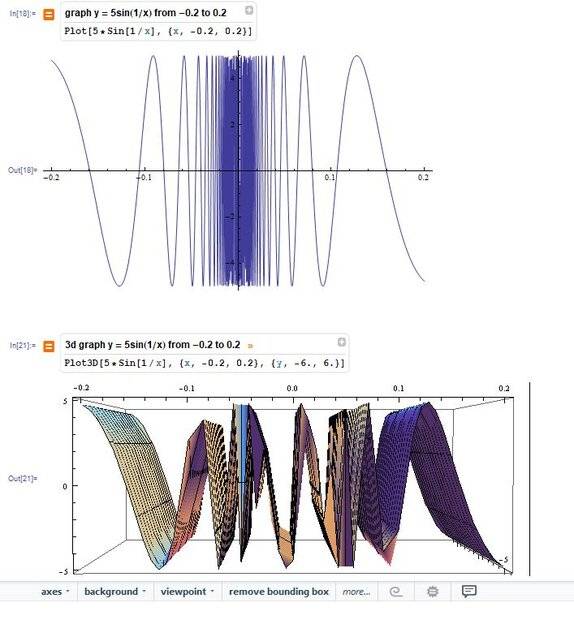
The discussion revolves around issues related to graphing the function y = 5sin(1/x) in 3D using Mathematica. Participants explore the behavior of the graph, particularly focusing on the challenges of visualizing the function accurately in three dimensions.
Discussion Character
- Technical explanation, Debate/contested, Experimental/applied
Main Points Raised
- One participant notes that while the 2D graph appears as expected, the 3D graph does not seem to represent the function correctly, questioning the addition of the z-axis.
- Another participant suggests increasing the number of plot points to improve the graph's accuracy, while also expressing skepticism about the function's overall appearance.
- A different participant highlights strange behavior of the 3D graph near x = ±0.05, indicating that the graph may not be accurately representing y = 5sin(1/x) but rather a different function f(x,y) that includes y values not present in the original equation.
- One participant mentions aliasing as a potential issue due to low sampling relative to the function's frequency.
- Another participant provides a suggestion for increasing plot points in Mathematica and mentions the possibility of using MaxRecursion to address rapid changes in the function.
- There is a concern expressed about the quality of the documentation for Mathematica, with one participant feeling that it leaves much to be desired.
Areas of Agreement / Disagreement
Participants express varying opinions on the reasons for the graphing issues, with some agreeing on the need for increased plot points and others questioning the representation of the function in 3D. The discussion remains unresolved regarding the exact cause of the discrepancies in the graph.
Contextual Notes
Limitations include potential misunderstandings of the function's behavior in 3D, the impact of sampling on graph accuracy, and the reliance on Mathematica's documentation, which some participants find inadequate.