JavaScript Why is my EXTJS Combobox displaying small list items?

  • Thread starter Thread starter iamjon.smith
  • Start date Start date
  • Tags Tags
    Javascript
Click For Summary
The discussion revolves around the implementation of a combobox in ExtJS that initially starts with an empty store. After a successful AJAX call, the returned data is processed to populate the store with station information. However, an issue arises where the dropdown items appear too small, resembling a line when selected. The problem is identified as an incorrect data format being inserted into the store; instead of inserting a string, the store requires an object. The solution involves modifying the insert method to include an object, which resolves the display issue in the combobox. This highlights the importance of ensuring data formats align with store requirements in ExtJS applications.
iamjon.smith
Messages
117
Reaction score
3
I am creating the following combobox:
Code:
//stations store
  var stationStore = Ext.create('Ext.data.Store', {
      id: 'stationStore',
      fields:[{name: 'station'}]
  });

the store is build on app load, and is empty to start. At this point the combobox is hidden Once the user runs a search and the ajax call is successful, the returndata is processed and all of the stations are added to the store in the success callback:

Code:
 success: function (data) {
                  for (var i = 0; i < data.length; i++) {
                      var store = Ext.StoreMgr.lookup("stationStore");
                      store.insert(i, data[i].stationID);
                  }
                  console.log('success');
              },

Code:
// Create the combo box, attached to the stations data store
  var stationCombo = Ext.create('Ext.form.ComboBox', {
      id: 'stationCombo',
      emptyText: 'Choose Station',
      store: stationStore,
      queryMode: 'local',
      displayField: 'station',
      valueField: 'station',
      hidden: true
  });
  tb.add(stationCombo);

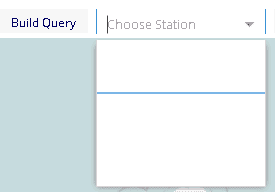
The combobox is then displayed and the user is able to select a station from the list. The store has data added into it, and the list is populated, but when you click the dropdown, the list items are so small it looks like a line when you select from the list...
upload_2016-2-9_16-41-52.png
 
Technology news on Phys.org
I figured out what the problem was, so in case someone else runs across this post, here is the fix...
JavaScript:
success: function (data) {                 
   for (var i = 0; i < data.length; i++) {                     
      var store = Ext.StoreMgr.lookup("stationStore");                     
      store.insert(i, {'station' : data[i].stationID});  //<--This line was wrong, the store takes an object, not a string
   }                  console.log('success');             
},

the store takes an OBJECT. I was trying to insert a string, so it was getting the values, but the store couldn't handle just the string. Changing the insert to insert an object instead of a string fixed the problem.
 
  • Like
Likes Borg and jedishrfu
THanks for posting your solution too! So many times threads are left dangling without answers.
 
  • Like
Likes Borg
Learn If you want to write code for Python Machine learning, AI Statistics/data analysis Scientific research Web application servers Some microcontrollers JavaScript/Node JS/TypeScript Web sites Web application servers C# Games (Unity) Consumer applications (Windows) Business applications C++ Games (Unreal Engine) Operating systems, device drivers Microcontrollers/embedded systems Consumer applications (Linux) Some more tips: Do not learn C++ (or any other dialect of C) as a...

Similar threads

  • · Replies 10 ·
Replies
10
Views
3K
  • · Replies 9 ·
Replies
9
Views
2K
  • · Replies 9 ·
Replies
9
Views
4K
  • · Replies 1 ·
Replies
1
Views
4K
  • · Replies 3 ·
Replies
3
Views
3K