iamjon.smith
- 117
- 3
I am creating the following combobox:
the store is build on app load, and is empty to start. At this point the combobox is hidden Once the user runs a search and the ajax call is successful, the returndata is processed and all of the stations are added to the store in the success callback:
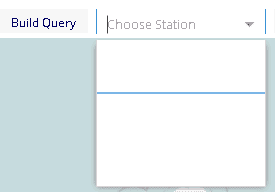
The combobox is then displayed and the user is able to select a station from the list. The store has data added into it, and the list is populated, but when you click the dropdown, the list items are so small it looks like a line when you select from the list...
Code:
//stations store
  var stationStore = Ext.create('Ext.data.Store', {
      id: 'stationStore',
      fields:[{name: 'station'}]
  });
the store is build on app load, and is empty to start. At this point the combobox is hidden Once the user runs a search and the ajax call is successful, the returndata is processed and all of the stations are added to the store in the success callback:
Code:
 success: function (data) {
                  for (var i = 0; i < data.length; i++) {
                      var store = Ext.StoreMgr.lookup("stationStore");
                      store.insert(i, data[i].stationID);
                  }
                  console.log('success');
              },
Code:
// Create the combo box, attached to the stations data store
  var stationCombo = Ext.create('Ext.form.ComboBox', {
      id: 'stationCombo',
      emptyText: 'Choose Station',
      store: stationStore,
      queryMode: 'local',
      displayField: 'station',
      valueField: 'station',
      hidden: true
  });
  tb.add(stationCombo);
The combobox is then displayed and the user is able to select a station from the list. The store has data added into it, and the list is populated, but when you click the dropdown, the list items are so small it looks like a line when you select from the list...