Why use spread operator when sorting an array in JavaScript?

  • Context: Java 
  • Thread starter Thread starter shivajikobardan
  • Start date Start date
  • Tags Tags
    Javascript Operator
Click For Summary
SUMMARY

The discussion centers on the use of the spread operator in JavaScript for sorting arrays, specifically in the context of creating a copy of an array. The spread operator, denoted as [...array], efficiently creates a shallow copy of the original array, allowing for operations like sorting without mutating the original array. The example provided demonstrates that while the spread operator can be used to sort a copy of the array, it is not strictly necessary, as the original array can also be sorted directly. However, using the spread operator or the slice method is preferred to maintain the integrity of the original data.

PREREQUISITES
  • Understanding of JavaScript ES6 features, specifically the spread operator
  • Familiarity with array methods such as map, sort, and forEach
  • Knowledge of JavaScript functions and their syntax
  • Basic understanding of how to manipulate the DOM with JavaScript
NEXT STEPS
  • Learn about JavaScript array methods: map, sort, and forEach
  • Explore the differences between shallow and deep copying in JavaScript
  • Investigate the performance implications of using the spread operator versus slice
  • Study best practices for managing state in JavaScript applications
USEFUL FOR

JavaScript developers, particularly those working with array manipulation and DOM manipulation, as well as anyone looking to understand modern JavaScript features and their applications in coding practices.

shivajikobardan
Messages
637
Reaction score
54
TL;DR
spread operator javascript
I Understand the basic theory behind spread operator.

JavaScript:
const girlNames = ['Jessica', 'Emma', 'Amandine']
const newGirlNames = [...girlNames]
console.log(newGirlNames)
// Output: ["Jessica", "Emma", "Amandine"]

But I don't understand when it's applied. See here.

JavaScript:
function createList() {
  [...richestPeople]
    .map(a => ({ value: a, sort: Math.random() }))
    .sort((a, b) => a.sort - b.sort)
    .map(a => a.value)
    .forEach((person, index) => {
      const listItem = document.createElement("li");
      listItem.setAttribute("data-index", index);
      listItem.innerHTML =
        `
    <span class="number">${index + 1}</span>
    <div class="draggable" draggable="true">
    <p class="person-name">${person}</p>
    <i class="fa-solid fa-grip-lines"></i>
    </div>

    `

      listItems.push(listItem);
      draggable_list.appendChild(listItem);
    })
}

Why do we require spread operator here? I tried to see the output w/o spread operator and seeing that didn't help.
output with spread operator:
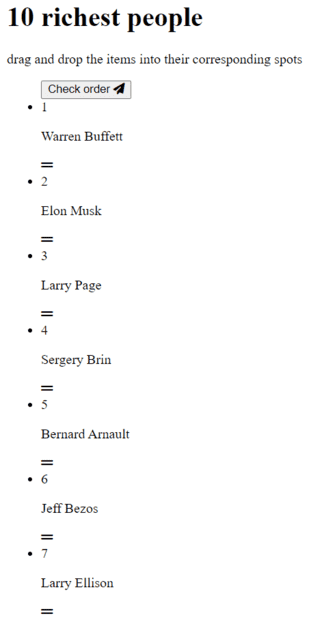
1673710726254.png


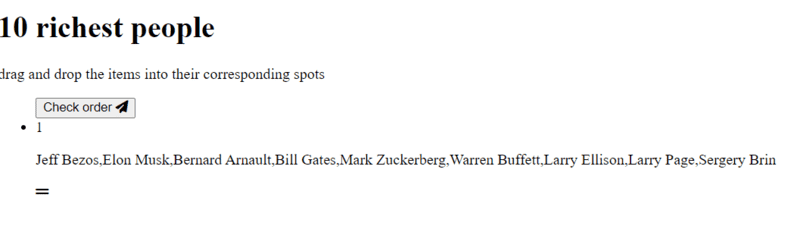
output without spread operator:
1673710757527.png


It must be obvious to people, but it's not to me. I'm not getting it.
 
Technology news on Phys.org
This suggests that [...arr] is an efficient way of creating a copy of the one-dimensional array arr. Without the operator, you have [arr], an array consisting of a single entry, namely arr. Hence your second screenshot has the entire list of names as a comma-separated string in a single <li> tag, rather than each name in its own <li> tag as in the first screenshot.
 
Last edited:
shivajikobardan said:
JavaScript:
function createList() {
  [...richestPeople]
    .map(a => ({ value: a, sort: Math.random() }))
    // ...
}
Why do we require spread operator here? I tried to see the output w/o spread operator and seeing that didn't help.
You don't. The code below has exactly the same result.
JavaScript:
function createList() {
  richestPeople
    .map(a => ({ value: a, sort: Math.random() }))
    // ...
}
But note
JavaScript:
function createList() {
// This sorts the array richestPeople.
richestPeople.sort();
// This creates a new array of the elements of richestPeople and sorts it.
// richestPeople is left unsorted.
sortedRichestPeople = [...richestPeople].sort();
// This code has an identical result and is preferred by some:
sortedRichestPeople = richestPeople.slice().sort();
 

Similar threads

  • · Replies 2 ·
Replies
2
Views
2K