shivajikobardan
- 637
- 54
- TL;DR
- spread operator javascript
I Understand the basic theory behind spread operator.
But I don't understand when it's applied. See here.
Why do we require spread operator here? I tried to see the output w/o spread operator and seeing that didn't help.
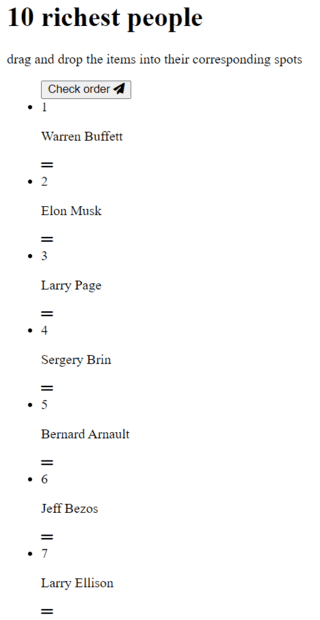
output with spread operator:
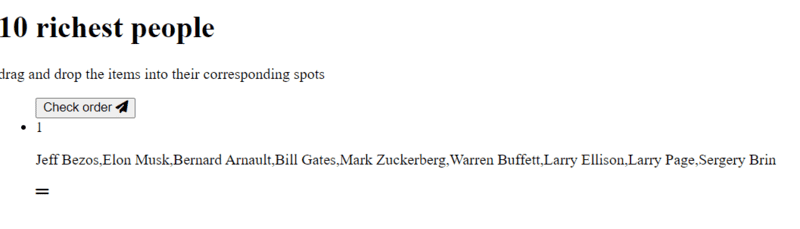
output without spread operator:
It must be obvious to people, but it's not to me. I'm not getting it.
JavaScript:
const girlNames = ['Jessica', 'Emma', 'Amandine']
const newGirlNames = [...girlNames]
console.log(newGirlNames)
// Output: ["Jessica", "Emma", "Amandine"]
But I don't understand when it's applied. See here.
JavaScript:
function createList() {
  [...richestPeople]
    .map(a => ({ value: a, sort: Math.random() }))
    .sort((a, b) => a.sort - b.sort)
    .map(a => a.value)
    .forEach((person, index) => {
      const listItem = document.createElement("li");
      listItem.setAttribute("data-index", index);
      listItem.innerHTML =
        `
    <span class="number">${index + 1}</span>
    <div class="draggable" draggable="true">
    <p class="person-name">${person}</p>
    <i class="fa-solid fa-grip-lines"></i>
    </div>

    `

      listItems.push(listItem);
      draggable_list.appendChild(listItem);
    })
}
Why do we require spread operator here? I tried to see the output w/o spread operator and seeing that didn't help.
output with spread operator:
output without spread operator:
It must be obvious to people, but it's not to me. I'm not getting it.