Options for fixing power connector on Acer laptop

  • Thread starter Thread starter DaveC426913
  • Start date Start date
Join the discussion
Registration is free. Ask a follow-up in this thread, or start your own.
26 replies · 2K views
DaveC426913
Gold Member
2025 Award
Messages
24,621
Reaction score
8,968
TL;DR
The clip that holds the power connector in the socket has worn down and now connector won't connect.
I am looking for options before sending my laptop away for a week only to have them tell me I need a whole new motherboard.

The little springy clip that holds the connector in the socket seems to have worn down, so it sits against the central pin. When I put the connector in it doesn't push the clip aside, so I can't put the connector in.
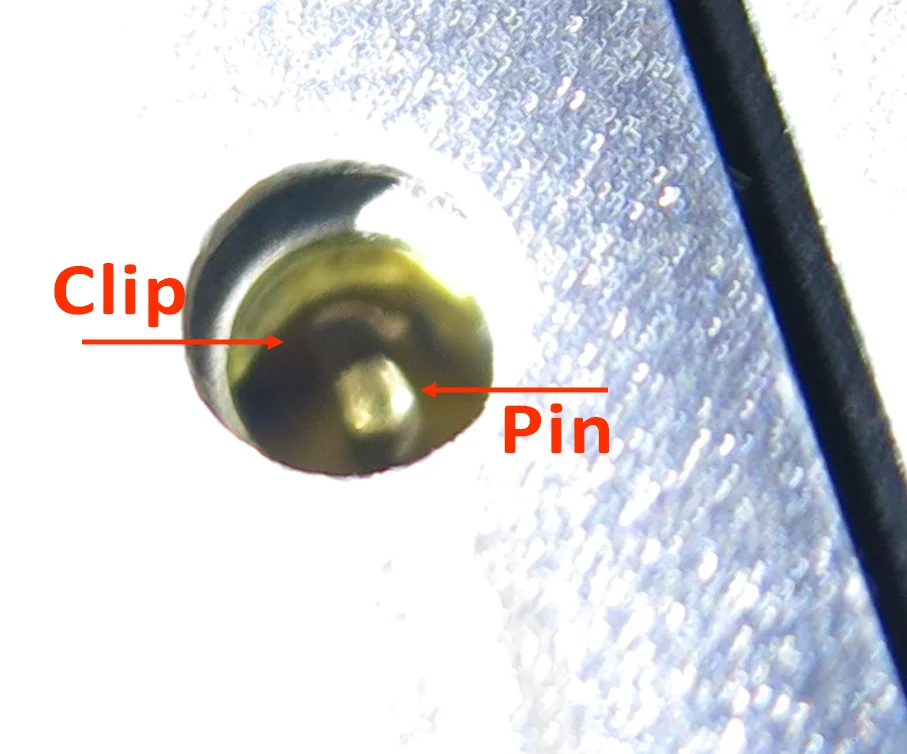
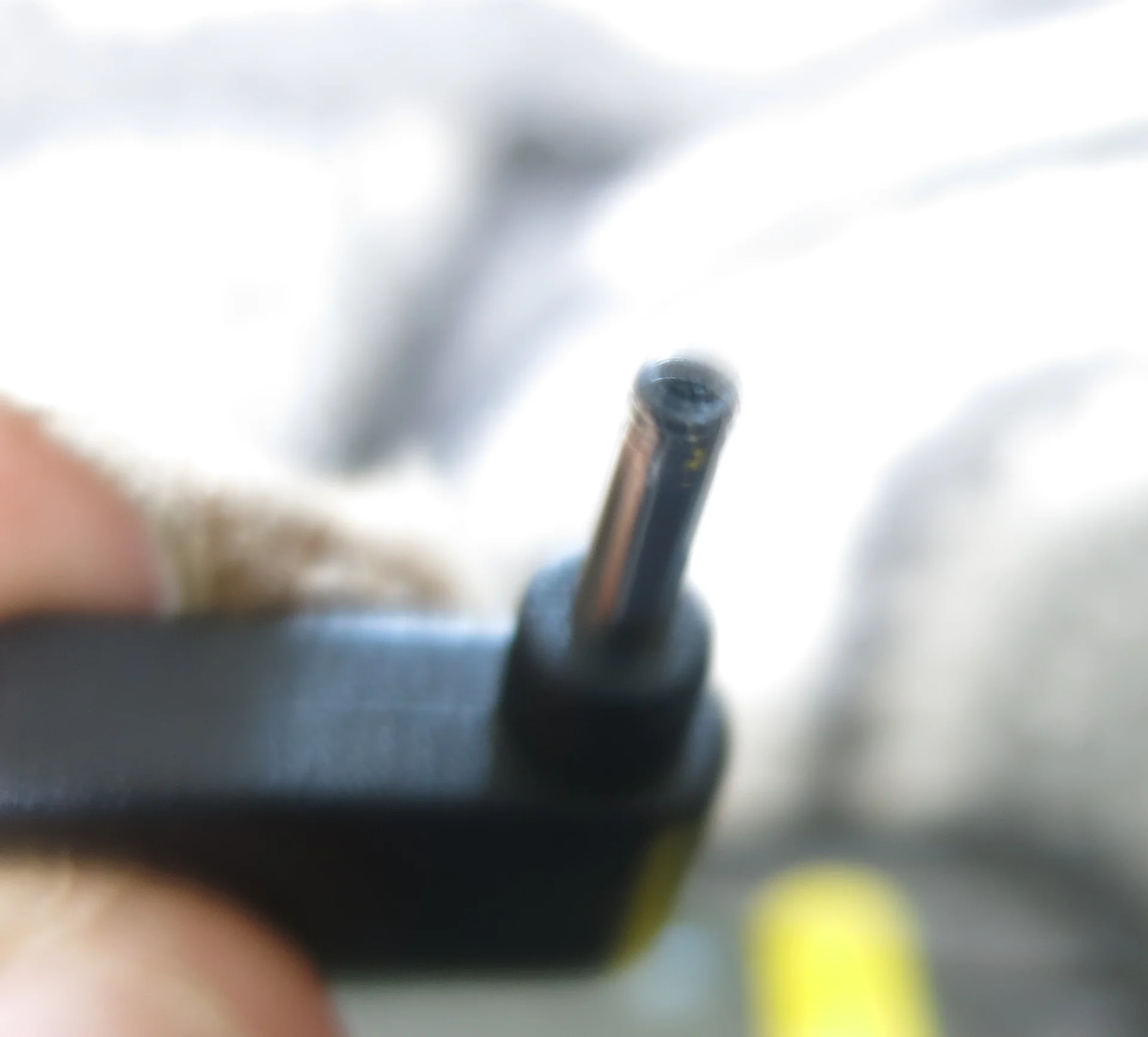
1784751377886.webp

1784751452099.webp


Sometimes (10%) I can get the connector in all the way. Sometimes (10% of that) I can get it charging. Even when I do, it charges to about 13% and then just ... stops charging. I don't know why.

So I'm exploring my options before shipping it off for a week and a $1000 repair.

Things I've tried:

  • Use micro tweezers to bend clip back. No success.
  • Use USB-C port to charge. Technical success, practical no. (No appreciable charging while drive is on. A full 8 hour overnight charge gets it to about 50%. That'll give me a few hours and then I'm done for the day.)
Things I have not tried:
  • crack the case it open and ... what? bypass the plug? try to get a replacement plug?

Suggestions?
 
Physics news on Phys.org
For USB-C charge, do you have a suitable power supply ? My laptop is usb-c powered but the power supply I use is 100W capable power supply.
 
Reply
  • Like
Likes   Reactions: DaveE
Roberto Pavani said:
For USB-C charge, do you have a suitable power supply ? My laptop is usb-c powered but the power supply I use is 100W capable power supply.
Well, its just a little charger cube that plugs in to an AC socket. I think it says 2.1A.

Do you mean its possible to plug a 60W power into a USB-C port somehow?

[EDIT] Sunuvagun, such things exist apparently.
 
Reply
  • Like
Likes   Reactions: berkeman
Personally I would retire your computer and transfer your stuff to a new one.

Reason a connector fail but when it works it stops.
 
Reply
  • Like
Likes   Reactions: DaveC426913
Honestly cracking open the case and soldering off the old connector and putting a new one on would be pretty trivial in all probability. That connector was probably only rated for like 10k connections or something and has given up the ghost, but MB itself is probably still fine.

First crack it open and make sure it isn't gooped with conformal coating or potted and see if you can find a replacement at micro center/online. It's probably through hole mounted too, so it would be super easy and you could most likely even find replacement connector types to upgrade that would fit easily.

If it's gooped I'd just transfer things off and burn it with fire.
 
QuarkyMeson said:
soldering off the old connector and putting a new one on would be pretty trivial in all probability.
In my experience the ratio of people that really know how to solder on PCBAs to those that think they know how is a relatively small number. This is exacerbated by their lack of good tools. Personally, I always preferred Metcal, but YMMV.

Still, if you can get the part, and you'll scrap the computer otherwise, why not? Backup first! Of course.

BTW, my Lenovo laptop only charges through the USB-C port, by design. It's a few years old now. So try that first.
 
Note: USB-C can work at high powers IF both sides (sender and receiver - power supply and the laptop in your case) agree on parameters. In theory there is no risk of getting something destroyed, you can safely connect any two USB-C devices, they should agree on who is supplying and who is consuming, and what power is being sent (kind of the "lowest common denominator"), but it can be way lower than expected just from the power supply rating.

In the worst case all you get is the standard USB 5 V/500 mA.
 
DaveE said:
I always preferred Metcal
Same here. Without a Metcal, any SMT soldering is problematical. For through-hole parts that have good thermal relief from any power/ground plane, a lesser soldering iron might work. If the thermal relief of the pads is not great, then a Metcal would probably be the only option.
 
Thanks everyone.

While I have done a little PCB soldering in my time, I am confident I fall outside @DaveE 's "smaller number of people".

I am pretty confident I do not have the chops to do soldering in a "mission critical" state. i.e. I don't have a practical way to backup/restore my drive, so any slip would be the end of it.

Metcal sounds like a nutrition supplement. That seems off-topic as well as a little personally attack-y.

I am currently trying a "fast charge" recharger. I left it overnight and it only reached high 80%. Now that I am using it, it looks like I might get an hour or two before it's out of power again.

It say nothing about wattage, it says "Output 9V 1.87A or 5V 2A", which is (accesses 50 year old memories) 10W.
 
It looks like they do sell USB-C chargers in the 60W+ range.

Here's a 65W one on Amazon. That should do the trick, yes?
 
Is this an Aspire? I wouldn't go anywhere near it with any kind of soldering equipment, in fact I wouldn't even take the case apart unless I was prepared to hold it together with duct tape for ever after. Those things are built down to a price and are effectively unmaintainable.

If you can use power over USB C that is the way to go.

DaveC426913 said:
I am currently trying a "fast charge" recharger. I left it overnight and it only reached high 80%. Now that I am using it, it looks like I might get an hour or two before it's out of power again.

It say nothing about wattage, it says "Output 9V 1.87A or 5V 2A", which is (accesses 50 year old memories) 10W.

That is not the right device, laptops generally require 20V to get up to a full charge. I use a UGREEN Nexode 100W 5-Port USB-C Charger, they are about GBP 50, don't know how much in CAD. You will need a suitable lead too, USB C-USB C rated for 100W.
 
Reply
  • Like
  • Informative
Likes   Reactions: dextercioby and berkeman
Most modern laptops support USB-C charging, so you could ask a friend or neighbor to lend you his laptop USB-C charger and see whether the laptop starts charging.
(Not a phone charger.)
 
pbuk said:
Is this an Aspire? I wouldn't go anywhere near it with any kind of soldering equipment, in fact I wouldn't even take the case apart unless I was prepared to hold it together with duct tape for ever after. Those things are built down to a price and are effectively unmaintainable.

If you can use power over USB C that is the way to go.


That is not the right device, laptops generally require 20V to get up to a full charge. I use a UGREEN Nexode 100W 5-Port USB-C Charger, they are about GBP 50, don't know how much in CAD. You will need a suitable lead too, USB C-USB C rated for 100W.
I was wondering why the price was ridiculously low. $25 seems like a pittance.

Here's one apparently designed for laptops. Says it will output 20V.

https://a.co/d/09oXIaEH

Do I need to ensure its an exact match? It says Acer Chromebook, mine is an Acer i5.
 
DaveC426913 said:
Metcal sounds like a nutrition supplement. That seems off-topic as well as a little personally attack-y.
Sorry, that wasn't my intent. My point is that it can be very hard to do a good job on a modern PCBA without good tools. The "Radio Shack" type of soldering iron that plugs directly into the wall, isn't temperature regulated, and has a big tip that isn't treated well or ever replaced is really not suitable regardless of your skill. Good tools are only common for people that actually do this sort of work more than occasionally. Otherwise, they are a waste of money.

You can absolutely do a DIY repair if you practice a bit and get the right stuff. You can also screw it up if you are unlucky.
 
DaveC426913 said:
Metcal sounds like a nutrition supplement. That seems off-topic as well as a little personally attack-y.
LOL Dave. :smile:

BTW, Metcal soldering irons/stations are pricey, so it would be cheaper to replace the laptop instead of investing in a Metcal to try to fix it.

I agree that the laptop USB-C charger is the way to go.

1784831936981.webp
 
Reply
  • Wow
  • Like
Likes   Reactions: OmCheeto and DaveE
DaveE said:
Sorry, that wasn't my intent.
I was joking. (Poe's Law strikes again.)


DaveE said:
My point is that it can be very hard to do a good job on a modern PCBA without good tools. The "Radio Shack" type of soldering iron that plugs directly into the wall, isn't temperature regulated, and has a big tip that isn't treated well or ever replaced is really not suitable regardless of your skill. Good tools are only common for people that actually do this sort of work more than occasionally. Otherwise, they are a waste of money.

You can absolutely do a DIY repair if you practice a bit and get the right stuff. You can also screw it up if you are unlucky.
Yeah. It's not worth all my data and apps.
 
Reply
  • Like
Likes   Reactions: DaveE
Seems an appropriate place to post this meme:
1784848536641.webp
 
Reply
  • Haha
Likes   Reactions: OmCheeto, DaveE and berkeman
DaveE said:
The USB-C charging rate will be the least of the power supply capacity and the PCs capacity. There should be documentation somewhere for your PC that says what it can handle. The fact that they still use a separate power connector suggests a lower USB rate.
This could be a concern, but the fact that it charges at all over USB C indicates that it will be plenty - it wouldn't be worth implementing PD otherwise.
 
Sounds similar to the problem I had with my 10 year old smart phone.
After a $10 investment for a can of compressed air to blast out a decades worth of compacted dust in the usb-c, with no success, my ultimate solution was to replace just the cord: $10

I suspect that there were two problems, the dust problem, making it harder and harder each year to keep the plug in the phone, which masked the ultimate problem that most, if not all, of the wires at the solid portion of the plug, had broken, and gave intermittent charging success.

Microscope view of dust collected in my usb-c phone connector:
1784874702577.webp
 
OmCheeto said:
After a $10 investment for a can of compressed air to blast out a decades worth of compacted dust in the usb-c,
The solution that worked for me was to use a toothpick to scrape out the dust/lint. It needs to be non-conducting, and ultimately a swordfloss-type toothpick worked the best for me. My USB-C phone charger port now works perfectly again.

1784900822057.webp
 
OmCheeto said:
Sounds similar to the problem I had with my 10 year old smart phone.
After a $10 investment for a can of compressed air to blast out a decades worth of compacted dust in the usb-c, with no success, my ultimate solution was to replace just the cord: $10

I suspect that there were two problems, the dust problem, making it harder and harder each year to keep the plug in the phone, which masked the ultimate problem that most, if not all, of the wires at the solid portion of the plug, had broken, and gave intermittent charging success.

Microscope view of dust collected in my usb-c phone connector:
View attachment 373165
I'm more impressed you had the same cord for ten years.
 
pbuk said:
That would work but I think you would find something like this more versatile: https://a.co/d/04Y7H582 - you could charge your phone too at the same time.
Got phone chargers and cables coming out the wazoo.

pbuk said:
You'll also need cables e.g. https://a.co/d/0idWyBHy
Oh. Cable needs to be compatible too? Good to know.
 
Thanks everybody. A 65W USB-C charger has done the trick. I now have a perpetuitous, non-proprietary solution. Whatever it is that fails on my laptop next, it won't be a power cable problem.
 
Reply
  • Like
Likes   Reactions: DaveE and berkeman