Science Advisor
Homework Helper
- 7,926
- 13,238
i All,
I have a Jupyter Python Notebook with data like below:
\
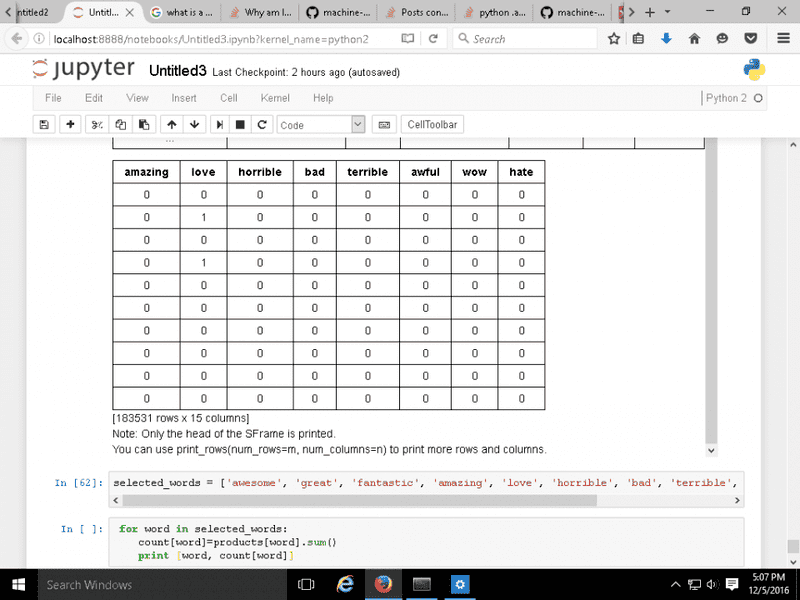
I want to create an SFrame with 2 columns and 11 rows.Each row has two entries:
One containing the name of each word and the other entry containing the total count of the word. The words are part of a list called 'Selected Words' . I am kind of clueless,
I know how to create new columns for an existing SFrame, but no clue for how to create a new SFrame, or some other Python Data Structure. The best I have is :
for word in selected_words:
count[word]=products[word].sum()
print [word, count[word]]
Any Ideas?
Thanks.
I have a Jupyter Python Notebook with data like below:
\
I want to create an SFrame with 2 columns and 11 rows.Each row has two entries:
One containing the name of each word and the other entry containing the total count of the word. The words are part of a list called 'Selected Words' . I am kind of clueless,
I know how to create new columns for an existing SFrame, but no clue for how to create a new SFrame, or some other Python Data Structure. The best I have is :
for word in selected_words:
count[word]=products[word].sum()
print [word, count[word]]
Any Ideas?
Thanks.