Booting from USB to default to KNOPPIX

  • Thread starter Thread starter julian
  • Start date Start date
  • Tags Tags
    Usb
Click For Summary
SUMMARY

This discussion focuses on configuring a laptop to boot from an external CD drive using the KNOPPIX disc. The user is guided through the PhoenixBIOS Setup Utility to prioritize the external CD drive in the boot order. It is emphasized that while booting from external devices can be risky due to potential malware, the user successfully learns to set the CD drive as the primary boot device. Additionally, the discussion advises against installing KNOPPIX on a hard drive, recommending alternatives like Linux Mint or Ubuntu for regular use.

PREREQUISITES
  • Understanding of PhoenixBIOS Setup Utility
  • Familiarity with boot device priority settings
  • Basic knowledge of KNOPPIX and its purpose
  • Awareness of risks associated with booting from external devices
NEXT STEPS
  • Research how to install KNOPPIX on a hard drive
  • Learn about configuring BIOS settings for boot order
  • Explore the features of Linux Mint and Ubuntu as alternatives
  • Investigate best practices for securing USB devices against malware
USEFUL FOR

This discussion is beneficial for users looking to boot from external devices, particularly those interested in using KNOPPIX for system recovery, as well as individuals considering Linux distributions for everyday use.

julian
Science Advisor
Gold Member
Messages
860
Reaction score
365
I have an external cd drive for my laptop. When I restart my computer I want it to boot from this external drive and my KNOPPIX disc.

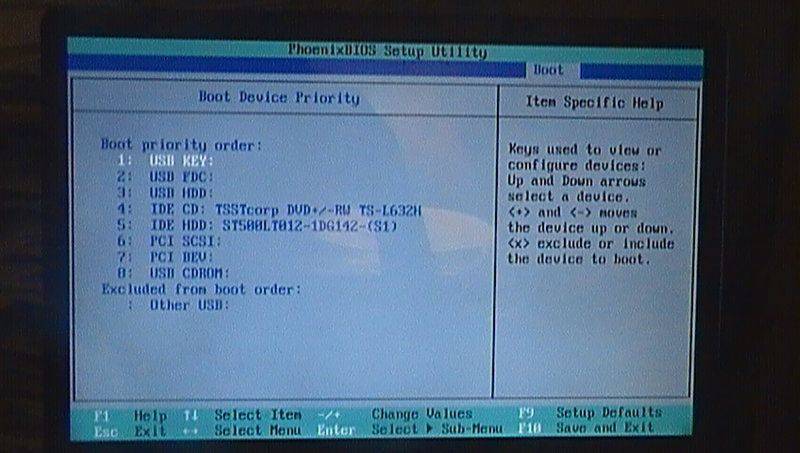
I'm trying to get my computer to default to the USB upon restarting. But I'm not sure how to do it. When the computer restarts I press F2 for setup (I have windows Vista by the way). Then

##\rightarrow## PhoenixBIOS Setup Utility

##\rightarrow## Boot

##\rightarrow## Boot Device Priority

and I get the screen:
SAM_1209.JPG
But I don't know what to do next!
 

Attachments

  • SAM_1209.JPG
    SAM_1209.JPG
    49.1 KB · Views: 716
Computer science news on Phys.org
The link to the figure "SAM_1209.JPG" is missing. But, in general you should put the USB disk first in boot order. I don't see why you want to do this. Why are you not installing Knoppix or another Linux to your harddrive. Alternatively, you can install it in a virtual machine.
 
In general, it’s dangerous to boot from an external device especially a USB stick that could have been compromised with malware. For CD drives it’s less of a risk because usually you boot the computer then insert and load the CD and seldom leave it in the drive. Also, you usually know what’s on it as either you created it or its a factory disk from the vendor.

USB sticks are different. It’s common to use them to share files between users and so a compromised stick could infect your machine just like diskettes did in the past.

In one famous espionage case, USB sticks were sprinkled in a parking lot and unsuspecting Good Samaritan employees popped them into their computers and installed some vicious malware that took over the corporate network of a major company. The employees thought they could check the files on the stick and return the stick to its original owner.
 
@jedishrfu, as I understand he talks about a cd drive connected via USB. But, I agree with your points regarding not booting from external devices.

The instructions I give is therefore on the OP's own risk. In BIOS the CD drive is listed as number 4. By using the "-" key you can move the drive up in boot order, so it is number one. Then, save and exit by using "F10".

But, as I said in my first reply, I recommend to either install to harddrive or in virtual machine instead.
 
  • Like
Likes jedishrfu
Thanks eyes. I worked out how to do it.

Can I install what is on my cd to harddrive or do I need to dowload the KNOPPIX software from somewhere?
 
As described here, it is possible to install KNOPPIX to the harddrive. It is however not recommended. KNOPPIX is not a Linux distribution for everyday use. It is instead a distribution which one is using for rescuing failed systems, e.g. copy data or partition the harddrive etc. For this kind of things it is very useful.
But, if you want a Linux distribution to be used instead of Windows I recommend Linux Mint or Ubuntu.

One reason for not installing Knoppix to harddrive is that the software cannot be easily updated. So, you will not run an updated system which over time could be dangerous. Most/all the software included on the Knoppix CD can also be installed in the distributions I mentioned.
 
  • Like
Likes jedishrfu
Thanks eyes.
 

Similar threads

  • · Replies 1 ·
Replies
1
Views
2K
  • · Replies 11 ·
Replies
11
Views
3K
Replies
12
Views
2K
Replies
15
Views
5K
  • · Replies 13 ·
Replies
13
Views
2K
  • · Replies 6 ·
Replies
6
Views
2K
  • · Replies 18 ·
Replies
18
Views
3K
Replies
4
Views
9K
  • · Replies 14 ·
Replies
14
Views
3K
  • · Replies 5 ·
Replies
5
Views
4K