gumanov
- 1
- 0
Hi all,
This isn't really "homework" - it's a personal project I'm working on.
I'm attempting to animate some mechanical controls of a turbine engine in Adobe After Effects.
Having a hard time with the math for "rotating two interconnected points".
Here is a photo for visual aid:
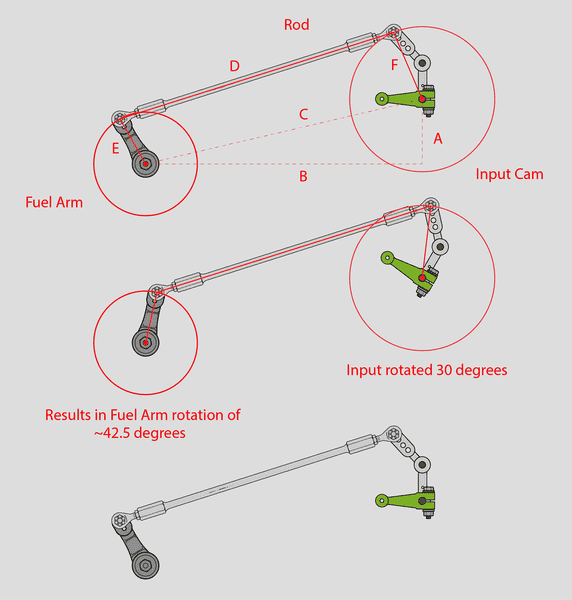
It's basically two mechanical "levers" that are connected together by a rod. The right one is the input (green arm), which controls the "fuel arm" to the left.
I managed to get the rod to rotate properly with the rotation of the input (and the rod automatically faces itself toward the anchor point of the fuel arm), but I can't figure out a way to calculate the proper angle for the fuel arm rotation (relative to input rotation angle).
For example: If green input arm is rotated by 30 degrees, the resultant angle of fuel arm rotation is roughly 42.5 degrees. I'd like to figure out the math formula behind this, so it will be done automatically within the Adobe After Effects software without me constantly having to manually rotate the fuel arm after rotating the green input arm.
Note: The mechanism is physically limited in the range of -40 degrees to +60 degrees, so the green input arm will never be outside of that range.
In the top image, the mechanism is at its' initial "zero" point. All rotations are done from this initial point.
So ultimately it's the rotation angle of line "E" that I'm after, in relation to the rotation angle of line "F".
Thanks for any suggestions!
This isn't really "homework" - it's a personal project I'm working on.
I'm attempting to animate some mechanical controls of a turbine engine in Adobe After Effects.
Having a hard time with the math for "rotating two interconnected points".
Here is a photo for visual aid:
It's basically two mechanical "levers" that are connected together by a rod. The right one is the input (green arm), which controls the "fuel arm" to the left.
I managed to get the rod to rotate properly with the rotation of the input (and the rod automatically faces itself toward the anchor point of the fuel arm), but I can't figure out a way to calculate the proper angle for the fuel arm rotation (relative to input rotation angle).
For example: If green input arm is rotated by 30 degrees, the resultant angle of fuel arm rotation is roughly 42.5 degrees. I'd like to figure out the math formula behind this, so it will be done automatically within the Adobe After Effects software without me constantly having to manually rotate the fuel arm after rotating the green input arm.
Note: The mechanism is physically limited in the range of -40 degrees to +60 degrees, so the green input arm will never be outside of that range.
In the top image, the mechanism is at its' initial "zero" point. All rotations are done from this initial point.
So ultimately it's the rotation angle of line "E" that I'm after, in relation to the rotation angle of line "F".
Thanks for any suggestions!
Attachments