Concealing Landmarks for google reverse image search

Click For Summary

Discussion Overview

The discussion revolves around techniques for concealing landmarks in images to evade detection by Google reverse image search. Participants explore various methods and tools used to alter images, focusing on practical applications and effectiveness.

Discussion Character

  • Exploratory, Technical explanation, Debate/contested

Main Points Raised

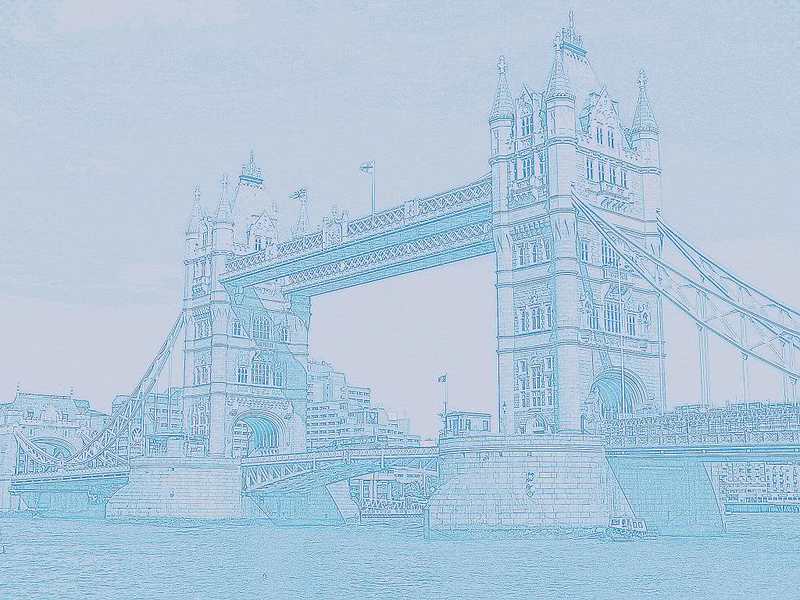
  • One participant describes using Google's Picasa-3 to create a pencil drawing effect and alter colors, suggesting this method successfully conceals the image from Google.
  • Another participant mentions using a PNG format from a panorama screen clip, noting that resizing the image is challenging but appears to bypass Google image search.
  • There is a repeated inquiry about additional tricks or techniques that may be effective in further concealing images.

Areas of Agreement / Disagreement

Participants express varying methods for concealing images, but there is no consensus on the most effective techniques or whether any method is universally successful.

Contextual Notes

Some methods discussed may depend on specific image characteristics or the capabilities of Google image search, which are not fully explored in the conversation.

Andre
Messages
4,296
Reaction score
73
So we have been struggling to defeat the google image searcher. This seems to work
vn08x5.jpg


While we see what it is, google didn't have any idea.

I made this with googles Picasa-3. It's very simple with a few clicks, I selected pencil drawing and then some other tricks, changing colors and such. I saved under a different name.

Any other tricks worthwile to know?
 
Computer science news on Phys.org
PNG from panorama screen clip. It is difficult to resize, but seems to get by google images.

2s79vsi.jpg
 
Testing for size.

35m3228.jpg
 
Andre said:
So we have been struggling to defeat the google image searcher. This seems to work


While we see what it is, google didn't have any idea.

I made this with . It's very simple with a few clicks, I selected pencil drawing and then some other tricks, changing colors and such. I saved under a different name.

Any other tricks worthwile to know?

Awesome, I like.
 

Similar threads

  • · Replies 1 ·
Replies
1
Views
3K
  • Sticky
  • · Replies 0 ·
Replies
0
Views
5K
Replies
10
Views
5K
  • · Replies 4 ·
Replies
4
Views
3K
  • · Replies 56 ·
2
Replies
56
Views
9K
  • · Replies 10 ·
Replies
10
Views
4K
  • · Replies 1 ·
Replies
1
Views
2K
  • · Replies 5 ·
Replies
5
Views
2K
  • · Replies 6 ·
Replies
6
Views
3K
  • · Replies 1 ·
Replies
1
Views
3K