- 69,306
- 24,529
- TL;DR
- I need to print high-resolution graphics agency approval labels and MAC ID labels for a new product's Manufacturing Test Fixture that I'm helping with. My main program and test GUI are in Tcl/Tk, and I have helper programs in C. I'm having trouble understanding the best way to send files to the Zebra printer (ZPL files).
I'm able to send these ZPL files to my 600dpi industrial Zebra printer using their Zebra Setup Utilities program, but I'm not understanding yet how to send the files to the label printer from my Tcl/Tk Mfg test program.
With Google searches, I've found the ezprint option:
http://compgroups.net/comp.lang.tcl/printing-to-a-zebra-label-printer/1858009
but it is too old and it corrupts my Tcl installation and does not work. Ouch.
I've looked at this option recommended by my IT savant:
http://compgroups.net/comp.lang.tcl/printing-to-a-zebra-label-printer/1858009
but so far I'm not understanding the tserialport mechanics and linking it to my Tcl code...
I've tried making the Zebra label printer my Win7 default printer, and sending files via Notepad /P calls, but there are extra things sent with the ZPL file by Notepad or Notepad++ to the printer that seem to confuse it.
I'm thinking that I need to open a Tcl channel to the USB printer with the right syntax, but so far I haven't been able to figure that out. I'm fine with making a C helper app that I call from my Tcl program if that is an easier way to send text files to a printer with no extra information sent along.
Thanks for any ideas!
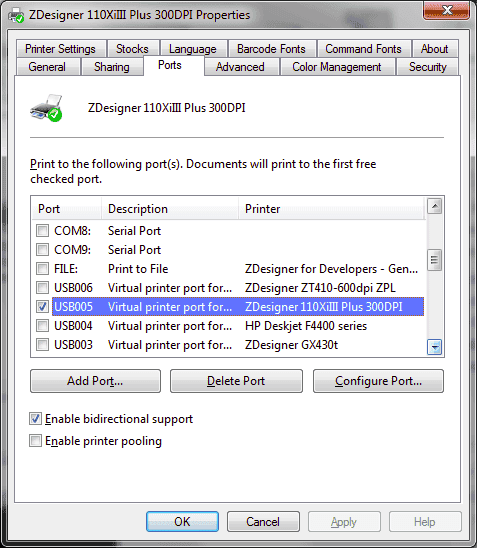
This is info on a lower-resolution Zebra printer that I'm using for some prototyping:
With Google searches, I've found the ezprint option:
http://compgroups.net/comp.lang.tcl/printing-to-a-zebra-label-printer/1858009
but it is too old and it corrupts my Tcl installation and does not work. Ouch.
I've looked at this option recommended by my IT savant:
http://compgroups.net/comp.lang.tcl/printing-to-a-zebra-label-printer/1858009
but so far I'm not understanding the tserialport mechanics and linking it to my Tcl code...
I've tried making the Zebra label printer my Win7 default printer, and sending files via Notepad /P calls, but there are extra things sent with the ZPL file by Notepad or Notepad++ to the printer that seem to confuse it.
I'm thinking that I need to open a Tcl channel to the USB printer with the right syntax, but so far I haven't been able to figure that out. I'm fine with making a C helper app that I call from my Tcl program if that is an easier way to send text files to a printer with no extra information sent along.
Thanks for any ideas!
This is info on a lower-resolution Zebra printer that I'm using for some prototyping:
Last edited:
 And that worked finally! Whew!