How can I implement a website using HTML and CSS without functionality?

187 replies · 16K views · last reply
evinda
Gold Member
MHB
Messages
3,741
Reaction score
0
Hello! (Wave)

I wanted to ask you if you are familiar with html, css, javascript and php... What is it about? 🤔

Here is for example an exercise:

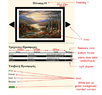
Implement in HTML and CSS the site that is shown below (the specifications are marked with red). The site will be without functionality. How would we proceed? 🤔
 
Attachments
  • Annotated mockup of a Greek web page with a Heading 1 'Πίνακας #1', an image carousel with left and right arrow links, a zebra-striped table titled 'Τρέχουσες Προσφορές' with columns for name, surname, email and offer, and a form titled 'Υποβολή Προσφοράς' with bold labels and a green rounded submit button, marked with CSS specifications.
    matrix.PNG
    99.1 KB · Views: 171
Hey evinda!

Either find a web design editor, or write it directly in text files.
To be honest, I wouldn't know which web design editor to pick.
But I do know how to write it directly.

I think a good starting point is https://www.w3schools.com/.
You'll see all of the topics that you've mentioned and it allows you to try things out directly and interactively. 🤔
 
Here's how it can look.

HTML:
<!DOCTYPE html>
<html>
<head>
<style>
h1 {
  text-align: center;
}

.imageview {
  width: 480px;
  padding: 12px;
  border: 12px solid black;
  display: block;
  margin-left: 100px;
}

table {
  border-collapse: collapse;
}

th {
  background-color: #eeeeee;
  color: black;
  border-bottom: 3px solid black;
}

th.colwidth {
  width: 200px;
}

td {
  border: 1px solid #dddddd;
  padding: 4px;
}

tr:nth-child(odd) {
  background-color: black;
  color: white;
}

td:nth-child(4) {
  text-align: right;
}
</style>
</head>
<body>

<h1>Ηινακας #1</h1>

<image class="imageview" src="https://images-na.ssl-images-amazon.com/images/I/718%2BGbOJfoL._AC_SL1000_.jpg"></image>

<h2>Τρέχουσες Προσφορές</h2>

<table>
  <tr>
    <th class="colwidth">Ονομα</th>
    <th class="colwidth">Επώνυμο</th>
    <th class="colwidth">Email</th>
    <th>Προσφορά</th>
  </tr>
  <tr>
    <td>Alfreds Futterkiste</td>
    <td>Maria Anders</td>
    <td>Germany</td>
    <td>100</td>
  </tr>
  <tr>
    <td>Centro comercial Moctezuma</td>
    <td>Francisco Chang</td>
    <td>Mexico</td>
    <td>150</td>
  </tr>
  <tr>
    <td>Ernst Handel</td>
    <td>Roland Mendel</td>
    <td>Austria</td>
    <td>200</td>
  </tr>
  <tr>
    <td>Island Trading</td>
    <td>Helen Bennett</td>
    <td>UK</td>
    <td>80</td>
  </tr>
</table>

</body>
</html>

We can copy and paste it for instance here to see it. 🤔
 
Last edited:
Klaas van Aarsen said:
Here's how it can look.

HTML:
<!DOCTYPE html>
<html>
<head>
<style>
h1 {
  text-align: center;
}

.imageview {
  width: 480px;
  padding: 12px;
  border: 12px solid black;
  display: block;
  margin-left: 100px;
}

table {
  border-collapse: collapse;
}

th {
  background-color: #eeeeee;
  color: black;
  border-bottom: 3px solid black;
}

th.colwidth {
  width: 200px;
}

td {
  border: 1px solid #dddddd;
  padding: 4px;
}

tr:nth-child(odd) {
  background-color: black;
  color: white;
}

td:nth-child(4) {
  text-align: right;
}
</style>
</head>
<body>

<h1>Ηινακας #1</h1>

<image class="imageview" src="https://images-na.ssl-images-amazon.com/images/I/718%2BGbOJfoL._AC_SL1000_.jpg"></image>

<h2>Τρέχουσες Προσφορές</h2>

<table>
  <tr>
    <th class="colwidth">Ονομα</th>
    <th class="colwidth">Επώνυμο</th>
    <th class="colwidth">Email</th>
    <th>Προσφορά</th>
  </tr>
  <tr>
    <td>Alfreds Futterkiste</td>
    <td>Maria Anders</td>
    <td>Germany</td>
    <td>100</td>
  </tr>
  <tr>
    <td>Centro comercial Moctezuma</td>
    <td>Francisco Chang</td>
    <td>Mexico</td>
    <td>150</td>
  </tr>
  <tr>
    <td>Ernst Handel</td>
    <td>Roland Mendel</td>
    <td>Austria</td>
    <td>200</td>
  </tr>
  <tr>
    <td>Island Trading</td>
    <td>Helen Bennett</td>
    <td>UK</td>
    <td>80</td>
  </tr>
</table>

</body>
</html>

We can copy and paste it for instance here to see it. 🤔
Based on that, I want to try to implement in HTML and CSS the following website using the following specifications-marked with red.
Mockup of a Greek e-shop page titled Ηλεκτρονικό Κατάστημα, with a sidebar of filters (manufacturer, screen size, operating system) and two mobile phone product cards: Apple iPhone 12 at 732€ and Samsung Galaxy S21 at 709€.


Wireframe mockup of a Greek electronics store page annotated in red with HTML heading levels, pixel dimensions and hex colours, showing a filter sidebar and two phone product listings.


According to your code, at the beginning do we use <style> </style>, in order to insert all the information given, for example the dimensions of the image?
 
evinda said:
Based on that, I want to try to implement in HTML and CSS the following website using the following specifications-marked with red.

According to your code, at the beginning do we use <style> </style>, in order to insert all the information given, for example the dimensions of the image?
Yes. (Nod)

In the <head> part we have a <style> part that contains the CSS that specifies the various dimensions and other style attributes.
The CSS can also be put in a separate file with the extension .css. 🤔

In the <body> part we have the HTML elements that contains the various texts and layout elements. 🤔
 
Klaas van Aarsen said:
Yes. (Nod)

In the <head> part we have a <style> part that contains the CSS that specifies the various dimensions and other style attributes.
The CSS can also be put in a separate file with the extension .css. 🤔

In the <body> part we have the HTML elements that contains the various texts and layout elements. 🤔
So far I have tried the following:

Code:
<html>

<body>

<h1>Ηλεκτρονικό Καστάστημα</h1><h2>Φίλτρα</h2>

<table>
  <tr>
    <th class="rowspan">Κατασκευαστής</th>
    <th class="rowspan">Μέγεθος Οθόνης</th>
    <th class="rowspan">Λειτουργικό σύστημα</th>
  </tr>
  <tr>
    <td>Apple</td>
    <td>Samsung</td>
  </tr>
  <tr>
    <td>Μεσαία (5" έως 5.9")</td>
    <td>Μεγάλη(6" και άνω)</td>
  </tr>
  <tr>
    <td>Android</td>
    <td>iOS</td>
  </tr>
</table>

</body>
</html>
Don't we use rowspan to change the row where the next heading of the table is shown?
Because, by running it, I saw that the one heading is shown next to the other... :unsure:
 
evinda said:
Don't we use rowspan to change the row where the next heading of the table is shown?
Because, by running it, I saw that the one heading is shown next to the other...

First off, "rowspan" is not the name of a class.
Instead it's an attribute on its own.
See here. You may want to click the Try it Yourself buttons to see what it looks like.
So we should not have class="rowspan" but instead we could have for instance rowspan="3".
Its purpose is to merge multiple cells in the same column to one cell, but that's not what we want. 🤔

I'm not aware of a means to split the cells of the header of a table over multiple rows.
As far as I know, the cells of the header are always horizontally aligned. 🤔
 
Last edited:
Suppose we do it without a table? 🤔

Something like this:
Code:
<html>

<body>

<h1>Ηλεκτρονικό Καστάστημα</h1>

<h2>Φίλτρα</h2>

<h3>Κατασκευαστής</h3>
Apple<br/>
Samsung<br/>
<hr/>

<h3>Μέγεθος Οθόνης</h3>
Μεσαία (5" έως 5.9")<br/>
Μεγάλη(6" και άνω)<br/>
<hr/>

<h3>Λειτουργικό σύστημα</h3>
Android<br/>
iOS<br/>
<hr/>

</body>
</html>

Rendered web page in Greek showing a filter panel: heading Φίλτρα, then Κατασκευαστής with Apple and Samsung, Μέγεθος Οθόνης with Μεσαία (5" έως 5.9") and Μεγάλη(6" και άνω), and Λειτουργικό σύστημα with Android and iOS, separated by horizontal lines.

🤔
 
Klaas van Aarsen said:
Suppose we do it without a table? 🤔

Something like this:
Code:
<html>

<body>

<h1>Ηλεκτρονικό Καστάστημα</h1>

<h2>Φίλτρα</h2>

<h3>Κατασκευαστής</h3>
Apple<br/>
Samsung<br/>
<hr/>

<h3>Μέγεθος Οθόνης</h3>
Μεσαία (5" έως 5.9")<br/>
Μεγάλη(6" και άνω)<br/>
<hr/>

<h3>Λειτουργικό σύστημα</h3>
Android<br/>
iOS<br/>
<hr/>

</body>
</html>

View attachment 11003
🤔

Looks good! I will check it more analytically and I will ask you if I don't understand something... 🤔

As for the white box at the right side, I have done :

https://www.w3schools.com/code/tryit.asp?filename=GOD4O2CZH208

But so far I don't have the desired spaces of 20px around the text and image. How do we fix that? 🧐
 
evinda said:
Looks good! I will check it more analytically and I will ask you if I don't understand something...

As for the white box at the right side, I have done :

https://www.w3schools.com/code/tryit.asp?filename=GOD4O2CZH208

But so far I don't have the desired spaces of 20px around the text and image. How do we fix that?
Good! :)

It's called padding. See this link on w3schools.

If you right-click on your white box and select Inspect Element, you should see the current layout as a tab sheet on the right side in the window that pops up.
It looks like this:
Browser developer tools box model diagram: margin, border and padding layers around a content area labelled 450×191.917, with all margin, border and padding values shown as 0.

It shows that you currently have a padding of 0 on all sides of your image+text that has size 450x192 pixels. 🤔
 
Last edited:
Klaas van Aarsen said:
Good! :)

It's called padding. See this link on w3schools.

If you right-click on your white box and select Inspect Element, you should see the current layout as a tab sheet on the right side in the window that pops up.
It looks like this:
View attachment 11004
It shows that you currently have a padding of 0 on all sides of your image+text that has size 450x192 pixels. 🤔

Ah, I see! (Nod)

How can we get the logo in the dark blue box next to the text? Now it is above the dark blue box... 🤔

https://www.w3schools.com/code/tryit.asp?filename=GOE85RFLJHNE
 
Klaas van Aarsen said:
You have specified the image source https://images.app.goo.gl/wKQ35qkjRAmVB7218.
But that is not a picture file.
If we open that address in a browser we can follow the redirections to https://ypodomes.com/wp-content/uploads/2020/04/skroutz.jpg.
If we specify that as the image source then it works for me. 🤔

https://www.w3schools.com/code/tryit.asp?filename=GOE0Y8MPZ43Z

https://www.w3schools.com/code/tryit.asp?filename=GOEDP3FEHHY8

Now I used the desired image, but it is atill above the title... 🧐
What am I doing wrong? 🤔
 
Last edited:
evinda said:
It still doesn't work for me... How could we add the following image as the desired logo ?

file:///C:/Users/dimma/AppData/Local/Temp/Temp1_assignment1_images%20(2).zip/skroutz.svg

We cannot link to a local file from an internet page.
The browser prohibits it as it is deemed unsafe. 🧐

Or if we want to, then the html page itself must also be a local file. Say, in the same directory. Then you can just refer to "skroutz.svg" without any prefix or path.
Btw, you will need to extract it from the .zip file before it can find it. :oops:

However, we should be able to use the https link to the picture.
Here is one that works for me with the .svg file.
https://www.w3schools.com/code/tryit.asp?filename=GOE0Y8MPZ43Z

What does not work for you? :unsure:
 
Last edited:
Klaas van Aarsen said:
We cannot link to a local file from an internet page.
The browser prohibits it as it is deemed unsafe. 🧐

Or if we want to, then the html page itself must also be a local file. Say, in the same directory. Then you can just refer to "skroutz.svg" with any prefix or path.
Btw, you will need to extract it from the .zip file before it can find it. :oops:

However, we should be able to use the https link to the picture.

I see! (Nod)
Klaas van Aarsen said:
Here is one that works for me with the .svg file.
https://www.w3schools.com/code/tryit.asp?filename=GOE0Y8MPZ43Z

What does not work for you? :unsure:

For me it appears like that:
Screenshot of an online HTML editor: code on the left with a body background rule, an .imageview class and an img tag with float:left, and the rendered result on the right showing a partly cropped orange and black 'skroutz' logo.


The image is very big and not at the same line with the title...🧐 What is at the way of my previous post wrong? Why I still get not the image at the right position? :unsure:
 
evinda said:
For me it appears like that:

The image is very big and not at the same line with the title...

What is at the way of my previous post wrong? Why I still get not the image at the right position?
It's because the picture is very big and it is shown in its natural size.
Your CSS puts it at the left top, which is where it is.
To make it smaller, we need to set the width attribute.
If you make the style of the image style="width: 100px;", you'll see that it will be smaller. 🤔

Additionally, the default style of a <h1> element puts it on its own line.
If we don't want that, then we need to either put it inside a <span> element, which is by default inline.
Or we need to add display: inline-block to the style of the <h1> element. 🤔

Alternatively we can create a table with 2 columns and put the logo in the first cell, and the <h1> element in the second cell. 🤔
 
Klaas van Aarsen said:
It's because the picture is very big and it is shown in its natural size.
Your CSS puts it at the left top, which is where it is.
To make it smaller, we need to set the width attribute.
If you make the style of the image style="width: 100px;", you'll see that it will be smaller. 🤔

Additionally, the default style of a <h1> element puts it on its own line.
If we don't want that, then we need to either put it inside a <span> element, which is by default inline.
Or we need to add display: inline-block to the style of the <h1> element. 🤔

Alternatively we can create a table with 2 columns and put the logo in the first cell, and the <h1> element in the second cell. 🤔
I tried the last way: https://www.w3schools.com/code/tryit.asp?filename=GOEG5J7IH4JV 🧐

Now the problem is that the backround dark blue is not everywhere above. Were an other of your propositions better to use? :unsure:
 
Last edited:
Klaas van Aarsen said:
Just for fun, I found jsfiddle.net, which looks a bit neater than w3schools.
And it seems to allow for collaboration. 🤔
https://jsfiddle.net/klaas_vanaarsen/j0m79sx2/6/#&togetherjs=EzJsfNs8n3

Now the header part works! (Nod) I created an account at jsfiddle. I am trying now to create the checkmark box which is on the left, it should be a white box with black checkmark. When we have a white backround it is correct, but now we have a blue backround and then I get a blue box with white checkmark: https://jsfiddle.net/evinda/0u98q37k/2/ :unsure:
 
evinda said:
I created an account at jsfiddle. I am trying now to create the checkmark box which is on the left, it should be a white box with black checkmark. When we have a white backround it is correct, but now we have a blue backround and then I get a blue box with white checkmark: https://jsfiddle.net/evinda/0u98q37k/2/ :unsure:
What do you mean? :unsure:

I've commented out the CSS for the checkbox.
Oh, and I've also added a close tag </input> that was missing.
It looks like this:
Screenshot of a checked checkbox labelled Text, rendered in a grey box on a light blue background.


That is correct isn't it? :unsure:
 
Klaas van Aarsen said:
I've commented out the CSS for the checkbox.
Oh, and I've also added a close tag </input> that was missing.
It looks like this:
View attachment 11009

That is correct isn't it? :unsure:

Yes, that is correct, but I don't get the same result as you. My result:

Screenshot of an online HTML, CSS and JavaScript editor showing a checked checkbox labelled Text followed by an empty text input on a light blue background.
 
evinda said:
Yes, that is correct, but I don't get the same result as you. My result:
I see what you mean.
It should be </input> instead of <input/>, which fixes the issue for me. :giggle:
 
Klaas van Aarsen said:
I see what you mean.
It should be </input> instead of <input/>, which fixes the issue for me. :giggle:

I get now:

Online code editor with HTML panel showing an input checkbox tag with checked attribute and a closing input tag error, CSS panel setting body background-color and color, and preview showing a checked checkbox labelled Text on a blue-grey background.
The colors of my result is still different than yours. 🧐
 
evinda said:
The colors of my result is still different than yours.

Strange... 🤨

Turns out it is a style that is apparently coming from your browser.
With Chrome it looks like you've shown it.
But with Firefox it looks like I've shown it.
It happens on any other web page as well. 🧐

In other words, nothing to worry about. It is fine as it is. It is just how a checkbox happens to be displayed by a particular browser. :giggle:
 
Klaas van Aarsen said:
Strange... 🤨

Turns out it is a style that is apparently coming from your browser.
With Chrome it looks like you've shown it.
But with Firefox it looks like I've shown it.
It happens on any other web page as well. 🧐

In other words, nothing to worry about. It is fine as it is. It is just how a checkbox happens to be displayed by a particular browser. :giggle:

I tried that now in Firefox and it works! (Nod) As for the two pictures that are in the white boxes I have written the dimensions as noted but I don't get the desired result. Do I have to change the spaces between the parts of the text? Because if I have done this correctly, the dimensions of the image are as shown.

I wrote: https://www.w3schools.com/code/tryit.asp?filename=GOF7O1ZJ8HS4

My result:

Product card showing a dark blue Apple iPhone 12 front and back, with the title Apple iPhone 12 and Greek text listing specifications and a price of 732€.
 
evinda said:
As for the two pictures that are in the white boxes I have written the dimensions as noted but I don't get the desired result. Do I have to change the spaces between the parts of the text? Because if I have done this correctly, the dimensions of the image are as shown.

I wrote: https://www.w3schools.com/code/tryit.asp?filename=GOF7O1ZJ8HS4

My result:
That's because of the float: left.
It makes the picture 'float' to the left and effectively breaks the tie to the surrounding <div>.
So we have to remove the 'float'. 🧐

After we remove it, the text is displayed below the picture instead of to the right.
But we know how to solve that now don't we? (Wait)

Either a <table> as we did for the page header.
Or modify the style of the <h2> to include display: inline-block. In this case our <div>'s are also causing trouble since their default style is not inline either.

If we pick a table then we can also use 3 rows to nicely split the text.
And we can use rowspan="3" to merge the cells in the left column to accommodate the picture. ;)
 
Klaas van Aarsen said:
That's because of the float: left.
It makes the picture 'float' to the left and effectively breaks the tie to the surrounding <div>.
So we have to remove the 'float'. 🧐

After we remove it, the text is displayed below the picture instead of to the right.
But we know how to solve that now don't we? (Wait)

Either a <table> as we did for the page header.
Or modify the style of the <h2> to include display: inline-block. In this case our <div>'s are also causing trouble since their default style is not inline either.

If we pick a table then we can also use 3 rows to nicely split the text.
And we can use rowspan="3" to merge the cells in the left column to accommodate the picture. ;)

I picked a table with the rowspan and it works! (Nod)
But in the desired result between the text and the price there is more space than between the rows of the text, do we use for this an other comment? Or just an additional empty row? :unsure:
 
evinda said:
But in the desired result between the text and the price there is more space than between the rows of the text, do we use for this an other comment? Or just an additional empty row?
What do you mean? o_O