How Can Mathematica Be Used to Plot Transient Heating in a Slab?

  • Context: Graduate 
  • Thread starter Thread starter Dustinsfl
  • Start date Start date
  • Tags Tags
    Mathematica Pdes Plot
Click For Summary

Discussion Overview

The discussion revolves around the use of Mathematica to plot transient heating in a slab, focusing on the mathematical modeling of heat diffusion using the 1-D heat equation. Participants explore various boundary conditions, initial conditions, and numerical methods to visualize temperature profiles over time through different types of plots.

Discussion Character

  • Exploratory
  • Technical explanation
  • Mathematical reasoning
  • Experimental/applied

Main Points Raised

  • One participant presents a problem involving a slab with one insulated boundary and another held at a constant temperature, providing the governing equation and boundary conditions.
  • Another participant suggests a different approach involving symmetric convective cooling at both boundaries, proposing a series representation for the temperature profile and discussing the implications of Robin boundary conditions.
  • A third participant introduces Laplace's equation with specific boundary conditions and explores the solution for a case where both boundary functions are set to unity.
  • A later post considers modifying the initial temperature function to a piecewise definition, prompting further exploration of the effects on the solution and visualizations.
  • Participants share Mathematica code snippets for generating various plots, including contour plots, density plots, and 3D plots, to illustrate the temperature distribution over time.

Areas of Agreement / Disagreement

There is no consensus on a single approach or solution, as participants propose different models and boundary conditions, leading to multiple competing views on how to represent the transient heating problem.

Contextual Notes

Participants rely on specific assumptions regarding boundary conditions and initial temperature distributions, which may affect the applicability of their solutions. The discussion includes unresolved mathematical steps and dependencies on the choice of parameters.

Who May Find This Useful

This discussion may be useful for individuals interested in numerical methods for solving partial differential equations, particularly in the context of heat transfer and transient phenomena in engineering applications.

Dustinsfl
Messages
2,217
Reaction score
5
You can find problems with downloadable notebooks now http://www.mathhelpboards.com/f49/engineering-analysis-notes-2882/.

If one boundary is insulated and the other is subjected to and held at a temperature of unity, we wish to determine the solution for the transient heating of the slab.
The governing equation is the usual 1-D heat equation and the boundary conditions (mixed) are given by
\begin{alignat*}{3}
T_x(0,t) & = & 0\\
T(L,t) & = & 1
\end{alignat*}
with initial conditions
$$
T(x,0) = 0.
$$
Obtain the solution to this problem.
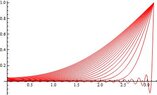
For the special case $\alpha = 1$ and $L = \pi$ plot a sequence of the temperature profiles between the initial state and the steady-state, construct a contour plot, density plot, and 3D plot.

Once we solve the problem, we obtain the solution as
$$
T(x,t) = 1 + \frac{4}{\pi}\sum_{n = 1}^{\infty}\frac{(-1)^n}{2n - 1}\cos\left[\left(n - \frac{1}{2}\right)x\right]\exp\left[-\left(n - \frac{1}{2}\right)^2t\right]
$$
Next, we construct all the plots using Mathematica
Code:
Nmax = 40;
L = Pi;
\[Lambda] = Table[(n - 1/2)*Pi/L, {n, 1, Nmax}];
\[Alpha] = 1;
MyTime = Table[t, {t, 0.0001, 1, .05}];
f[x_] = -1;

A = Table[2/L*Integrate[f[x]*Cos[\[Lambda][[n]]*x], {x, 0, L}], {n, 1,Nmax}];

u[x_, t_] = 1+Sum[A[[n]]*Cos[\[Lambda][[n]]*x]*E^{-\[Alpha]*\[Lambda][[n]]^2*t}, {n, 1, Nmax}];

Plot[u[x, MyTime], {x, 0, L}, PlotStyle -> {Red}]

This will produce the graph
https://www.physicsforums.com/attachments/390._xfImport

Adding in this piece of code will produce an animation between the different time profiles.
Code:
Animate[Plot[u[x, t], {x, 0, L}, PlotRange -> {0, 1.1}, GridLines -> Automatic, Frame -> True, PlotStyle -> {Thick, Red}], {t,0, 1, 0.02}, 
 AnimationRunning -> False]
We can produce the contour plot by adding in
Code:
ContourPlot[u[x, y], {x, 0, L}, {y, 0, L}, PlotRange -> All, ColorFunction -> "Rainbow"]

The end result is

https://www.physicsforums.com/attachments/393._xfImport

The density plot
Code:
DensityPlot[u[x, y], {x, 0, L}, {y, 0, L}, PlotRange -> All, ColorFunction -> "Rainbow"]

The plot is
https://www.physicsforums.com/attachments/392._xfImport

And lastly the 3d plot

Code:
Plot3D[u[x, y], {x, 0, L}, {y, 0, L}, PlotRange -> All, Boxed -> False, ColorFunction -> "Rainbow"]

https://www.physicsforums.com/attachments/391._xfImport
Here we can see the Gibbs Phenomenon occurring.
 

Attachments
  • plotseries1hw3.jpg
    plotseries1hw3.jpg
    11.9 KB · Views: 133
  • 3dplot1hw3.jpg
    3dplot1hw3.jpg
    17.8 KB · Views: 125
  • density1hw3.jpg
    density1hw3.jpg
    11.5 KB · Views: 113
  • contour1hw3.jpg
    contour1hw3.jpg
    13.1 KB · Views: 120
Last edited:
Physics news on Phys.org
Consider the transient diffusion of heat in a 1-D slab initially with a temperature $f(x)$ that is then subjected to symmetric convective cooling of equal strength at its two boundaries $x = -L$ and $x = L$.
Recognizing that the problem will have a symmetry plane about $x = 0$, the problem may be then treated more simply as one with an insulated condition at $x = 0$ and a convection condition at $x = L$.
With proper non-dimensionalization and assuming for convenience that the ratio of convection and conduction parameters $h/k = 1$, the cooling process is described by the following equations:
\begin{alignat*}{3}
T_t & = & T_{xx}\\
T_x(0,t) & = & 0\\
T_x(1,t) + T(1,t) & = & 0\\
T(x,0) & = & f(x)
\end{alignat*}
For the particular case of $f(x) = 1$, numerically determine the series coefficients $A_n$ and construct a series representation for $T(x,t)$.
Using this series approximation, plot the temperature profiles on the same set of axes for a range of time steps in the dimensionless time interval $t\in [0,4]$ in order to visualize the process.
Robin boundary conditions.
With this problem, let's identify the first 40 eigenvalues and construct the same plots.
In solving this problem, we have that the eigenvalues are
$$
\tan\lambda_n = \frac{1}{\lambda_n}.
$$
Code:
Nmax = 40;
MyTime = Table[t, {t, 0.0001, 4, .2}];
f[x_] = 1;
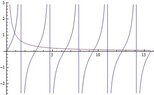
Plot[{Tan[x] , 1/x}, {x, 0, 5 Pi}]
Here we can look at the plot of the solution to $\tan\lambda_n = \frac{1}{\lambda_n}$.
View attachment 367
Now, let's find the first 40 eigenvalues numerically.
Code:
\[Lambda] = Flatten[Table[FindRoot[Tan[x] - 1/x == 0, {x, (n - 1/2)*\[Pi] - 0.0001}], {n, Nmax}]][[All, 2]]

{0.860334, 3.42562, 6.4373, 9.52933, 12.6453, 15.7713, 18.9024, 
22.0365, 25.1724, 28.3096, 31.4477, 34.5864, 37.7256, 40.8652, 
44.005, 47.1451, 50.2854, 53.4258, 56.5663, 59.707, 62.8478, 65.9886, 
69.1295, 72.2705, 75.4115, 78.5525, 81.6936, 84.8348, 87.976, 
91.1172, 94.2584, 97.3996, 100.541, 103.682, 106.824, 109.965, 
113.106, 116.248, 119.389, 122.53}
Let's setup the rest of our problem now so we can produces the plots and obtain the coefficients of the first 40 terms.
Code:
A = Table[2*Integrate[f[x]*Cos[\[Lambda][[n]]*x], {x, 0, 1}], {n, 1, Nmax}]

{1.76225, -0.163604, 0.0476919, -0.0219042, 0.0124686, -0.00802462, 
0.0055897, -0.00411432, 0.00315382, -0.00249397, 0.00202131, 
-0.00167123, 0.00140477, -0.00119727, 0.00103256, -0.00089962, 
0.00079079, -0.000700571, 0.000624951, -0.000560943, 0.000506285, 
-0.000459243, 0.000418464, -0.000382884, 0.000351655, -0.000324096, 
0.000299655, -0.000277877, 0.000258389, -0.000240882, 0.000225095, 
-0.000210811, 0.000197844, -0.000186038, 0.000175258, -0.000165388, 
0.000156329, -0.000147995, 0.000140309, -0.000133208}

u[x_, t_] = Sum[A[[n]]*Cos[\[Lambda][[n]]*x]*E^{-\[Lambda][[n]]^2*t}, {n, 1, Nmax}];

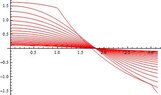
Plot[u[x, MyTime], {x, 0, L}, PlotStyle -> {Red}]
View attachment 368
Let's produce our density plot
Code:
DensityPlot[u[x, y], {x, 0, 1}, {y, 0, 1}, PlotRange -> All, ColorFunction -> "Rainbow"]
View attachment 369
Next is our 3d plot
Code:
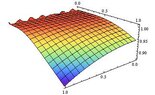
Plot3D[u[x, y], {x, 0, 1}, {y, 0, 1}, PlotRange -> All, Boxed -> False, ColorFunction -> "Rainbow"]
View attachment 370
Finally, we have the contour plot
Code:
ContourPlot[u[x, y], {x, 0, 1}, {y, 0, 1}, PlotRange -> All, ColorFunction -> "Rainbow"]
View attachment 371
 

Attachments

  • tanv1overlambda.jpg
    tanv1overlambda.jpg
    9.3 KB · Views: 113
  • thalfstep.jpg
    thalfstep.jpg
    11.5 KB · Views: 111
  • density2chw3.jpg
    density2chw3.jpg
    9.7 KB · Views: 111
  • 3dPlot2hw3.jpg
    3dPlot2hw3.jpg
    18.1 KB · Views: 124
  • contour2chw3.jpg
    contour2chw3.jpg
    12 KB · Views: 100
Last edited:
Consider Laplace's equation $\nabla^2u = 0$ on the rectangle with the following boundary conditions:
$$
u_y(x,0) = f(x)\quad u(L,y) = 0\quad u(x,H) = 0\quad u(0,y) = g(y).
$$
Evaluate the series coefficients for the particular case of $f(x) = g(y) = 1$ and plot a contour map of $u(x,y)$ assuming $L = H = 1$.
So the solution is
$$
u(x,y) = \frac{4}{\pi}\sum_{n = 1}^{\infty}\left[\frac{\sin(2n - 1)\pi x\sinh\left[\pi(2n - 1) (1 - y)\right]}{\pi(2n - 1)^2\sinh\left[(2n - 1)\pi\right]} + \frac{\sin(2n - 1)\pi y\sinh\left[(2n - 1)\pi(1 - x)\right]}{(2n - 1)\sinh\left[(2n - 1)\pi\right]}\right].
$$
Let's use Mathematica to produce the desired plots.
Code:
Nmax = 40;
L = 1;
H = 1;
\[Lambda] = Table[(n*Pi)/L, {n, 1, Nmax}];

f[x_] = 1;
g[y_] = 1;A = Table[2/(L*\[Lambda][[n]]*Cosh[\[Lambda][[n]]*H])*Integrate[f[x]*Sin[\[Lambda][[n]]*x], {x, 0, L}], {n, 1, Nmax}];
B = Table[2/(L*Sinh[\[Lambda][[n]]*H])*Integrate[g[y]*Sin[\[Lambda][[n]]*y], {y, 0, H}], {n, 1, Nmax}];

u[x_, y_] = Sum[A[[n]]*Sin[\[Lambda][[n]]*x]*Sinh[\[Lambda][[n]]*(H - y)] + B[[n]]*Sin[\[Lambda][[n]]*y]*Sinh[\[Lambda][[n]]*(L - x)], {n, 1, Nmax}];

DensityPlot[u[x, y], {x, 0, L}, {y, 0, H}, PlotRange -> All, ColorFunction -> "Rainbow"]
View attachment 372
Code:
Plot3D[u[x, y], {x, 0, L}, {y, 0, H}, PlotRange -> All, Boxed -> False, ColorFunction -> "Rainbow"]
View attachment 373
Code:
ContourPlot[u[x, y], {x, 0, L}, {y, 0, H}, PlotRange -> All, ColorFunction -> "Rainbow"]
View attachment 374
 

Attachments

  • density3bhw3.jpg
    density3bhw3.jpg
    9.7 KB · Views: 110
  • 3dPlot3bhw3.jpg
    3dPlot3bhw3.jpg
    11.3 KB · Views: 116
  • contour3bhw3.jpg
    contour3bhw3.jpg
    12.1 KB · Views: 106
Let's consider the problem we just did. What if $f(x)$ was defined

Code:
Nmax = 40;
L = 1;
H = 1;
\[Lambda] = Table[(n*Pi)/L, {n, 1, Nmax}];

f[x_] = Piecewise[{{1, x < L/2}, {0, x > L/2}}];
g[y_] = 1;A = Table[2/(L*\[Lambda][[n]]*Cosh[\[Lambda][[n]]*H])*Integrate[f[x]*Sin[\[Lambda][[n]]*x], {x, 0, L}], {n, 1, Nmax}];
B = Table[2/(L*Sinh[\[Lambda][[n]]*H])*Integrate[g[y]*Sin[\[Lambda][[n]]*y], {y, 0, H}], {n, 1, Nmax}];

u[x_, y_] = Sum[A[[n]]*Sin[\[Lambda][[n]]*x]*Sinh[\[Lambda][[n]]*(H - y)] + B[[n]]*Sin[\[Lambda][[n]]*y]*Sinh[\[Lambda][[n]]*(L - x)], {n, 1, Nmax}];

DensityPlot[u[x, y], {x, 0, L}, {y, 0, H}, PlotRange -> All, ColorFunction -> "Rainbow"]
View attachment 375
Code:
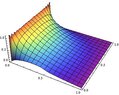
Plot3D[u[x, y], {x, 0, L}, {y, 0, H}, PlotRange -> All, Boxed -> False, ColorFunction -> "Rainbow"]
View attachment 376
Code:
ContourPlot[u[x, y], {x, 0, L}, {y, 0, H}, PlotRange -> All, ColorFunction -> "Rainbow"]
View attachment 377
 

Attachments

  • density3hw3piecewise.jpg
    density3hw3piecewise.jpg
    10.7 KB · Views: 90
  • 3dPlot3hw3piecewise.jpg
    3dPlot3hw3piecewise.jpg
    22.3 KB · Views: 106
  • contour3hw3piecewise.jpg
    contour3hw3piecewise.jpg
    11.9 KB · Views: 117

Similar threads

  • · Replies 1 ·
Replies
1
Views
952
  • · Replies 0 ·
Replies
0
Views
3K
  • · Replies 2 ·
Replies
2
Views
3K
  • · Replies 5 ·
Replies
5
Views
3K
  • · Replies 1 ·
Replies
1
Views
3K
  • · Replies 1 ·
Replies
1
Views
3K
  • · Replies 11 ·
Replies
11
Views
3K
  • · Replies 1 ·
Replies
1
Views
2K
  • · Replies 3 ·
Replies
3
Views
4K
  • · Replies 2 ·
Replies
2
Views
3K