Plotting the solution of an ODE

  • Context: Mathematica 
  • Thread starter Thread starter Robin04
  • Start date Start date
  • Tags Tags
    Ode Plotting
Click For Summary

Discussion Overview

The discussion revolves around plotting the solution of an ordinary differential equation (ODE) using sliders for parameter evaluation in a computational environment. Participants explore syntax issues related to the Manipulate function and its interaction with ODE solutions.

Discussion Character

  • Technical explanation
  • Debate/contested
  • Mathematical reasoning

Main Points Raised

  • One participant seeks clarification on the correct syntax for using a variable name in the Manipulate function to plot the solution of an ODE, noting that directly copying the solution works but referencing it by name does not.
  • Another participant suggests using NDsolve in conjunction with Manipulate for similar problems, providing links to external resources for further reference.
  • A different participant expresses having encountered the same issue with Manipulate and indicates a lack of a solution.
  • One participant shares a successful approach by defining all necessary functions and definitions within the Manipulate function itself, demonstrating a specific syntax that worked for them.

Areas of Agreement / Disagreement

Participants do not appear to reach a consensus on the best approach to resolve the syntax issue with Manipulate and ODE solutions, indicating multiple competing views and unresolved challenges.

Contextual Notes

Limitations include potential missing assumptions about the definitions of variables and functions, as well as unresolved mathematical steps related to the implementation of the ODE solutions.

Robin04
Messages
259
Reaction score
16
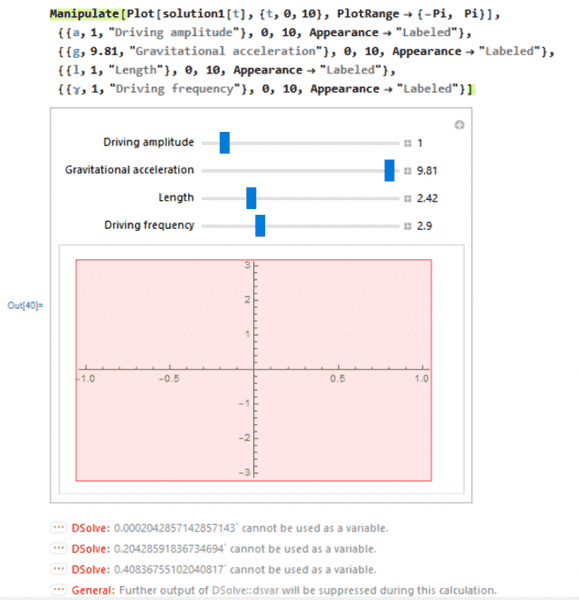
I'm trying to plot the solution to an ODE (with given initial values) but there are some constants in it that I want to evaluate with sliders and I'm not sure what is the right syntax for this.

Code:
Manipulate[Plot[solution1[t], {t, 0, 10}, PlotRange -> {-Pi, Pi}],
{{a, 1, "Driving amplitude"}, 0, 10, Appearance -> "Labeled"},
{{g, 9.81, "Gravitational acceleration"}, 0, 10,
  Appearance -> "Labeled"},
{{l, 1, "Length"}, 0, 10, Appearance -> "Labeled"},
{{\[Gamma], 1, "Driving frequency"}, 0, 10, Appearance -> "Labeled"}]

K-pkiv-g-s.png


K-pkiv-g-s.png


If I copy solution1 explicitly into plot it works, but if I refer to it by the variable name it doesn't. What's the correct syntax for this?
 

Attachments

  • K-pkiv-g-s.png
    K-pkiv-g-s.png
    34.3 KB · Views: 521
  • K-pkiv-g-s.png
    K-pkiv-g-s.png
    12.9 KB · Views: 469
Physics news on Phys.org
I have found the same problem with Manipulate. I have not found a way around it.
 
I have had consistent success with putting all the needed definitions and functions inside the Manipulate

Manipulate[
sol=p[t]/.DSolve[{a p''[t]==p[t],p[0]==0,p'[0]==a},p[t],t][[1]];
Plot[sol,{t,0,4}],
{{a,1},0,4}
]
 

Similar threads

  • · Replies 2 ·
Replies
2
Views
3K
  • · Replies 3 ·
Replies
3
Views
2K
Replies
3
Views
2K
  • · Replies 4 ·
Replies
4
Views
4K
  • · Replies 5 ·
Replies
5
Views
3K
  • · Replies 1 ·
Replies
1
Views
2K
  • · Replies 2 ·
Replies
2
Views
2K
  • · Replies 2 ·
Replies
2
Views
2K
  • · Replies 1 ·
Replies
1
Views
1K
  • · Replies 1 ·
Replies
1
Views
3K