LaTeX How do I insert an image on a LaTex doc?

  • Thread starter Thread starter Saladsamurai
  • Start date Start date
  • Tags Tags
    Image Latex
Click For Summary
The discussion revolves around inserting images into a LaTeX document using TeXshop on a Mac. The user, new to LaTeX, is struggling to successfully include a JPG image in their document. Initial attempts involved using the \usepackage{graphicx} command but did not yield results. A key point raised is the importance of the image file's location; it should ideally be in the same directory as the .tex file to avoid complications with file paths. Users noted that dragging and dropping the image into the document automatically includes the full file path, which can be cumbersome. The discussion highlights that while templates suggest a simple argument like {moon.jpg}, this may not work unless the file is correctly referenced. Additionally, users shared experiences and solutions, emphasizing the need for proper file management and understanding of LaTeX commands to successfully display images.
Saladsamurai
Messages
3,009
Reaction score
7
I googled this, but all articles assume previous knowledge of Latex.

I am brand new to Latex. I am using TeXshop on my Mac.

I have a template open and I want to insert a jpg in the document.

I clicked on the "Graphics Template" and then pasted the the name of my picture in there like the template implies. But that doesn't do it (nor do I think it should). Clearly I am missing something here.

Here is a screenshot of my attempt.
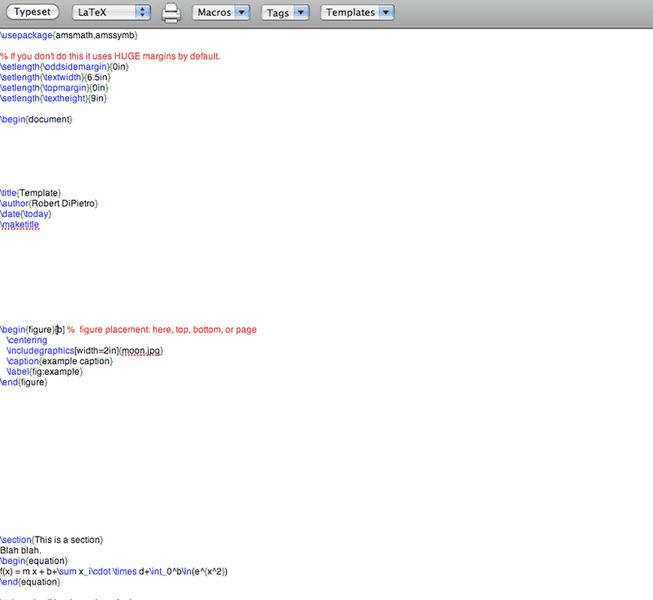
Picture2-14.png


Thanks,
Casey
 
Physics news on Phys.org
What is your error message?

did you use \usepackage{graphics} or \usepackage{graphicx}?
http://www.artofproblemsolving.com/LaTeX/AoPS_L_PictMan.php
 
Last edited by a moderator:
robphy said:
What is your error message?

did you use \usepackage{graphics} or \usepackage{graphicx}?
http://www.artofproblemsolving.com/LaTeX/AoPS_L_PictMan.php

I tried \usepackage{graphicx} but got nothing... noob question: I put "\usepackage{graphicx} " with all the other "usepackages" at the top of the page right?
 
Last edited by a moderator:
Where does the mage need to be saved? Does that matter?
 
Error message:

Picture3-10.png
 
robphy said:
What is your error message?

did you use \usepackage{graphics} or \usepackage{graphicx}?
http://www.artofproblemsolving.com/LaTeX/AoPS_L_PictMan.php

So I went to this site and copy/pasted this into a doc:

\documentclass{article}
\usepackage[pdftex]{graphicx}
\begin{document}

This is my first image.

\includegraphics{myimage.png}

That's a cool picture up above.
\end{document}
I saved an image as "myimage.png"

I compiled and got nothing.

So I deleted everything except document class and such.

Then I just drag-and-dropped the image from my desktop to the doc and it worked!

It appears to have put the entire file path which I am not sure why the website does not?
 
Last edited by a moderator:
This is kind of annoying. The template implies that you only need to put in the argument {moon.jpg} but when I do that, it does not work.

When I drag and drop an image it automatically prints the line with the entire address. But the address looks like this

../../Users/me/moon.jpg

It literally prints the dots "..."

I use a Mac and cannot figure out how to find the address for certain files?

On PC its just right-click-->properties and you're there.

But with Mac?
 
Not sure if that will be helpful (because I am on a Windows machine and use TeXnicCenter and MikTeX) but the following works for me:

after the declaration of my document class I have

\usepackage{graphicx}

then where I want my figure I use

\begin{figure}[h]
\begin{center}
\scalebox{0.80}{\includegraphics{propagator.eps}}
\caption{\label{mprop} Majorana propagator.}
\end{center}
\end{figure}

where the file propagator.eps is in the same directory as my TeX file. The factor of 0.80 simply scales down the figure to 80%.
 
Saladsamurai said:
It appears to have put the entire file path which I am not sure why the website does not?

Is your image in the same folder as your tex file? If so, then you should not need the entire path.
 

Similar threads

  • · Replies 4 ·
Replies
4
Views
3K
  • · Replies 8 ·
Replies
8
Views
3K
  • · Replies 6 ·
Replies
6
Views
2K
  • · Replies 5 ·
Replies
5
Views
4K
  • · Replies 8 ·
Replies
8
Views
3K
  • · Replies 3 ·
Replies
3
Views
4K
  • · Replies 3 ·
Replies
3
Views
2K
Replies
3
Views
4K
  • · Replies 5 ·
Replies
5
Views
3K
  • · Replies 6 ·
Replies
6
Views
3K