LaTeX How Do I Remove Navigation Symbols in LaTeX Beamer?

  • Thread starter Thread starter Haorong Wu
  • Start date Start date
  • Tags Tags
    Latex
Click For Summary
SUMMARY

The discussion focuses on removing navigation symbols in LaTeX Beamer presentations. Two effective methods are highlighted: using the command \beamertemplatenavigationsymbolsempty in the document preamble and employing \setbeamertemplate{navigation symbols}{} to eliminate these symbols. Both solutions are confirmed as valid by references to a StackExchange question, providing clear guidance for users seeking to customize their Beamer presentations.

PREREQUISITES
  • Familiarity with LaTeX document structure
  • Understanding of LaTeX Beamer class
  • Basic knowledge of LaTeX commands and syntax
  • Access to a LaTeX editor or compiler
NEXT STEPS
  • Explore advanced customization options in LaTeX Beamer templates
  • Learn about other Beamer presentation features and settings
  • Investigate LaTeX document preamble configurations
  • Review community discussions on LaTeX customization on StackExchange
USEFUL FOR

LaTeX users, particularly those creating presentations with Beamer, who wish to customize their document layout by removing unnecessary navigation symbols.

Haorong Wu
Messages
419
Reaction score
90
I do not know which forum I should turn to, so I post it here. If I should post it here, please help me move it.

I want to delete those buttons at the bottom just before the footer. They are useless to me. I have googled them. But no relevant information shows up. Maybe I search them with wrong words. Maybe I should not call them buttons?
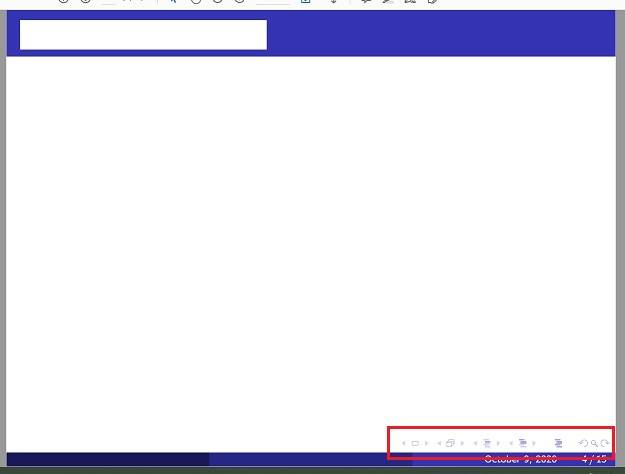
beamer.jpg
 
Physics news on Phys.org
Check this StackExchange question:

https://tex.stackexchange.com/q/686/200495

The above question has two answers:

1. Use \beamertemplatenavigationsymbolsempty in your document preamble.

2. Use \setbeamertemplate{navigation symbols}{} in the preamble.
 
  • Like
Likes Haorong Wu
Wrichik Basu said:
Check this StackExchange question:

https://tex.stackexchange.com/q/686/200495

The above question has two answers:

1. Use \beamertemplatenavigationsymbolsempty in your document preamble.

2. Use \setbeamertemplate{navigation symbols}{} in the preamble.
Thanks! So that is called the navigation symbols. I had no idea. lol.
 
  • Like
Likes Wrichik Basu

Similar threads

  • · Replies 4 ·
Replies
4
Views
2K
  • · Replies 3 ·
Replies
3
Views
2K
  • · Replies 8 ·
Replies
8
Views
2K
  • · Replies 3 ·
Replies
3
Views
6K
  • · Replies 4 ·
Replies
4
Views
3K
  • · Replies 2 ·
Replies
2
Views
2K
  • · Replies 7 ·
Replies
7
Views
4K
  • · Replies 4 ·
Replies
4
Views
3K
  • · Replies 3 ·
Replies
3
Views
2K
  • · Replies 8 ·
Replies
8
Views
7K