MATLAB How to extract data from existing JPEG/TiFF graph?

Click For Summary
To extract data from a graph in JPEG or TIFF format using MATLAB, users can utilize the DataThief software, which is specifically designed for this purpose. Additionally, MATLAB's built-in function getframe() can capture the graph as an image. The process involves plotting a simple graph, capturing it with getframe(), and then displaying the image using imshow(). This method allows for the visualization of the graph, which can aid in manually extracting approximate numerical data for the x and y axes. Overall, these tools provide a straightforward approach to converting graphical representations into usable data.
kelvin490
Gold Member
Messages
227
Reaction score
3
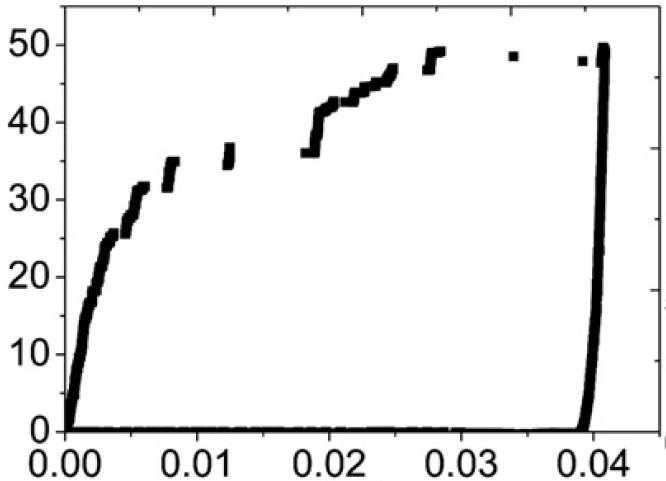
Is there any method to extract data from a graph in JPEG/TIFF format, using simple software such as MATLAB? I have a graph as shown below:
Untitled.jpg


I only have this picture but no raw data and I want to plot the black curve in this graph. How to get approximate numerical data of the x and y axis? Thank you.
 

Attachments

  • Untitled.jpg
    Untitled.jpg
    17.6 KB · Views: 713
Physics news on Phys.org
I don't know how to do it simply in Matlab. For such tasks, I use DataThief.
 
  • Like
Likes kelvin490
You can use getframe()

Code:
plot(1:10);
structFrame = getframe(); % Get structure
rgbImage = structFrame.cdata;
figure;
imshow(rgbImage);
 

Similar threads

  • · Replies 1 ·
Replies
1
Views
3K
  • · Replies 12 ·
Replies
12
Views
4K
Replies
2
Views
2K
  • · Replies 2 ·
Replies
2
Views
1K
  • · Replies 14 ·
Replies
14
Views
3K
  • · Replies 5 ·
Replies
5
Views
3K
  • · Replies 1 ·
Replies
1
Views
4K
  • · Replies 3 ·
Replies
3
Views
3K
  • · Replies 4 ·
Replies
4
Views
2K
  • · Replies 12 ·
Replies
12
Views
4K