Windows 10 help bar on HP15 showing blank content
- Thread starter WWGD
- Start date
-
- Tags
- File
Join the discussion
Registration is free. Start your own thread to ask a follow-up.
20 replies · 3K views

Physics news on Phys.org
Discussion
- 11,327
- 8,758
Nothing attached that I see.WWGD said:Please see attached.
- 11,327
- 8,758
OK, now it is attached to post #1. Not easy to read, but it appears that the help popup appears but it is not populated, correct?
Has anyone been playing with color schemes, or styles on that machine? Hackers sometimes put white on white or black on black to fool people.
Has anyone been playing with color schemes, or styles on that machine? Hackers sometimes put white on white or black on black to fool people.
Science Advisor
Homework Helper
- 7,911
- 13,227
Correct, it is not populated. I can view some options by clicking on the Windows icon, but not through the search bar. EDIT Certainly I did not change the scheme myself. But may the color scheme be changed for the search bar only? Rest of the operation does not have that problem.anorlunda said:OK, now it is attached to post #1. Not easy to read, but it appears that the help popup appears but it is not populated, correct?
Has anyone been playing with color schemes, or styles on that machine? Hackers sometimes put white on white or black on black to fool people.
Last edited:
Mentor
- 38,154
- 10,762
You might be right. Are you running any AV software?WWGD said:It may be viruses infecting the computer I would say.
Is this the same computer you were having problems with before? I forget what the problem was -- a bad battery?
Lottie Faucette
- 1
- 0
I have the same problem. Help!
Science Advisor
Homework Helper
- 7,911
- 13,227
Yes, I run Avast. Yes, it was (I assume) a bad battery, I never got to test whether that was the case. Now the content of a folder in Gmail disappeared. It is just suddenly empty.Mark44 said:You might be right. Are you running any AV software?
Is this the same computer you were having problems with before? I forget what the problem was -- a bad battery?
Mentor
- 38,154
- 10,762
WWGD said:And now the data in one of my folders disappeared.
From the first quote above, I assumed that you meant a folder or directory on your computer. The further clarification in the second quote might mean that it wasn't a folder (directory) on the computer itself. As far as I can tell, gmail doesn't store your mail folders on your computer, but instead is a client app that gives you a view of storage on a server somewhere. I have a gmail account, but am not able to find any files on my computer that are associated with gmail.WWGD said:Now the content of a folder in Gmail disappeared. It is just suddenly empty.
So to the best of my knowledge, which I can't guarantee is correct, if you have empty folders in gmail, that doesn't have anything to do with the state of your computer, as long as you still have access to your gmail account.
The problem you first asked about, with Win10 not working correctly, seems to me to be unrelated to what you're seeing in gmail, and is possibly due to some file corruption in Windows.
Is your Avast installation up to date? Also, Win10 has its own virus software -- Windows Defender, I think it's called.
- 11,327
- 8,758
What evidence do you see that these files are gone? I ask because I saw a video about people whose computers were attacked by hackers seeking ransom.
I don't know how the hackers did it, but they used the trick of making the text in certain windows turn white-on-white or black-on-black, to cause their victims to panic.
But regardless of whether your files are really vanishing or perhaps it just appears that way, both cases are serious malware. I suggest that you shut down that computer immediately, and use some other computer to research remedies.
I don't know how the hackers did it, but they used the trick of making the text in certain windows turn white-on-white or black-on-black, to cause their victims to panic.
But regardless of whether your files are really vanishing or perhaps it just appears that way, both cases are serious malware. I suggest that you shut down that computer immediately, and use some other computer to research remedies.
Science Advisor
Homework Helper
- 7,911
- 13,227
The strange thing is that every diagnostic I run, whether Avast, dxdiag, msinfo32 or just checking in device manager whether drivers, devices are ok, suggests everything is ok. I have been going over event viewer logs and those do provide more of a clue on what may be wrong. Sort of an aside: Is it worth using Sys Internals to do the diagnostic s?
Mentor
- 38,154
- 10,762
Have you tried shutting the computer down, and restarting it? Hopefully that is one of the first things you've tried.WWGD said:More Win10 fun. I cannot access any content in the Win10 help bar, on the lower left of the screen. I just get a blank. Please see attached.
Any Ideas?
sysprog
- 2,617
- 1,793
Sorry this is so late ...
You could first try:
Ctrl+Alt+Del > Start Task Manager > Processes > [select] explorer.exe > [right click] > Stop Process
(please don't be alarmed when that makes your taskbar and icons disappear)
Then: File > New Task (Run...) > explorer
If that works, do a restart, so the newly restored default settings are saved. If not, given that this started just a couple of days ago, I suggest running a system restore from the latest restore point before then, assuming you can get to a command prompt.
Does Win+R work to get to a command prompt?
If not: Ctrl+Alt+Del > Start Task Manager > File > New Task (Run...) > rstrui
That will start system restore.
You could also from New Task (Run...) enter: cmd
That will get you to a command prompt.
From there you can enter rstrui
Please let us know how you're progressing.
You could first try:
Ctrl+Alt+Del > Start Task Manager > Processes > [select] explorer.exe > [right click] > Stop Process
(please don't be alarmed when that makes your taskbar and icons disappear)
Then: File > New Task (Run...) > explorer
If that works, do a restart, so the newly restored default settings are saved. If not, given that this started just a couple of days ago, I suggest running a system restore from the latest restore point before then, assuming you can get to a command prompt.
Does Win+R work to get to a command prompt?
If not: Ctrl+Alt+Del > Start Task Manager > File > New Task (Run...) > rstrui
That will start system restore.
You could also from New Task (Run...) enter: cmd
That will get you to a command prompt.
From there you can enter rstrui
Please let us know how you're progressing.
OCR
- 996
- 936
.
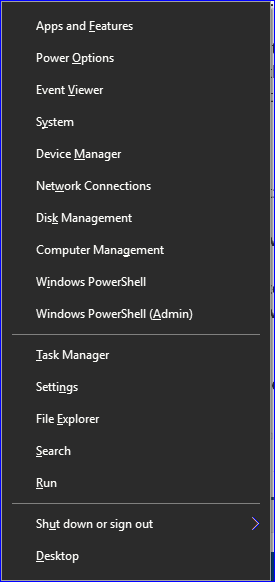
Just press the Windows key+x and you can get most of that, without all the Ctrl+Alt+Del > Start Task Manager > File > New Task (Run...) stuff. . . .
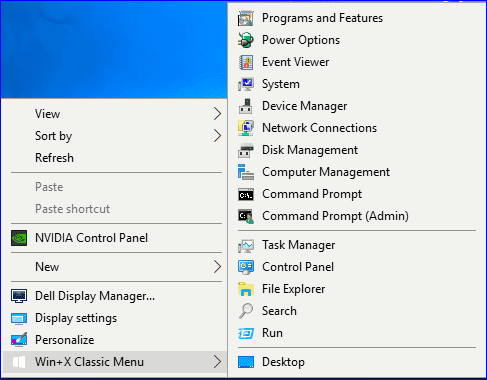
 If you have a right click context menu, most of those programs can be accessed from there, also. . .
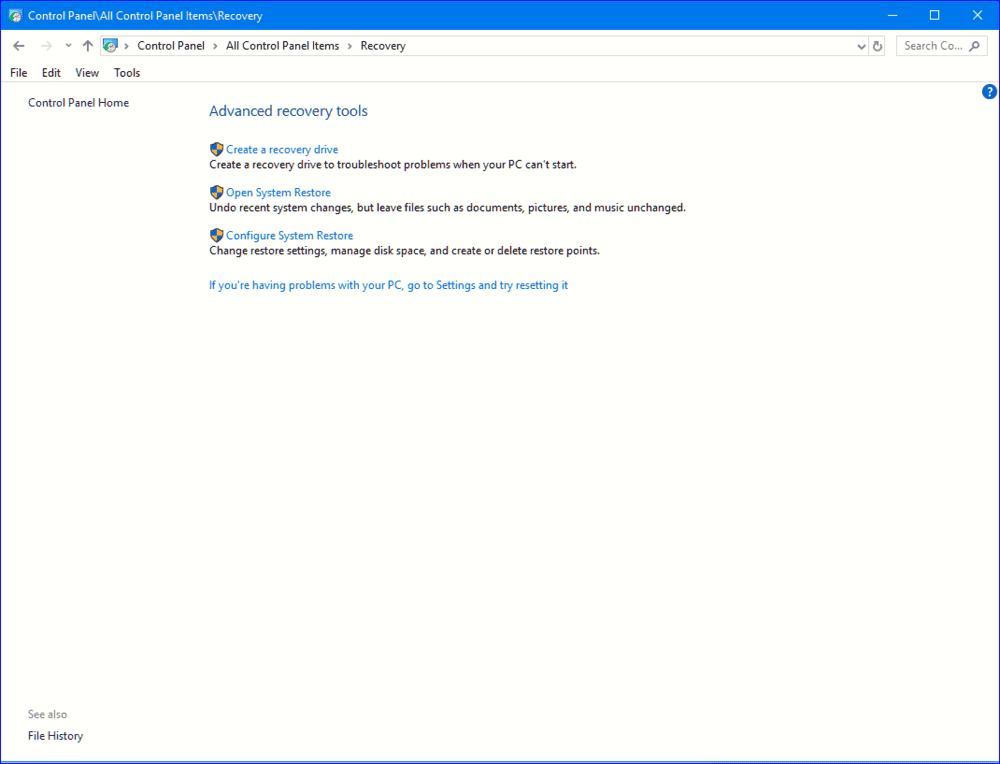
The Control Panel will get you to System Restore, without any cmd prompts, too.
.
Just press the Windows key+x and you can get most of that, without all the Ctrl+Alt+Del > Start Task Manager > File > New Task (Run...) stuff. . . .
The Control Panel will get you to System Restore, without any cmd prompts, too.
.
Last edited: