- 2,180
- 2,721
I have a program where I am supposed to find out the pressure, given the ideal gas equation with Van der Waal's correction, $$\left(p - \frac{a}{v^2}\right)\left(v - b\right) \ = \ Rt$$I have to take a constant value for ##t## (user input), and ##v## will range from 1 to 20 in steps of 0.01. ##a = 0.002## and ##b = 1.2## are given.
I have written the following code:
[CODE lang="python" highlight="29,34"]import numpy as np
from sympy import Symbol, solve
class P008:
def declarations(self):
global R, a, b
R = 8.314
a = .0002
b = 1.2
def inp_PvsV(self):
"""
Takes input for the P vs V file.
"""
print("Enter the value of T: ", end="")
temp = float(input())
vol = np.linspace(1, 20, num=2001)
vol = np.around(vol, decimals=2)
self.compute_PvsV(vol, temp)
def compute_PvsV(self, vol, temp):
"""
Computes pressure from volume and temperature.
:param vol: The Volume as a numpy array
:param temp: The Temperature as a numpy array
"""
p = Symbol("p")
s = []
for i in range(0, np.size(vol)):
# Equation for p (lhs-rhs)
eq = (p + (a / (vol ** 2))) * (vol - b) - R * temp
# Now solving for p
s1 = solve(eq, p)
s.append(s1[0])
print("i = ", i, " s = ", s)
pres = np.asarray(s)
print(pres)
obj = P008()
obj.declarations()
obj.inp_PvsV()[/CODE]
I found during debugging that in line no. 29, if I change np.size(vol) to anything <= 20, I get a good output:
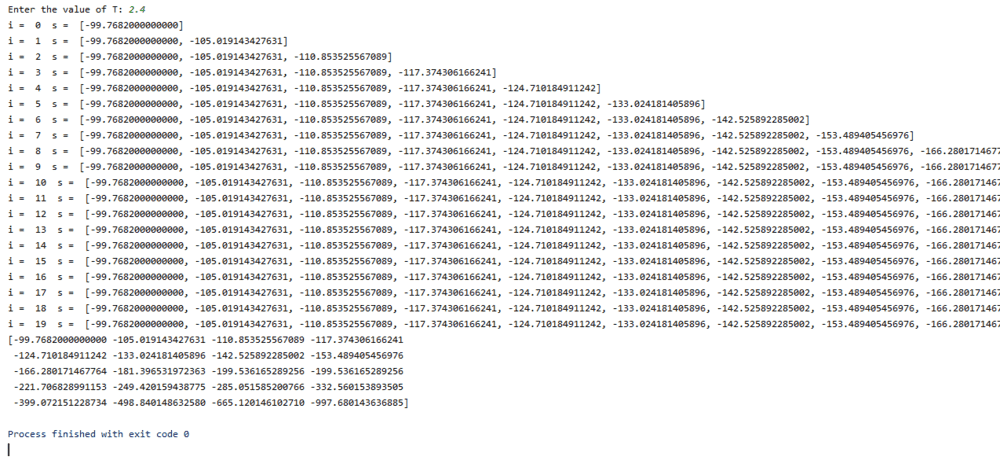
(Couldn't give the full output screen, but the fact that it finished with exit code 0 means that there was no error.)
When I change the number to anything > 20, I get an error:
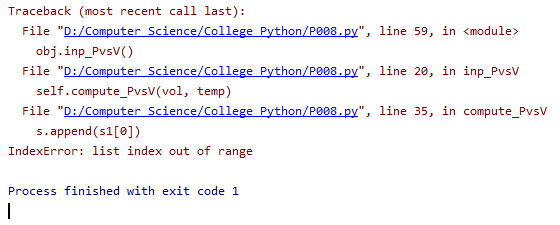
This seems more like an overflow problem. My code is unchanged, only that number in the range increases, and I get an error. But I am supposed to accomplish this task for 2001 values.
Any idea on how to do this?
I am working in Python 3.7.4, and using PyCharm IDE.
I have written the following code:
[CODE lang="python" highlight="29,34"]import numpy as np
from sympy import Symbol, solve
class P008:
def declarations(self):
global R, a, b
R = 8.314
a = .0002
b = 1.2
def inp_PvsV(self):
"""
Takes input for the P vs V file.
"""
print("Enter the value of T: ", end="")
temp = float(input())
vol = np.linspace(1, 20, num=2001)
vol = np.around(vol, decimals=2)
self.compute_PvsV(vol, temp)
def compute_PvsV(self, vol, temp):
"""
Computes pressure from volume and temperature.
:param vol: The Volume as a numpy array
:param temp: The Temperature as a numpy array
"""
p = Symbol("p")
s = []
for i in range(0, np.size(vol)):
# Equation for p (lhs-rhs)
eq = (p + (a / (vol ** 2))) * (vol - b) - R * temp
# Now solving for p
s1 = solve(eq, p)
s.append(s1[0])
print("i = ", i, " s = ", s)
pres = np.asarray(s)
print(pres)
obj = P008()
obj.declarations()
obj.inp_PvsV()[/CODE]
I found during debugging that in line no. 29, if I change np.size(vol) to anything <= 20, I get a good output:
(Couldn't give the full output screen, but the fact that it finished with exit code 0 means that there was no error.)
When I change the number to anything > 20, I get an error:
This seems more like an overflow problem. My code is unchanged, only that number in the range increases, and I get an error. But I am supposed to accomplish this task for 2001 values.
Any idea on how to do this?
I am working in Python 3.7.4, and using PyCharm IDE.
