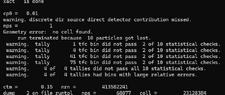
MCNP6 Error: "Geometry error: no cell found"

Click For Summary

Discussion Overview

The discussion revolves around an error encountered in MCNP6, specifically a "Geometry error: no cell found" message. Participants explore potential solutions related to the bounding sphere and object placement within the geometry, focusing on technical aspects of the software's input and visualization features.

Discussion Character

  • Technical explanation, Debate/contested

Main Points Raised

  • One participant describes their ongoing issue with MCNP6 and requests assistance from the community.
  • Another participant explains that the bounding sphere defines the experiment area and suggests that objects should not extend beyond it. They recommend checking the corners of specific geometrical shapes to identify any overlaps.
  • A follow-up response reiterates the previous advice and suggests increasing the size of the bounding sphere as a potential fix.
  • A later reply indicates that the problem has been resolved after following the suggested advice.

Areas of Agreement / Disagreement

The discussion shows a progression from problem identification to a proposed solution, with one participant confirming that the issue was resolved. However, the initial problem and its resolution are based on individual experiences, and no broader consensus on the underlying cause of the error is established.

ameermukhtar
Messages
17
Reaction score
1
respected all
i am using MCNP6 and i am facing this problem from days and i can not found solution if anyone help me than i am ever grateful to you
files are attached
Thanks
 

Attachments

  • 屏幕截图 2024-12-27 025957.png
    屏幕截图 2024-12-27 025957.png
    32.6 KB · Views: 56
  • neutron16.txt
    neutron16.txt
    7.1 KB · Views: 49
Engineering news on Phys.org
Hello @ameermukhtar,

Welcome to PhysicsForums. Your bounding sphere defines the experiment area, and anything outside it is part of the void. That works so long as no objects poke through. If you run "mcnp ip inp=filename", the default view seems fine. But click on the input box and type "pz 149", to check close to corners of 9 and 10, you can see the corners of 9 (rpp) sticking through it. Just try making the sphere bigger and see if that fixes the problem.
 
  • Informative
Likes   Reactions: berkeman
can you correct it brother
 
Alex A said:
Hello @ameermukhtar,

Welcome to PhysicsForums. Your bounding sphere defines the experiment area, and anything outside it is part of the void. That works so long as no objects poke through. If you run "mcnp ip inp=filename", the default view seems fine. But click on the input box and type "pz 149", to check close to corners of 9 and 10, you can see the corners of 9 (rpp) sticking through it. Just try making the sphere bigger and see if that fixes the problem.
thank you dear the problem has been solved
 
  • Like
Likes   Reactions: berkeman

Similar threads

Replies
2
Views
2K
Replies
6
Views
998
  • · Replies 4 ·
Replies
4
Views
3K
  • · Replies 6 ·
Replies
6
Views
4K
  • · Replies 2 ·
Replies
2
Views
3K
  • · Replies 0 ·
Replies
0
Views
3K
Replies
2
Views
976
Replies
1
Views
3K
Replies
6
Views
7K
Replies
2
Views
7K