Need a fix for Firefox SEC_ERROR_INADEQUATE_KEY_USAGE error

  • Thread starter Thread starter Borg
  • Start date Start date
  • Tags Tags
    Error Firefox
Join the discussion
Ask a follow-up here, or get your own question answered by working scientists, mathematicians and engineers — people, not an autocomplete.
Real named experts · corrections over time · the nuance an AI answer skips
7 replies · 15K views
Science Advisor
Gold Member
Messages
2,378
Reaction score
5,201
I figured that I would post this in case someone may know the answer. I have a small server at home that is using a self-signed certificate. Firefox used to give a warning about this and then let you accept the certificate. However, newer versions just block the site without being able to override the warning.
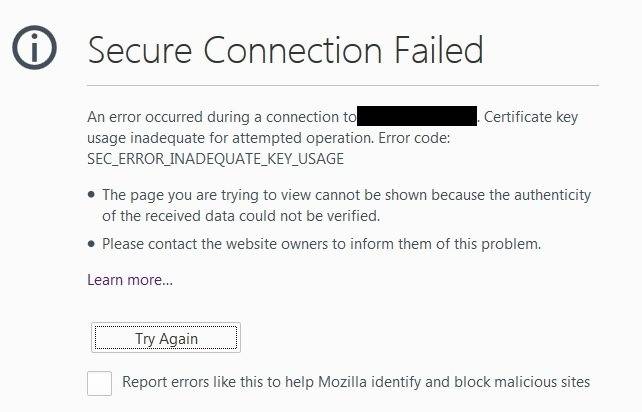
FirefoxError.jpg

I did find a fix that required you to install an older version of Firefox, go to the site, override the warning and then install the newer version of Firefox. That worked great at home but I don't have that kind of administrative access on one of my work computers.

I suspect that there is something being set in my profile that is saving the overrides. If so, I should be able to copy that to the profile on my work computer. However, all of my searches have turned up nothing. The best resource that I've found so far is this one describing where Firefox stores profile data. Unfortunately, I haven't had any success yet.

Does anyone know which file may have this data so that I might be able to copy it from my other computer?
 
on Phys.org
One of the articles that I looked at led me to think that I might be using a non-TLS setting on my server. I will check later to see if that's the case. Then, I just have to update one line on the server and restart.
 
It can be your antivirus as well. It may be blocking the untrusted certificates and preventing you from going to the site. Actually a really good thing in production scenarios.

Have you tried adding the certificate in question to your trusted store?
 
  • Like
Likes   Reactions: Borg
Routaran said:
It can be your antivirus as well. It may be blocking the untrusted certificates and preventing you from going to the site. Actually a really good thing in production scenarios.

Have you tried adding the certificate in question to your trusted store?
Yes, I have added the root CA that I created to Firefox. The problem didn't start until I was upgraded and the admin rebuilt my profile on the machine. That killed the previous override.
 
In windows the profile data should be stored under c:\users\yourname\appdata\
there are 3 folders, roaming, local and one other.
Look under each and find the firefox/mozilla folder.
Copy the contents of that folder and paste it into the same location at your work system. That will effectively copy your profile from home to work.

since it's under your account, you should not require admin rights to do this.
 
  • Like
Likes   Reactions: Borg
Routaran said:
In windows the profile data should be stored under c:\users\yourname\appdata\
there are 3 folders, roaming, local and one other.
Look under each and find the firefox/mozilla folder.
Copy the contents of that folder and paste it into the same location at your work system. That will effectively copy your profile from home to work.

since it's under your account, you should not require admin rights to do this.
Yes, I've tried that with the roaming part of the profile where most of the profile stuff is located. There wasn't a Firefox folder in the third one (LocalLow). I guess that I could try copying both completely to see if it works but the version at work is a little older and is an ESR version. I can give it a try with both profile sections.

I looked at the server's cert and it seems OK.
BorgPiEncryption.jpg


This is exactly the same that you see if you look at PF's Tools -> Page Info -> Security tab.
PFEncryption.jpg
 
Check your TLS security settings on firefox
in the address bar, type in about:config
then in the search box, tls

and check these settings
https://lh6.googleusercontent.com/WpSdMF2vCj1hP1pxR60L9U118tPm8mLdK9K0tRCWLg5zAKSicTbBBWBhBJTckFt_FzuK6B5MjuCILaA=w1920-h904
 
  • Like
Likes   Reactions: Borg
Yup. Been there also. I even added my IP to the security.tls.insecure_fallback_hosts to see if that would help. I'll double check the settings again tomorrow along with attempting to use a full copy of my Mozilla profile.