Java Newer versions of JDK have a "private" JRE?

  • Thread starter Thread starter Wrichik Basu
  • Start date Start date
  • Tags Tags
    java
Click For Summary
SUMMARY

The discussion clarifies that starting from JDK 11, Oracle no longer provides a standalone Java Runtime Environment (JRE), instead introducing a "private" JRE that is bundled with the JDK. This private JRE is essential for running tools included with the JDK and is located in its own jre directory, known only to the JDK. Unlike the public JRE, which is registered with the Windows Registry and can be used by other Java applications, the private JRE has no registry settings and is solely for JDK use. Users can access the private JRE by setting the JAVA_HOME environment variable to the JDK directory and updating the system path accordingly.

PREREQUISITES
  • Understanding of JDK 11 and later versions
  • Familiarity with environment variables in operating systems
  • Basic knowledge of Java application execution
  • Experience with IDEs like NetBeans
NEXT STEPS
  • Research how to configure JAVA_HOME for JDK installations
  • Learn about the differences between Oracle JDK and OpenJDK
  • Explore command line execution of Java applications
  • Investigate the implications of removing the standalone JRE from Java distributions
USEFUL FOR

Java developers, software engineers, and system administrators who need to understand the changes in JDK versions and their impact on Java application deployment and execution.

Wrichik Basu
Science Advisor
Insights Author
Gold Member
Messages
2,180
Reaction score
2,690
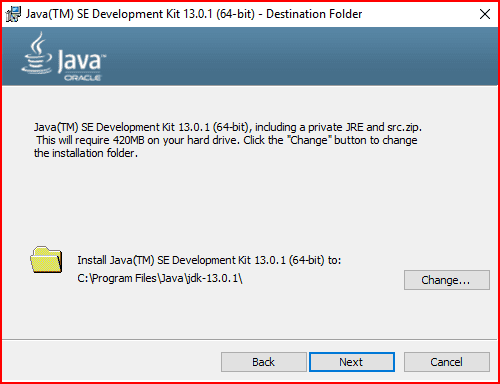
I had JDK 12.0.1 for some time and recently upgraded to JDK 13.0.1. During the installation, this screen was shown:
jdk13.png

I know that newer versions of JDK have no accompanying separate JRE; the standalone JRE currently available is 1.8.0u231. But what is the story about this "private" JRE? How to access it from command line?

Some months ago, while developing a GUI application in NetBeans using JDK 12.0.1, I had discovered that while I can run the application within NetBeans, I cannot execute the .jar file outside the IDE in terminal. This was because I did not have a standalone JRE at that point of time. But NetBeans was still executing the programs. Was it using this "private" JRE?
 
Technology news on Phys.org
Wrichik Basu said:
But what is the story about this "private" JRE?

The private JRE is required to run the tools included with the JDK, i.e. it is only for the JDK. It has no registry settings - talking about Windows. Also, it is contained entirely in its own jre directory. Its location is known only to the JDK.

The public JRE on the other hand, can be used by other Java apps, it exists outside the JDK and it is registered with the Windows Registry. If java.exe file is copied to the Windows System directory, it becomes the default system Java platform.

As for why not a standalone JRE from Java 11 on, there are some pretty fair reasons, at least from a company perspective:

The JRE is not a real part of OpenJDK i.e. it is a Sun (and Oracle later on) creation. So, by eliminating it makes this difference between Oracle JDK and OpenJDK disappear. Second, there was a removal of some client deployment technologies, so there is no primary reason for JRE existence anymore. Also, JRE is not a means to accomplish a small footprint anymore, for various reasons beginning from Java 9.

Wrichik Basu said:
How to access it from command line?

JAVA_HOME environment variable should exist (or created, if not) and be set to point to the directory where the JDK software is located. Also, you have to update the system path. You can find very easily how to do it by googling it, in case you don't know.

Wrichik Basu said:
Some months ago, while developing a GUI application in NetBeans using JDK 12.0.1, I had discovered that while I can run the application within NetBeans, I cannot execute the .jar file outside the IDE in terminal. This was because I did not have a standalone JRE at that point of time. But NetBeans was still executing the programs. Was it using this "private" JRE?

See above about private JRE.
 
  • Informative
Likes Wrichik Basu
We have many threads on AI, which are mostly AI/LLM, e.g,. ChatGPT, Claude, etc. It is important to draw a distinction between AI/LLM and AI/ML/DL, where ML - Machine Learning and DL = Deep Learning. AI is a broad technology; the AI/ML/DL is being developed to handle large data sets, and even seemingly disparate datasets to rapidly evaluated the data and determine the quantitative relationships in order to understand what those relationships (about the variaboles) mean. At the Harvard &...

Similar threads

  • · Replies 3 ·
Replies
3
Views
6K
Replies
1
Views
2K
  • · Replies 5 ·
Replies
5
Views
2K
  • · Replies 4 ·
Replies
4
Views
20K
  • · Replies 3 ·
Replies
3
Views
15K
  • · Replies 9 ·
Replies
9
Views
3K
  • · Replies 5 ·
Replies
5
Views
2K
Replies
3
Views
4K
  • · Replies 1 ·
Replies
1
Views
2K
  • · Replies 3 ·
Replies
3
Views
11K