Polynomials in Matlab - Plotting Results

  • Context: MATLAB 
  • Thread starter Thread starter ineedhelpnow
  • Start date Start date
  • Tags Tags
    Matlab Polynomials
Click For Summary
SUMMARY

The discussion focuses on plotting polynomial results in MATLAB using the polyfit and polyval functions. The user initially provided incomplete code without defining the x values, which was corrected by another participant. The final code includes defining x values, fitting a polynomial of degree 3 to the data, and plotting the results. Additional enhancements such as adding titles, legends, and axis labels were also suggested for improved visualization.

PREREQUISITES
  • Understanding of MATLAB syntax and functions
  • Familiarity with polynomial fitting using polyfit
  • Knowledge of data visualization techniques in MATLAB
  • Basic concepts of plotting in MATLAB
NEXT STEPS
  • Learn how to use MATLAB's title(), legend(), xlabel(), and ylabel() functions for enhanced plots
  • Explore advanced polynomial fitting techniques in MATLAB
  • Research MATLAB's data visualization best practices
  • Investigate the impact of polynomial degree on fitting accuracy
USEFUL FOR

MATLAB users, data analysts, and engineers interested in polynomial fitting and data visualization techniques.
ineedhelpnow
Messages
649
Reaction score
0
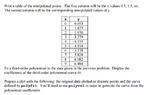
View attachment 5037

Code:
y = [0.053 1.477 1.970 3.279 4.153 4.934 5.178 5.828 6.082 6.484]; % data
coef = polyfit(x,y,3) 
X=0:.1:9;
Y=polyval(coef,X);
plot(x,y,'o',X,Y)

that's my code. did i do it right?
 

Attachments

  • 1.png
    1.png
    16.9 KB · Views: 123
Physics news on Phys.org
You need to define your $x$ values. This should be right:

Code:
y = [0.053 1.477 1.970 3.279 4.153 4.934 5.178 5.828 6.082 6.484]; % data
x = [0 1 2 3 4 5 6 7 8 9];
coef = polyfit(x,y,3) 
X=0:.1:9;
Y=polyval(coef,X);
plot(x,y,'o',X,Y)

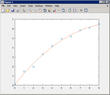
Output:

View attachment 5038

You can add a title, legend, and axis labels if you want, using [m]title()[/m], [m]legend()[/m], [m]xlabel()[/m], [m]ylabel()[/m], respectively.
 

Attachments

  • interpolation.PNG
    interpolation.PNG
    5.2 KB · Views: 116
i cut that part of the code out by mistake but i have it in there. i see it's the same graph though. thanks rido!
 

Similar threads

  • · Replies 6 ·
Replies
6
Views
3K
  • · Replies 12 ·
Replies
12
Views
7K
  • · Replies 8 ·
Replies
8
Views
3K
  • · Replies 14 ·
Replies
14
Views
4K
  • · Replies 10 ·
Replies
10
Views
2K
  • · Replies 2 ·
Replies
2
Views
8K
  • · Replies 5 ·
Replies
5
Views
3K
  • · Replies 11 ·
Replies
11
Views
5K
  • · Replies 9 ·
Replies
9
Views
5K
Replies
2
Views
3K