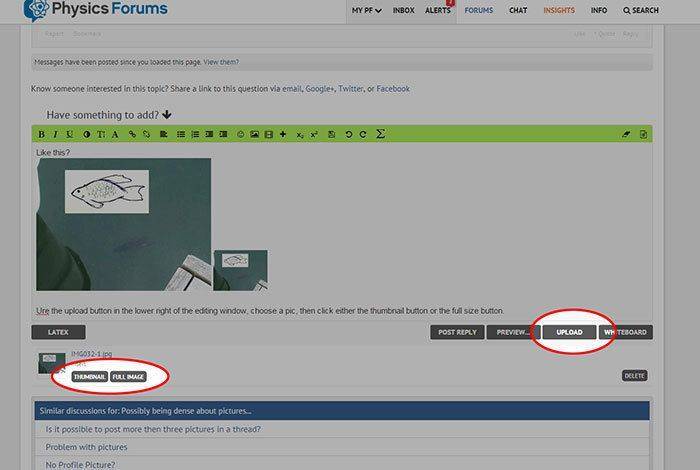
But how do I upload one from my computer and have it in text? I know how to add a picture as an attachment, and how to link one via url, but I don't know how to take something from a folder on my desktop and drop it in between what I'm writing.
Possibly being dense about pictures....
- Thread starter Ryan_m_b
- Start date
Join the discussion
Registration is free. Ask a follow-up in this thread, or start your own.
4 replies · 2K views
Physics news on Phys.org
- 19,954
- 11,048
Simply click the upload button and then select a photo. It will list under the editor and then you can choose to insert in your post. It ends up generating a media tag which you can move around.
DaveC426913
Gold Member
2025 Award
- 24,614
- 8,951
Use the upload button in the lower right of the editing window, choose a pic, then click either the thumbnail button or the full size button. Thus:
Last edited:
Thanks guys! Obviously I knew all this...what, you think a long term member and mentor wouldn't know how to use the forum...? I was testing you guys is all... 
Gold Member
- 4,458
- 3,265
Which is dang handy. Thanks Greg.Greg Bernhardt said:It will list under the editor and then you can choose to insert in your post.
Similar threads
- Mystic998
- · Replies 2 ·
- Calculus and Beyond Homework Help
- Replies
- 2
- Nick Levinson
- · Replies 12 ·
- MATLAB, Maple, Mathematica, LaTeX
- Replies
- 12
- AdamCH
- · Replies 6 ·
- Electromagnetism
- Replies
- 6
Graduate
Lubos great kennedy landscape essay
- marcus
- · Replies 11 ·
- Beyond the Standard Models
- Replies
- 11
- John Baez
- · Replies 1 ·
- MATLAB, Maple, Mathematica, LaTeX
- Replies
- 1