Problem with Generating Barnsley Fern Fractal in MATLAB

  • Context: MATLAB 
  • Thread starter Thread starter Euler2718
  • Start date Start date
  • Tags Tags
    Fractal Matlab
Click For Summary

Discussion Overview

The discussion revolves around issues related to generating the Barnsley Fern fractal using MATLAB code. Participants are exploring the iterative process and potential discrepancies in the implementation compared to established algorithms.

Discussion Character

  • Technical explanation
  • Debate/contested

Main Points Raised

  • The original poster shares their MATLAB code for generating the Barnsley Fern and expresses confusion about its functionality, questioning whether the iterative process is correct.
  • One participant suggests comparing the code to the algorithm provided on Wikipedia and mentions examples in other programming languages that may highlight differences in implementation.
  • Another participant raises a technical issue regarding copying the code into MATLAB, noting that it appears as a single line and includes an unwanted URL reference.
  • A further reply offers a potential solution for the copying issue, recommending the use of a different text editor to handle newline characters appropriately.

Areas of Agreement / Disagreement

Participants have not reached a consensus on the correctness of the original code or the iterative process. There are multiple viewpoints regarding the implementation and technical issues related to copying code into MATLAB.

Contextual Notes

There may be limitations related to the original code's adherence to the established algorithm, as well as potential formatting issues when transferring code between different operating systems.

Euler2718
Messages
90
Reaction score
3
The code is as followed:

Matlab:
function fern()

AI = [0  0 ; 0 0.16];
  
AII = [ 0.85  0.04 ; -0.04 -0.85 ] ;
  
AIII = [ 0.2  -0.26 ; 0.23 0.22 ] ;
  
AIV = [-0.15  0.28 ; 0.26 0.24 ];BI = [ 0 ; 0];
BII = [ 0 ; 1.6];
BIII = [ 0 ; 1.6];
BIV = [0 ; 0.44];

N = 10000;
I = 50;

H = zeros(N,2);

for n=1 : N
  
    x = rand;
    y = rand;
    T = [x;y];
 
  
    for i=1 : I
      
        p = rand;
      
        if p < 0.01
            %disp('Scheme 1')
            S1x = AI*T + BI;
            S1y = AI*T + BI;
            x = S1x(1);
            y = S1y(2);
        elseif p < 0.08
            %disp('Scheme 2')
            S2x = AII*T + BII;
            S2y = AII*T + BII;
            x = S2x(1);
            y = S2y(2);
        elseif p < 0.15
            %disp('Scheme 3')
            S3x = AIII*T + BII;
            S3y = AIII*T + BII;
            x = S3x(1);
            y = S3y(2);
        else
            %disp('Scheme 4')
            S4x = AIV*T + BIV;
            S4y = AIV*T + BIV;
            x = S4x(1);
            y = S4y(2);
        end
        H(n,1) = x;
        H(n,2) = y;
    end
end

X = H(:,1);
Y = H(:,2);
plot(X,Y,'.')

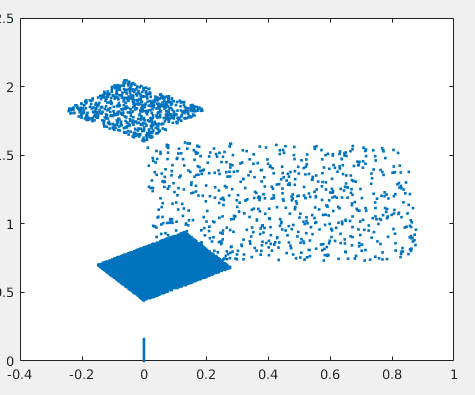
I have no idea why it isn't working. Is not the iterative process correct? I ran it once and got the picture below. I'm at the end of the road here, and on a deadline, any help would be appreciated.
Screenshot_2016-09-21_20-49-37.png
 
Last edited by a moderator:
Physics news on Phys.org
How can I copy your code to MATLAB? When I simply copied and pasted, it put your whole program as one single line in MATLAB, then added a URL reference link below it.
 
Image Analyst said:
How can I copy your code to MATLAB? When I simply copied and pasted, it put your whole program as one single line in MATLAB, then added a URL reference link below it.

Try copying to another editor that recognizes newline chars as line separators and will then save to the windows crlf format (carriage return/linefeed line terminator).

This is a common problem when moving text from unix to windows and vice versa (in which case you'll see every other line as a blank line)
 

Similar threads

  • · Replies 4 ·
Replies
4
Views
2K
Replies
2
Views
3K
  • · Replies 8 ·
Replies
8
Views
3K
  • · Replies 4 ·
Replies
4
Views
2K
  • · Replies 2 ·
Replies
2
Views
2K
  • · Replies 7 ·
Replies
7
Views
2K
  • · Replies 1 ·
Replies
1
Views
4K
  • · Replies 1 ·
Replies
1
Views
3K
  • · Replies 1 ·
Replies
1
Views
4K
  • · Replies 1 ·
Replies
1
Views
4K