MATLAB Solving Linear System with Eigenvalues in Matlab

Click For Summary
In the discussion, a user is generating a new matrix A in a loop and encountering issues with the visualization of eigenvalues in MATLAB, where some eigenvalues appear mixed up. They initially use the sum function to extract eigenvalues, but it is pointed out that this is incorrect since eigenvalues are located on the diagonal of the eigenvalue matrix. The recommended approach is to use the diag function to obtain the eigenvalues directly. To sort the eigenvalues while keeping them paired with their corresponding eigenvectors, it is suggested to use the sort function, which provides indices that can be used to rearrange the eigenvectors accordingly. This ensures that both eigenvalues and eigenvectors remain aligned after sorting.
member 428835
Hi PF!

I am looping through a linear system and each time I do I generate a new matrix, call this matrix ##A##. When finding the eigenvalues of ##A## in Matlab is use
Code:
[a,sigma2M] = eig(A);% a eigenvector and sigma2M matrix of eigenvalues
sigma2(:,ii) = sum(sigma2M);% create matrix with rows of eigenvalues for the iith system
where the ii is the for loop. The plot I get looks bad and you can see how some eigenvalues get mixed up (vertical axis are eigenvalues). Any ideas? I'd really appreciate it!
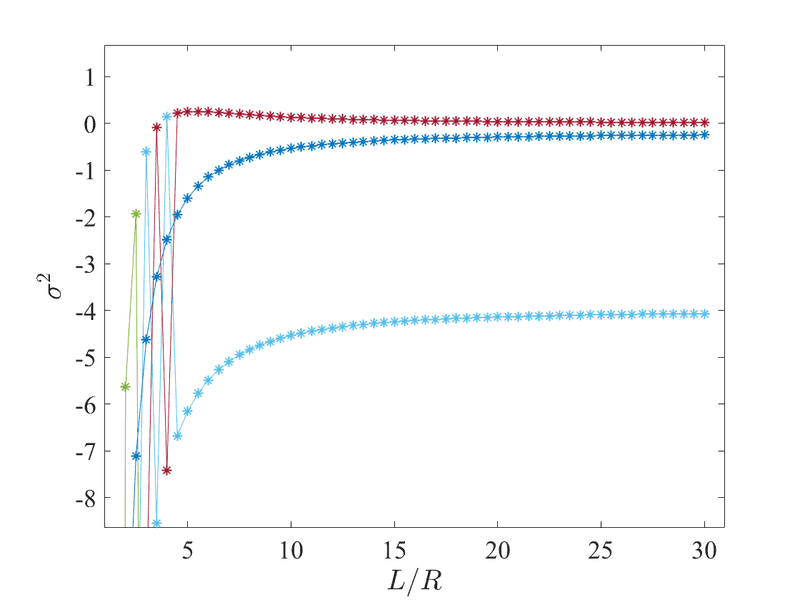
eigenvalues.png
 
Physics news on Phys.org
Sort the eigenvalues?
 
Orodruin said:
Sort the eigenvalues?
Doesn't it automatically do this for me? Is there a way to have this automated?
 
joshmccraney said:
Doesn't it automatically do this for me? Is there a way to have this automated?
If it did you would not get the result you are getting. Use the sort function.

I also recommend against using sum to get the eigenvalues out. The matrix contains the eigenvalues on the diagonal so use diag instead. For a square matrix it will give you a vector containing the diagonal elements.
 
  • Like
Likes member 428835
Orodruin said:
If it did you would not get the result you are getting. Use the sort function.

I also recommend against using sum to get the eigenvalues out. The matrix contains the eigenvalues on the diagonal so use diag instead. For a square matrix it will give you a vector containing the diagonal elements.
Good call on the diag function. I'd like the eigenvalues to remain paired with their corresponding eigenvectors. When I use sort on the eigenvalues, that only change their positions? Do you know of a way to have the eigenvectors align with the eigenvalues?
 
If you have the sort function output two return values, i.e.,
Code:
[B,I] = sort(A);
then B will contain the sorted list of eigenvalues and I will be a list of indices which is the order of the original indices. You can sort the eigenvectors by using the array I accordingly as an argument of the matrix containing the eigenvectors.
 
  • Like
Likes member 428835
Thanks got it!
 

Similar threads

  • · Replies 32 ·
2
Replies
32
Views
4K
  • · Replies 1 ·
Replies
1
Views
2K
  • · Replies 2 ·
Replies
2
Views
2K
Replies
11
Views
6K
  • · Replies 2 ·
Replies
2
Views
3K
Replies
3
Views
2K
  • · Replies 2 ·
Replies
2
Views
2K
  • · Replies 18 ·
Replies
18
Views
3K
  • · Replies 5 ·
Replies
5
Views
3K
  • · Replies 2 ·
Replies
2
Views
2K