The length of the line in the MCNP cell card MCNP

Click For Summary
SUMMARY

The discussion focuses on resolving an error encountered in the MCNP (Monte Carlo N-Particle Transport Code) cell card due to improper cell definitions. Users are advised to ensure that cell definitions do not overlap and that all zones are clearly assigned to a single cell. Suggestions include using the command line to read warnings and errors, checking for unusual characters in the input file, and rethinking cell construction for clarity. The importance of avoiding ambiguous definitions, such as using '#' characters, is emphasized to prevent conflicts in ray tracing.

PREREQUISITES
  • Understanding of MCNP cell card syntax and structure
  • Familiarity with ray tracing principles in computational physics
  • Basic command line usage for running MCNP simulations
  • Knowledge of input file formatting and error checking
NEXT STEPS
  • Review MCNP documentation on cell card definitions and constraints
  • Learn about debugging techniques for MCNP input files
  • Explore best practices for defining non-overlapping cell zones in MCNP
  • Investigate common errors and troubleshooting methods in MCNP simulations
USEFUL FOR

This discussion is beneficial for computational physicists, nuclear engineers, and researchers using MCNP for particle transport simulations, particularly those facing challenges with cell card configurations.

Asmae SAADI
Messages
2
Reaction score
0
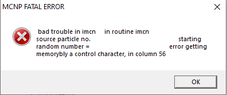
Homework Statement:: I go back to the line to finish the previous line in MCNP cell card but I had the error message shown in the photo.
Please make a solution to my problem
Relevant Equations:: c ********************* BLOCK 1: cartes des cellules ****************
1 2 -1.184 -40 #3 #19 #18 #20 #21 #22 #23 #24 #25 #26 #27 #28 #29 #30
#31 #32 #33 #34

is there a suggestion for my problem

 

Attachments

  • #30.PNG
    #30.PNG
    2.3 KB · Views: 208
  • erreur#.PNG
    erreur#.PNG
    2.8 KB · Views: 167
Engineering news on Phys.org
try to put "&" at the end
 
  • Like
Likes   Reactions: Asmae SAADI
A few suggestions,

Try running from the command line and read warnings as well as errors. Try reading the output file. Check you don't have any strange characters in the input file.

Your cell construction is strange. Cell 1 is defined in terms of the cells it isn't before defining *them*. Then cell 2 is 'above or outside 40' AND 'is not cell 1'. But cell 1 already includes 'below or inside 40'.

Due to the way MCNP works (It's a raytracer with dice), a ray passing through a surface must never match more than one cell definition. So there should be no zones that are assigned to more than one cell, ie cell definitions must not overlap. I don't know this is the the case here, but I think it might be. (There must also be no volume that isn't assigned to any cell.)

Try redoing your cells with a clear idea in your mind, and avoid # where possible.
 
  • Like
Likes   Reactions: Asmae SAADI

Similar threads

  • · Replies 13 ·
Replies
13
Views
4K
  • · Replies 1 ·
Replies
1
Views
3K
  • · Replies 3 ·
Replies
3
Views
3K
  • · Replies 1 ·
Replies
1
Views
4K
  • · Replies 1 ·
Replies
1
Views
2K
Replies
4
Views
2K
  • · Replies 7 ·
Replies
7
Views
4K
  • · Replies 3 ·
Replies
3
Views
5K
Replies
2
Views
3K
  • · Replies 15 ·
Replies
15
Views
6K