TI-89 won't graph whole function?

Click For Summary
SUMMARY

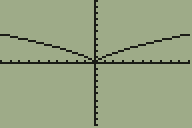
The TI-89 graphing calculator only displays the positive half of the function x^(2/3) due to its default settings. In contrast, the TI-84 correctly graphs the entire function. To resolve this issue on the TI-89, users should navigate to the "Mode" menu and change the "Complex Format" setting to "Real." This adjustment allows the TI-89 to graph both halves of the function accurately.

PREREQUISITES
  • Familiarity with TI-89 calculator functions
  • Understanding of graphing functions in mathematics
  • Knowledge of calculator settings and configurations
  • Basic comprehension of complex and real number formats
NEXT STEPS
  • Explore TI-89 calculator settings for graphing functions
  • Learn about complex vs. real number formats in graphing
  • Investigate other functions that may require similar settings adjustments
  • Review user manuals for TI-89 and TI-84 calculators for advanced graphing techniques
USEFUL FOR

Students, educators, and anyone using TI-89 calculators for graphing mathematical functions who need to understand settings adjustments for accurate graph representation.

amantonas
Messages
2
Reaction score
0
When I try and graph x^(2/3) in my TI-89, it only graphs the half of the graph where x>0.
My TI-84 gives me this:
abthqd.gif

But my TI-89 only gives me the right half. Is one of my settings wrong?
 
Computer science news on Phys.org
I believe that you can get the same graph given by the TI-84 by going into the "Mode" menu and selecting "Real" as the "Complex Format" type.
 
Last edited:

Similar threads

Replies
4
Views
3K
Replies
1
Views
3K
  • · Replies 6 ·
Replies
6
Views
6K
  • · Replies 1 ·
Replies
1
Views
4K
  • · Replies 8 ·
Replies
8
Views
31K
  • · Replies 5 ·
Replies
5
Views
7K
  • · Replies 5 ·
Replies
5
Views
5K
Replies
1
Views
2K
  • · Replies 15 ·
Replies
15
Views
9K
  • · Replies 1 ·
Replies
1
Views
10K