Tikz latex question (Evgeny.Makarov)

  • Context: LaTeX 
  • Thread starter Thread starter Dustinsfl
  • Start date Start date
  • Tags Tags
    Latex
Click For Summary

Discussion Overview

The discussion revolves around creating a TikZ diagram in LaTeX to represent certain inequalities on the complex plane, specifically focusing on shading areas defined by these inequalities. Participants explore how to implement this visually using TikZ commands.

Discussion Character

  • Technical explanation
  • Debate/contested
  • Mathematical reasoning

Main Points Raised

  • One participant asks how to shade areas on the complex plane defined by the inequalities involving \(u\) and \(v\).
  • Another participant suggests an alternative graphing approach involving different inequalities.
  • Participants discuss specific TikZ commands and syntax, including the correct use of options in the \texttt{tikzpicture} environment.
  • Errors related to TikZ commands are mentioned, with suggestions for correcting syntax and understanding error messages.
  • There is a request for making certain elements of the diagram dashed, with a proposed solution involving TikZ options.
  • One participant notes limitations due to lack of internet access, affecting their ability to troubleshoot effectively.

Areas of Agreement / Disagreement

Participants generally agree on the need to correct TikZ syntax errors, but there is no consensus on the best approach to shading the areas defined by the inequalities or the specific implementation details.

Contextual Notes

Some participants mention specific versions of PGF/TikZ, which may affect compatibility and functionality of the commands discussed.

Who May Find This Useful

Readers interested in LaTeX, TikZ graphics, and visual representation of mathematical concepts on the complex plane may find this discussion beneficial.
Dustinsfl
Messages
2,217
Reaction score
5
\begin{align}
\frac{1}{4} &< (1 - u)^2 + \left(v + \frac{1}{2}\right)^2\notag\\
\frac{1}{4} &< (1 - u)^2 + \left(v - \frac{1}{2}\right)^2\notag
\end{align}

How can I make this on the complex plane with the appropriate area shaded?

u is the real axis and v the imaginary
 
Physics news on Phys.org
dwsmith said:
\begin{align}
\frac{1}{4} &< (1 - u)^2 + \left(v + \frac{1}{2}\right)^2\notag\\
\frac{1}{4} &< (1 - u)^2 + \left(v - \frac{1}{2}\right)^2\notag
\end{align}

How can I make this on the complex plane with the appropriate area shaded?

u is the real axis and v the imaginary

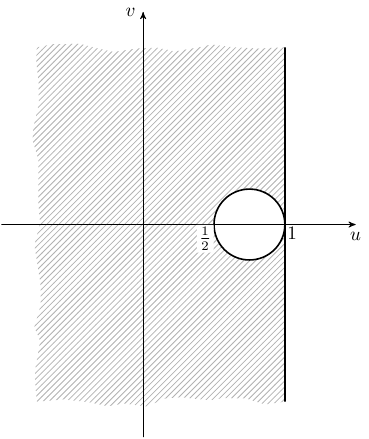
I would instead like to graph the image $u < 1$ and $\frac{1}{16} < \left(u - \frac{3}{4}\right)^2 + v^2$
 
dwsmith said:
I would instead like to graph the image $u < 1$ and $\frac{1}{16} < \left(u - \frac{3}{4}\right)^2 + v^2$
This code

Code:
 \usetikzlibrary{arrows,patterns,decorations.pathmorphing}
  \begin{tikzpicture}[scale=2.5,>=stealth']
 \fill[even odd rule,pattern=north east lines,pattern color=black!30,decoration=random steps]
   (1,1.25) -- (1,-1.25) decorate { -- (-.75,-1.25) -- (-.75,1.25) -- cycle}
   (.75,0) circle (.25);
 \draw[->] (-1,0) -- (1.5,0) node[below] {$u$};
 \draw[->] (0,-1.5) -- (0,1.5) node[left] {$v$};
 \draw[thick] (.75,0) circle (.25);
 \draw[thick] (1,1.25) -- (1,-1.25);
 \node[below left,fill=white,inner sep=1pt] at (.5,0) {$\frac{1}{2}$};
 \node[below right,inner sep=1pt] at (1,0) {$1$};
 \end{tikzpicture}
gives

argand1.png
 
I am getting an error on the line \begin{tikzpicture}[scale=2.5,>stealth']
 
dwsmith said:
I am getting an error on the line \begin{tikzpicture}[scale=2.5,>stealth']
First, it should be " >=stealth' ", not " >stealth' ". In fact, options in square brackets are optional here.

Did you say \usepackage{tikz} in the preamble? What is the error message?
 
Evgeny.Makarov said:
First, it should be " >=stealth' ", not " >stealth' ". In fact, options in square brackets are optional here.

Did you say \usepackage{tikz} in the preamble? What is the error message?

Ok thanks. Now I have this message 1.114... or =black!30,decoration = random steps]

---------- Post added at 17:38 ---------- Previous post was at 17:36 ----------

Evgeny.Makarov said:
Did you say \usepackage{tikz} in the preamble? What is the error message?

Of course
 
dwsmith said:
1.114... or =black!30,decoration = random steps]
This does not look like a complete error message. I am not sure where 1.114 came from.

Try replacing

Code:
\fill[even odd rule,pattern=north east lines,pattern color=black!30,decoration=random steps]
   (1,1.25) -- (1,-1.25) decorate { -- (-.75,-1.25) -- (-.75,1.25) -- cycle}
   (.75,0) circle (.25);

with

Code:
 \fill[pattern=north east lines]
   (1,1.25) -- (1,-1.25) -- (-.75,-1.25) -- (-.75,1.25) -- cycle
   (.75,0) circle (.25);

You can also try removing other lines.

Also, I am using PGF/TikZ 2.10. Your version can be generated using the command \pgfversion.
 
Evgeny.Makarov said:
This does not look like a complete error message. I am not sure where 1.114 came from.

Try replacing

Code:
\fill[even odd rule,pattern=north east lines,pattern color=black!30,decoration=random steps]
   (1,1.25) -- (1,-1.25) decorate { -- (-.75,-1.25) -- (-.75,1.25) -- cycle}
   (.75,0) circle (.25);

with

Code:
 \fill[pattern=north east lines]
   (1,1.25) -- (1,-1.25) -- (-.75,-1.25) -- (-.75,1.25) -- cycle
   (.75,0) circle (.25);

You can also try removing other lines.

Also, I am using PGF/TikZ 2.10. Your version can be generated using the command \pgfversion.
I fixed it typo. How can I make the circle and line at u=1 dashed?
 
dwsmith said:
I fixed it typo.
You copy-pasted the code instead of typing it, right?

dwsmith said:
How can I make the circle and line at u=1 dashed?
Use [thick,dashed] instead of just [thick] after \draw.
 
  • #10
I wish I could. At my apt, I can't since my roommate's don't like to pay bills so we have no more internet. I had to read this from my phone.
 

Similar threads

  • · Replies 1 ·
Replies
1
Views
4K
  • · Replies 19 ·
Replies
19
Views
2K
  • · Replies 1 ·
Replies
1
Views
3K
  • · Replies 1 ·
Replies
1
Views
2K
  • · Replies 11 ·
Replies
11
Views
8K
  • · Replies 3 ·
Replies
3
Views
2K
  • · Replies 2 ·
Replies
2
Views
2K
  • · Replies 2 ·
Replies
2
Views
2K
  • · Replies 4 ·
Replies
4
Views
2K
  • · Replies 7 ·
Replies
7
Views
3K