Use Google docs to edit equations using the built-in equation editor

  • Thread starter Thread starter greySky
  • Start date Start date
  • Tags Tags
    Edit Google
Join the discussion
Ask a follow-up here, or get your own question answered by working scientists, mathematicians and engineers — people, not an autocomplete.
Real named experts · corrections over time · the nuance an AI answer skips
11 replies · 4K views
greySky
Messages
4
Reaction score
2
Homework Statement:: use google docs to edit equations using the built-in equation editor (cursor positioning)
Homework Equations:: https://docs.google.com
https://www.physicsforums.com/help/latexhelp/

Problem: enter an equation using Google docs equation editor, the later goal being: to send emails in gmail that contain nice equations.

Show work already done:
Although I'm not sure if the Google docs equation editor can be used in gmail, I figure if I can get equations working in the "Google Ecosystem" in one method, the feature might be added to gmail later. I'm aware of latex and wikipedia equation editors, but using only the "Google Ecosystem" is desired.

In Google Docs (writing document), I'm having trouble simply moving the cursor to the "right-hand-side of the capital pi notation"
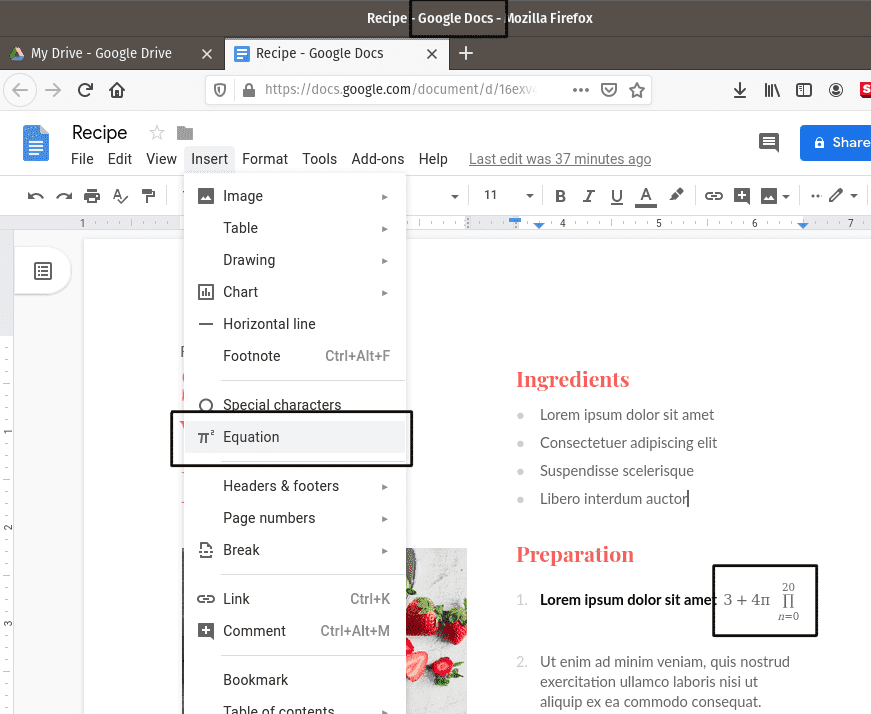
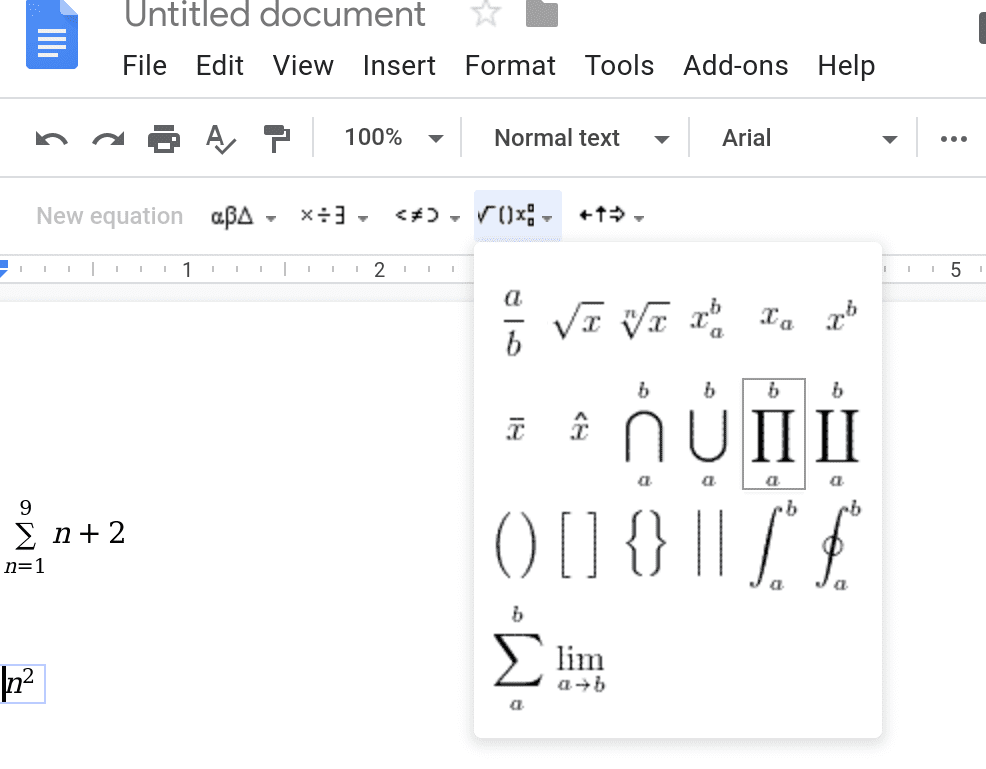
  • Please help solve the subproblem of: what is the best way to navigate the insertion cursor to the "right-hand-side of the capital pi notation", if the capital pi is input first
    • using the arrow keys or clicking "a lot" seems to just move the insertion cursor outside of the equation box entirely
    • I can insert the large Pi "in front of the object being multiplied" but this is literally backwards/nonintuitive
googleEquationEditor.png


enteringPi notation after the fact.png
 
Physics news on Phys.org
Conclusion, I was able to solve the cursor-positioning subproblem after trying a few more inputs.

  • Using the arrow keys works to continue the equation if the capital pi is entered before the object being multiplied.
    • The trick is, the insertion cursor will appear outside the equation box when it is ready to continue the equation (insertion cursor exaggerated below)
      cursor outside the equation box.png
    • on entering more content, the box will extend around the equation
      Screenshot from 2019-12-31 05-21-22.png
 
I think an FAQ blog about Google.doc is the better place to address those questions. ##\LaTeX## exists now for roundabout thirty years, and there is a reason it is still there. Attempts from Google or MicroSoft to reinvent the wheel are in my eyes desperate and expendable, meant to bind users to their products; plus you cannot charge ##\LaTeX##. It is better, more mature and easily available. I would rather invest time to get used to a TeX-editor than learning icons in proprietary shells.
 
  • Like
Likes   Reactions: Wrichik Basu
This would make a good insights article. It’s something some folks who use google docs might like to know.

Recently, I had to do something like this and developed a script to handle markdown syntax and mathjax to create a web page that could be saved as a pdf.
 
  • Like
Likes   Reactions: anorlunda
We have a forum
https://www.physicsforums.com/forums/matlab-maple-mathematica-latex.189/
under Math.

I've wondered before if that might be expanded to include help with use of any software. If so, then it is no longer just math. It could be moved to the lounge.

We have frequent questions about use of MCNP, but they remain under the Nuclear forum. But things like Word, Google, Facebook, CAD, and Chrome, are not specific to any discipline. That is why the thread in question here was hard to place.
 
Vanadium 50 said:
Both Word and Google Docs accept LaTex input, although it is nor so well-documented in either case.

Please tell me more about Word accepting LaTex input. Please please please! Even just a pointer at where to get started?
 
DEvens said:
Please tell me more about Word accepting LaTex input. Please please please! Even just a pointer at where to get started?
See https://support.office.com/en-us/ar...ns=WINWORD&version=16&ui=en-US&rs=en-US&ad=US

In Google Docs, I clicked Help, and typed in this search phrase "enter latex equations". Here's what comes up:
Insert an equation
  1. Open a document in Google Docs.
  2. Click where you want to put the equation.
  3. Click Insert
    s-E2sZftTTIHjBrdV-WsGPIhGjaxcEXjfgdIfW_UNG7Sw0=h18.png
    Equation.
  4. Select the symbols you want to add from one of these menus:
    • Greek letters
    • Miscellaneous operations
    • Relations
    • Math operators
    • Arrows
  5. Add numbers or substitute variables in the box.
 
  • Informative
Likes   Reactions: DEvens