Hello
kaliprasad,
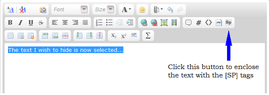
The easiest way I know of to accomplish this is to compose your reply as normal, and then when you are finished, but before submitting the post, select the portion of your post that contains the actual solution using your mouse or keyboard. Then while this text is selected, click the [Sp] button on the far right of the middle row of the toolbar, and this will generate the spoiler tags to enclose the selected text. Then preview your post to make sure it looks like you intend.
Here is an image of the button to click to enclose the selected text with the spoiler tags:
View attachment 1353
Feel free to ask if you have any problems getting this to work.