Why can't I open java applets on my computer?

  • Context: Java 
  • Thread starter Thread starter adjacent
  • Start date Start date
  • Tags Tags
    Java
Join the discussion
Ask a follow-up here, or get your own question answered by working scientists, mathematicians and engineers — people, not an autocomplete.
Real named experts · corrections over time · the nuance an AI answer skips
10 replies · 5K views
adjacent
Gold Member
Messages
1,552
Reaction score
62
Can't open java applets :(

I just visited thishttp://www.astro.ucla.edu/~wright/Balloon2.html and found that I can't open the java applet.
I encountered this:
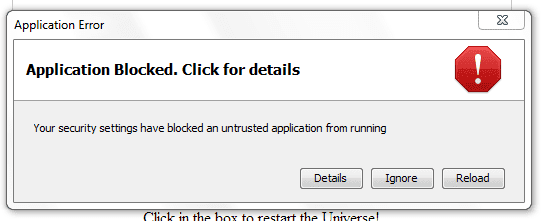
attachment.php?attachmentid=68370&stc=1&d=1396792321.png


Then I tried opening applets from other websites and tried using firefox.This is the result from firefox and chrome.

attachment.php?attachmentid=68371&stc=1&d=1396792459.png


From where can I change that security setting? I have searched Google but could not find an answer.
I am using java 7 update 51
 

Attachments

  • fgfg.PNG
    fgfg.PNG
    6.8 KB · Views: 870
  • gyt.PNG
    gyt.PNG
    2 KB · Views: 807
Last edited:
Physics news on Phys.org
I just put the security level to medium:
attachment.php?attachmentid=68372&stc=1&d=1396793140.png


Then I found out the my computer becomes as slow as a snail when I open any applet.And I get a white screen.
 

Attachments

  • tyu.PNG
    tyu.PNG
    14.6 KB · Views: 815
Last edited:
Microsoft and Apple have been in a war with Oracle and Adobe over who causes viruses. Microsoft and Apple inevitably win these battles because the operating system can block versions of Java, Flash, and Acrobat that the authors of the OS think are a conduit for viruses.

Update your Java.
 
Routaran said:
Step 3: Do what adjacent suggested and also clear the java cache by following the steps in my screenshot and try again. (Start>Control Pannel>Java)
:smile: Can't stop laughing.I am adjacent and also the OP :wink:
I have cleared the cache and nothing works.

D H said:
Update your Java.
But Java 7 update 51 IS the latest versionCan you check if it works for you?If so,which version of java and chrome/firefox are you using?
 
Last edited:
LoL oops! Kinda got used to you posting solutions, assumed someone else posted the question :)
But I really should read names more carefully

Yep, the applet worked for me fine. I'm running Chrome and it asked me twice if I wanted to allow the java application to run, I allowed it both times. The security settings must be what's causing the issue here.

jump into your java settings again. Under the Security tab, add the website address as an exception
Then go into the advanced tab
Ensure that the following are checked

Default Java for browsers: Mozilla Family
Java Plugin: Enable the next-generation...
Application Installation: Install if hinted
Secure Execution Environment: Everything on except for Show site certificate from server...
Mixed Code: Enable - show warning if needed
Advanced Security Settings: Everything on execpt Use SSL 2.0, TLS 1.1, TLS 1.2 (This will be the same as the browser settings generally)

Restart your browser and try again. Also give IE a go and see what it does.
 
  • Like
Likes   Reactions: 1 person
Routaran said:
Yep, the applet worked for me fine. I'm running Chrome and it asked me twice if I wanted to allow the java application to run, I allowed it both times. The security settings must be what's causing the issue here.

...
Restart your browser and try again. Also give IE a go and see what it does.

I did what you said. It still does not work.(The simpler version works ).
Which java and chrome version are you using?
EDIT:Can you check if you have some other java thing installed?(Like adobe flash player?)

IE doesn't even load webpages correctly.
Your browser does not support Java, or Java is not enabled. Sorry!
It's been 5 years since I left IE.
 
Last edited:
Chrome: Version 33.0.1750.154 m
Java: Version 7 Update 51 (build 1.7.0_51-b13)

I would uninstall Java, rename /program files (x86)/java to /program files (x86)/java_old or something
reboot
then download and reinstall the latest update.
again, reset Firefox and blow out all the cache from java and try again.
oh and while you're at it, reset IE as well. Browsers sometimes share some settings.

if that still doesn't work, then there may be something up with your user profile.
I would try creating a temp profile, logging into that and checking what happens there.
 
Last edited:
  • Like
Likes   Reactions: 1 person
Routaran said:
Chrome: Version 33.0.1750.154 m
Java: Version 7 Update 51 (build 1.7.0_51-b13)
I have exactly the same version of both java and chrome .
Routaran said:
I would uninstall Java, rename /program files (x86)/java to /program files (x86)/java_old or something
reboot
then download and reinstall the latest update.
again, reset Firefox and blow out all the cache from java and try again.
oh and while you're at it, reset IE as well. Browsers sometimes share some settings.

if that still doesn't work, then there may be something up with your user profile.
I would try creating a temp profile, logging into that and checking what happens there.
Nothing worked.
I think it's time to format my computer :wink: