Discussion Overview
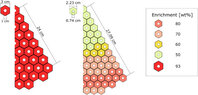
The discussion revolves around issues encountered while modeling a gas-cooled reactor with hexagonal fuel elements in MCNP, specifically focusing on the deletion of surfaces and resulting simulation errors. Participants explore the implications of surface deletion on the simulation's functionality and seek solutions to address particle loss and geometry errors.
Discussion Character
- Technical explanation
- Debate/contested
- Mathematical reasoning
Main Points Raised
- One participant notes that MCNP deletes coincident surfaces, which is a normal behavior, comparing it to overlapping objects on a surface.
- Another participant expresses concern that the deletion of surfaces may lead to the loss of entire cells, resulting in particles being lost during the simulation.
- It is suggested that lost particles typically indicate undefined volume within the simulation, pointing to potential issues beyond a specific cell that is not defined.
- A later reply mentions that adding a void cell did not resolve the 'particle lost' and 'geometry error: no cell found' messages, indicating ongoing issues with cell definitions.
- One participant inquires about the setup of the plotting package for MCNP, suggesting that dotted lines in the file may indicate improperly defined cells or overlaps.
Areas of Agreement / Disagreement
Participants express differing views on the causes of the simulation errors, with some attributing it to surface deletion and others to undefined volumes or overlaps in cell definitions. The discussion remains unresolved regarding the specific solutions to the errors encountered.
Contextual Notes
Limitations include potential missing assumptions about the geometry setup, dependence on the definitions of cells, and unresolved issues related to overlapping cells or undefined regions.