Darkmisc
- 222
- 31
- TL;DR
- My Godot game uses a touchscreen joystick comprising of two circles. One is the touchscreen area. The other is a smaller circle to show where the player is pressing. The smaller circle is visible when I run the joystick scene on its own, but not visible when the joystick is a child node.
Hi everyone
I'm using this code for a touchscreen joystick in my Godot game:
[CODE lang="python" title="joystick"]
extends CanvasLayer
var move_vector = Vector2(0, 0)
var joystick_active = false
func _input(event):
if event is InputEventScreenTouch or event is InputEventScreenDrag:
if $TouchScreenButton.is_pressed():
move_vector = calculate_move_vector(event.position)
joystick_active = true
$InnerCircle.position = event.position
$InnerCircle.visible = true
if event is InputEventScreenTouch:
if event.pressed == false:
joystick_active = false
Global.move_vector=Vector2(0,0)
$InnerCircle.visible = false
func _physics_process(_delta):
if joystick_active:
Global.move_vector = move_vector
emit_signal("use_move_vector", move_vector)
func calculate_move_vector(event_position):
var texture_center = $TouchScreenButton.position + Vector2(100,600)
return (event_position - texture_center).normalized()
[/CODE]
The code works for controlling the player, but the InnerCircle sprite is only visible when I run the joystick scene on its own. When I run it as a child node of Player.tscn, InnerCircle doesn't appear, although the joystick still works fine.
InnerCircle (the black dot) is visible in the editor, but not when I run Player.tscn.
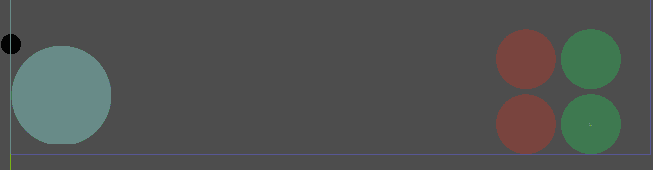
The same applies when I run Player.tscn as a child node of Level.tscn.
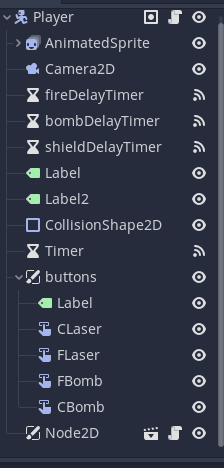
Does anyone know why this is happening? I'm stuck for ideas. I've tried making sure the joystick ("Node2D") is on top, but it's in a canvas layer, so nothing should be blocking it anyway. Thanks
I'm using this code for a touchscreen joystick in my Godot game:
[CODE lang="python" title="joystick"]
extends CanvasLayer
var move_vector = Vector2(0, 0)
var joystick_active = false
func _input(event):
if event is InputEventScreenTouch or event is InputEventScreenDrag:
if $TouchScreenButton.is_pressed():
move_vector = calculate_move_vector(event.position)
joystick_active = true
$InnerCircle.position = event.position
$InnerCircle.visible = true
if event is InputEventScreenTouch:
if event.pressed == false:
joystick_active = false
Global.move_vector=Vector2(0,0)
$InnerCircle.visible = false
func _physics_process(_delta):
if joystick_active:
Global.move_vector = move_vector
emit_signal("use_move_vector", move_vector)
func calculate_move_vector(event_position):
var texture_center = $TouchScreenButton.position + Vector2(100,600)
return (event_position - texture_center).normalized()
[/CODE]
The code works for controlling the player, but the InnerCircle sprite is only visible when I run the joystick scene on its own. When I run it as a child node of Player.tscn, InnerCircle doesn't appear, although the joystick still works fine.
InnerCircle (the black dot) is visible in the editor, but not when I run Player.tscn.
The same applies when I run Player.tscn as a child node of Level.tscn.
Does anyone know why this is happening? I'm stuck for ideas. I've tried making sure the joystick ("Node2D") is on top, but it's in a canvas layer, so nothing should be blocking it anyway. Thanks