Andre
- 4,296
- 73
So probably from experience and convenience I use IE (9 now) as main browser and secondary Chrome. This came from the time that Yahoo seemed not compatible with Chrome and gmail is still very uncompatible with IE for me. It doesn't work - but that's not the issue now.
I also found that it as Yahoo that tried to saturate the processor in IE as can be seen in these screenshot (only one window IE active and one window paint for collecting the screen shots).
Starting up Yahoo and putting in password, selecting mail:

Steady state yahoo mail on, idle, no actions (notice the second branch of the processor).
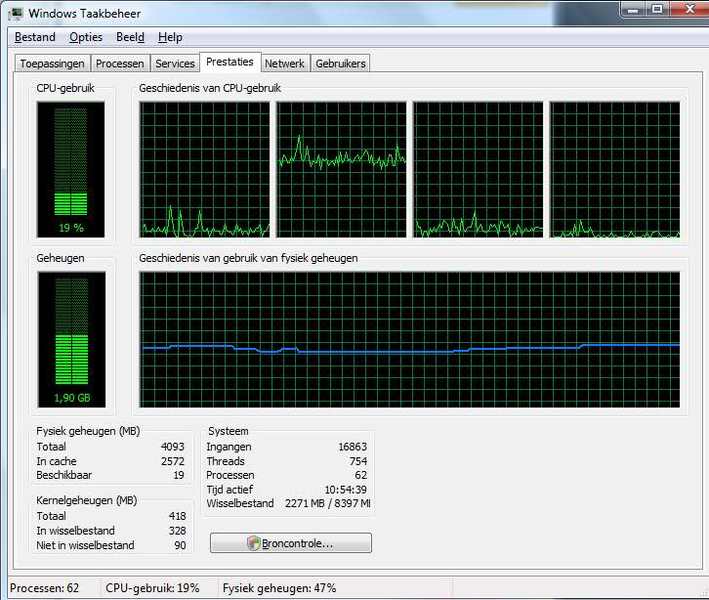
Terminating yahoo,

So then I tried yahoo in google chrome, where it had not worked properly before and the processor worked fine, going back to idle when nothing happened.
So that means that the simple solution is to forget about IE and switch 100% to chrome, but my question is what is Yahoo doing in IE with that second branch? Stealing processor time for unknown purposes?
I also found that it as Yahoo that tried to saturate the processor in IE as can be seen in these screenshot (only one window IE active and one window paint for collecting the screen shots).
Starting up Yahoo and putting in password, selecting mail:
Steady state yahoo mail on, idle, no actions (notice the second branch of the processor).
Terminating yahoo,
So then I tried yahoo in google chrome, where it had not worked properly before and the processor worked fine, going back to idle when nothing happened.
So that means that the simple solution is to forget about IE and switch 100% to chrome, but my question is what is Yahoo doing in IE with that second branch? Stealing processor time for unknown purposes?