Why are new dimensions added to the left in numpy arrays?

Click For Summary

Discussion Overview

The discussion revolves around the structure and indexing of 3D Numpy arrays, particularly focusing on the shape representation and the implications of row-major and column-major storage. Participants explore the confusion surrounding the order of dimensions and how they relate to the concept of nesting in arrays.

Discussion Character

  • Exploratory
  • Technical explanation
  • Debate/contested

Main Points Raised

  • One participant describes their understanding of 1D, 2D, and 3D Numpy arrays, noting that the shape of a 3D array is represented as (layers, rows, columns) rather than (rows, columns, layers).
  • Another participant explains that in Numpy, the outermost axis represents depth (or layers), followed by rows and then columns, which is a nested structure.
  • A participant expresses confusion about the connection between row-major storage and the order of dimensions in Numpy arrays.
  • Another participant asserts that there is no connection between row-major storage and the dimension order, stating that Numpy allows for both C-style (row-major) and Fortran-style (column-major) storage.
  • Concerns are raised about the decision to add new dimensions to the left, with one participant suggesting that it leads to confusion.

Areas of Agreement / Disagreement

Participants express varying interpretations of how dimensions are structured in Numpy arrays, with no consensus on the implications of row-major versus column-major storage or the rationale behind the dimension ordering.

Contextual Notes

Participants mention the concept of nesting in relation to memory storage, but there is no agreement on the clarity of this analogy. The discussion also touches on the potential confusion arising from the dimensionality order in Numpy.

fog37
Messages
1,566
Reaction score
108
TL;DR
3D numpy array indices and array shape
Hello,
I am clear on 1D and 2D Numpy arrays, how to create them and address them).
  • 1D array: single list
  • 2D array: list containing multiple lists as elements
  • 3D array: list containing lists which contain lists as elements
Array elements can be address using indices as a[], a[][], a[][][] respectively.

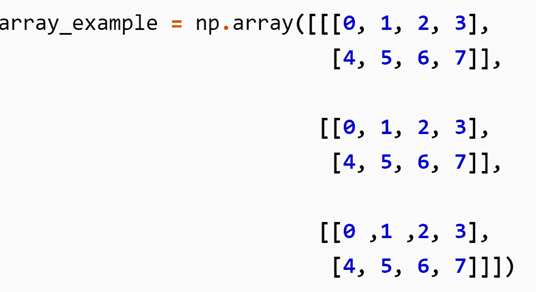
I have a question about 3D arrays like the one below:
1614297403478.png


I would say that it is a 2x4x3 array but that is not correct when I use the command
Python:
array_example.shape
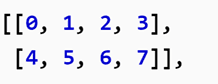
. The result is (3,2,4). My understanding is that shape should give (row, column, layer). My interpretation is that it is a 3D array composed of 3 identical 2x4 2D arrays
1614297608807.png

The command shape seem have the first integer in the tuple (, , ) represents the number of layers of the 3D array instead..

Thanks for any advice.
 
Last edited:
Technology news on Phys.org
In numpy, arrays are "nested" structures. In 2D arrays, you have rows, and under each row, you have columns. So, columns are nested under rows.

Similarly, for 3D arrays, the outermost axes is the "depth" (layer), under which you have rows, and then columns.

Therefore, when you execute np.reshape(array_example), numpy will show you the sizes of the axes from outside-inwards. In your example, there are 3 layers; inside each layer you have 2 rows, and under each row, there are 4 columns.

A bit perplexing. But that's how it works.

Also see this question on Stack Overflow:
https://stackoverflow.com/questions/22981845/3-dimensional-array-in-numpy

Edit: Fixed grammar.[/size]
 
Last edited:
  • Like
Likes   Reactions: fog37
Wrichik Basu said:
In numpy, arrays are "nested" structures. In 2D arrays, you have rows, and under each row, you have columns. So, columns are nested under rows.

Similarly, for 3D arrays, the outermost axes is the "depth" (layer), under which you have rows, and then columns.

Therefore, when you execute np.reshape(array_example), numpy will show you the sizes of the axes from outside-inwards. In your example, there are 3 layers; inside each layer you have 2 rows, and under each row, there are 4 columns.

A bit perplexing. But that's how it works.

Also see this question on Stack Overflow:
https://stackoverflow.com/questions/22981845/3-dimensional-array-in-numpy

Edit: Fixed grammar.
Thank you. Now I see. It makes sense now.

I read about row-major and column-major in relation to how array data elements are stored linearly in memory. Apparently numpy uses row-major (column indices change the fastest) when the array elements are arranged in line, row by row from top to bottom.

What is the connection between row-major and the fact that the order is (depth, row, column)?
You mention that "...In 2D arrays, you have rows, and under each row, you have columns. So, columns are nested under rows..."

In what sense are columns nested under rows?
 
T
The array shape is (4,3,2) which mean 4 arrays (each array is 2x3). So, in 3D arrays, axis 0 is reserved to the depth, axis 1 to rows, and axis 2 to columns: (dim along axis 0, dim along axis 1, dim along axis 2).

the first 2D array is the top one

1614347010838.png


the first 2D array in the stack is the top one (see below). That would be the first nested list of lists when we define the array. The confusion arises because the axis 0 here counts the layers while in 2D arrays it referred to the rows of 2D arrays.
1614347174263.png
 
fog37 said:
What is the connection between row-major and the fact that the order is (depth, row, column)?
There isn't any connection, as far as I can say. In Numpy, you can specify which style you want to store the array — the C-style (row major) or Fortran(F)-style (column major). In either style, the order of indexing the array will be the same.
fog37 said:
You mention that "...In 2D arrays, you have rows, and under each row, you have columns. So, columns are nested under rows..."

In what sense are columns nested under rows?
If you think in terms of memory, everything is flat. There is no nesting of any kind. I said that columns can be thought to be "nested" under rows because that will allow you to remember which comes first.

Simple logic says that new dimensions should be added to the right. I don't understand why the creators of numpy decided to add new dimensions to the left instead. Just results in confusion.
 
  • Like
Likes   Reactions: fog37

Similar threads

  • · Replies 2 ·
Replies
2
Views
22K
Replies
4
Views
5K
Replies
2
Views
2K
  • · Replies 2 ·
Replies
2
Views
2K
  • · Replies 4 ·
Replies
4
Views
2K
  • · Replies 5 ·
Replies
5
Views
14K
  • · Replies 15 ·
Replies
15
Views
5K
  • · Replies 3 ·
Replies
3
Views
3K
  • · Replies 1 ·
Replies
1
Views
9K
  • · Replies 8 ·
Replies
8
Views
3K