BASIC: Blink LED w/ Push Button Using DO...WHILE Loop

  • Context: MHB 
  • Thread starter Thread starter ineedhelpnow
  • Start date Start date
  • Tags Tags
    Loop
Click For Summary
SUMMARY

The discussion focuses on using the DO...WHILE...LOOP statement to control an LED's blinking rate based on a push button's state. The LED should blink twice per second while the button is pressed, and the program must wait for the button to be pressed before starting the blinking sequence. A master DO...LOOP is required to continuously check for the button press, allowing the program to repeat its operation effectively. The complexity of using APIs for circuit control is highlighted, emphasizing the need for specific libraries to manage such tasks.

PREREQUISITES
  • Understanding of DO...WHILE loops in programming
  • Familiarity with LED control in embedded systems
  • Basic knowledge of push button circuitry
  • Experience with a programming language such as C++ for implementing logic
NEXT STEPS
  • Research how to implement DO...WHILE loops in C++ for embedded systems
  • Learn about controlling LEDs using microcontrollers like Arduino
  • Explore libraries for handling push button inputs in embedded programming
  • Investigate APIs specific to circuit control, such as Arduino or Raspberry Pi libraries
USEFUL FOR

Electronics enthusiasts, embedded systems developers, and programmers looking to integrate button-controlled LED functionality in their projects.

ineedhelpnow
Messages
649
Reaction score
0
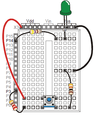
use the DO...WHILE...LOOP statement to blink an LED at a rate of 2 times a second as long as a push button is pressed. If the push button is not being pressed, the program should wait until the button is pressed and held before blinking the LED. To solve this problem, the DO...WHILE...LOOP will need to be inside of a separate master DO...LOOP that is used to allow our program to continuously repeat itself while waiting for a button press.

please help! i have no idea what to do.
the circuit looks something like this
View attachment 3412
 

Attachments

  • asdfdg.png
    asdfdg.png
    8.5 KB · Views: 129
Technology news on Phys.org
Writing programs that do some computations with numbers or strings and output them to a console ([m]count[/m] in C++) is the easiest. As soon as we involve APIs (application program interfaces, i.e., libraries that deal with a specific topic), such as those that are used to write graphical user interface or control circuits, things become significantly more complicated. Not only are there different APIs for the same task, but those APIs are often huge and require writing a lot of code even for simple tasks. For example, reading a name from a console and printing "Hello, <name>" can be done in a couple of lines. Writing a program that displays a window with a text box, a button and a label (output area) may take tens of lines.

So, I have no idea which API you are supposed to use to work with circuits.
 

Similar threads

  • · Replies 14 ·
Replies
14
Views
6K
  • · Replies 14 ·
Replies
14
Views
2K
  • · Replies 3 ·
Replies
3
Views
2K
  • · Replies 4 ·
Replies
4
Views
2K
Replies
6
Views
2K
  • · Replies 26 ·
Replies
26
Views
4K
Replies
5
Views
3K
  • · Replies 7 ·
Replies
7
Views
8K
  • Sticky
  • · Replies 13 ·
Replies
13
Views
8K
  • · Replies 1 ·
Replies
1
Views
3K